

Simplehuman, keyboard shortcuts and command bar for Gmail

總覽
Advanced keyboard shortcuts, natural language snooze, and smart email management features for Gmail.
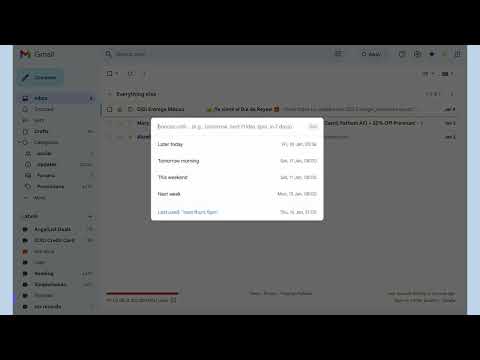
Simplehuman adds keyboard shortcuts and smart features to Gmail, to make it work like Superhuman. Use simple keyboard shortcuts (hotkeys) to navigate through email, archive, delete, snooze, switch between emails in almost flow-state speeds. It brings the Superhuman experience right inside Gmail, without costing you $30/month. Reach inbox zero or inbox read. Whatever your style, Simplehuman simply works. Features: ------------------- 1. Command Bar for emails - Cmd+K or Ctrl+K All your email actions - mark read/unread, report spam, archive, add label, compose etc available in an easy to use command bar. You wouldn't need to use your mouse again (mostly). This command bar means you don't have to memorise all the keyboard shortcuts and quickly search for email actions instead. ------------------- 2. Natural Language Snooze / Reminders Gmail's snooze UI is super clunky. You can snooze emails and set yourself reminders by typing "2 days" or "in 3 mins" or in "7 months". You don't have to think about the date & time, just when you want the email to be shown to you again. ------------------- 3. Nudges to learn keyboard shortcuts Whenever you use your mouse, Simplehuman gently prompts you with the keyboard shortcut that you could use instead. Migrate to using shortcuts at your own pace. ------------------- 4. Split your inbox with Simplehuman Tabs You can create tabs inside your inbox with your frequently used search queries or labels. Extra handy for accessing invoices, shopping bills, and important emails. ------------------- 5. Quick navigation through your email Jumping between your Inbox, Sent, Drafts, or Folders is now an easy to use command with Simplehuman. Hit `Esc` to go back to the previous screen from wherever you are. You don't need a $30/month app to give you shortcuts when Gmail already has them ;) ------------------- 6. Single step archive and delete You can just hit Del or E to delete and archive emails without selecting emails first. You can also select multiple emails by just pressing Shift key and using your arrows. ------------------- 7. Switch your Gmail Account You can use the command bar to quickly switch your Gmail account. Multiple tabs no more. ------------------- 8. Quick actions for Opening links, RSVP, Unsubscribe, and attachments RSVP to calendar invites, open attachments or links, or unsubscribe from those pesky emails using the Command Center. ------------------- 9. Browser extension that works everywhere, and along with your existing extensions Works on all popular browsers. You can continue using extensions like Grammarly, Streak, and Mailtrack while being faster at email. ------------------- 10. Superhuman shortcuts - Esc, Snooze, Command+K, RSVP, Open Links Use the same shortcuts and workflows that you have gotten used to on Superhuman. Extra handy when you *have* to use Gmail or if you want to stop using Superhuman and need a Superhuman alternative. Use that keyboard shortcut muscle memory inside Gmail, with Simplehuman. Pricing: Everyone gets a 2 week trial after sign up, without credit card. Monthly, yearly, and lifetime plans available starting at $5/month. Please check https://simplehuman.email/pricing for the latest prices. Email is heavy, hard, and plenty. But email does not have to be a pain or expensive. Mastery over your email is the quickest way to a healthier relationship with it and Simplehuman will get you there. Better productivity awaits.
4.9 分 (滿分 5 分)43 個評分
詳細資料
隱私權
「Simplehuman, keyboard shortcuts and command bar for Gmail」已揭露下列關於收集及使用資料的資訊。 如需更多詳細資訊,請參閱開發人員的《privacy policy》。
Simplehuman, keyboard shortcuts and command bar for Gmail 會處理下列資料:
這位開發者就你的資料做出下列聲明:
- 除經核准的用途外,不會將你的資料販售給第三方
- 不會基於與商品核心功能無關的目的,使用或轉移資料
- 不會為了確認信用度或基於貸款目的,使用或轉移資料
支援
如有疑問或建議,請使用電腦版瀏覽器開啟這個頁面