


Overview
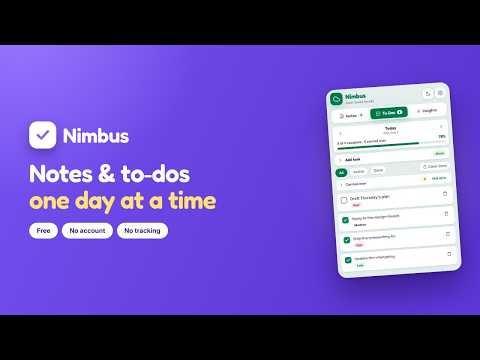
Notes and to-do list for Chrome. Plan one day at a time, carry over what you miss, and keep your streak. No account.
Nimbus is a notes and to-do app that lives in your Chrome toolbar. Open it, write, close it. No account, no sign-up, no network calls. ONE DAY AT A TIME Your to-do list shows one day, and opens on today. Step through days with ‹ / ›, jump anywhere with the date picker, or press T to snap back. The progress bar means this day — never a lifetime average. Unfinished tasks from the last 14 days collect in a "Carried over" group on today, so nothing silently disappears at midnight. Pull them in one at a time, or all at once. NOTES THAT GET OUT OF THE WAY Write in the popup, or pop out to a full-screen editor tab. Auto-save with a live status, Ctrl/Cmd+S, word and character count, six colour labels, pinning, and live search across titles and bodies. Flip on Markdown mode and the writing surface formats live as you type — headings grow, bold and italic render in place, lists and code style inline — in the same box you're typing in. No split preview pane. INSIGHTS THAT AREN'T VANITY METRICS A focus score out of 100: 40% completion rate, 30% consistency, 15% current streak, 15% on-time rate. Finishing 3 of 3 beats starting 20 and finishing 10. Plus a 13-week consistency heatmap, a 14-day done-vs-planned chart, and a breakdown by priority — so you can see whether you actually finish the High ones. A task finished late counts against the day it was planned for, but lights up the day you actually did it. That's what makes "finished on time" mean anything. MAKE IT YOURS Light, dark, or system theme. Eight accent colours that drive everything — buttons, charts, heatmap, dividers. Every accent is solved against a WCAG contrast target rather than eyeballed; the worst text pair across all 8 accents in both themes is 4.65:1. YOUR DATA STAYS YOURS Everything is written to local storage and Chrome sync at once, and merged on load. Clear your cookies, reinstall, or move to another computer signed into Chrome — your notes come with you. Export a JSON backup any time, and restore merges rather than overwrites. No accounts. No servers. No analytics. No tracking. The only permission Nimbus asks for is storage.
5 out of 51 rating
Details
- Version1.4.1
- UpdatedAugust 7, 2026
- Size243KiB
- LanguagesEnglish (United States)
- DeveloperWebsite
Email
nagipragalathan@gmail.com - Non-traderThis developer has not identified itself as a trader. For consumers in the European Union, please note that consumer rights do not apply to contracts between you and this developer.
Privacy

This developer declares that your data is
- Not being sold to third parties, outside of the approved use cases
- Not being used or transferred for purposes that are unrelated to the item's core functionality
- Not being used or transferred to determine creditworthiness or for lending purposes
Support
For help with questions, suggestions, or problems, visit the developer's support site