

NihonGo! - JLPT N1-N5 Netflix Japanese Subtitles

Overview
Learn Japanese with Netflix dual subtitles. JLPT N1-N5 vocabulary highlighting, flashcards & SRS. Watch anime & dramas!
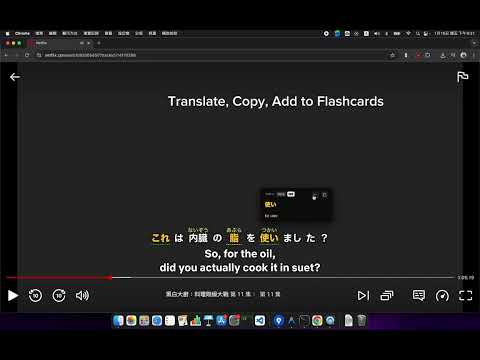
# NihonGo! - JLPT Assistant for Netflix **Turn Netflix into your ultimate JLPT learning tool.** Transform your binge-watching sessions into productive Japanese learning time. NihonGo! adds powerful bilingual subtitles, smart word analysis, and flashcard tools directly to Netflix, helping you prepare for JLPT N5-N1 effortlessly. ## 🚀 Key Features * **Smart JLPT Vocabulary Highlighting**: Automatically identifies and highlights words from JLPT N5 to N1. Know exactly what to focus on for your exam level. * **Bilingual Subtitles**: Displays Japanese subtitles alongside your native language (English, Chinese, Korean, Vietnamese, Thai, Indonesian). * **Instant Dictionary & Grammar**: Hover over any word for instant definitions, readings (Furigana), and translations without pausing the video. * **Intelligent Tokenization**: Unlike standard subtitles, we use advanced NLP to properly separate Japanese words, making it easier to parse sentences. * **One-Click Flashcards**: found a useful word? Save it to your personal flashcard deck with a single click, complete with the context sentence. * **Learning Mode**: Adjusts subtitle layout for optimal reading practice. ## 🌏 Supported Languages Perfect for learners around the world, supporting instant translation into: * English * Traditional Chinese (繁體中文) * Korean (한국어) * Vietnamese (Tiếng Việt) * Thai (ไทย) * Indonesian (Bahasa Indonesia) ## 🎯 Why NihonGo!? Stop pausing every 5 seconds to look up words. NihonGo! keeps you in the flow while building your vocabulary. Whether you're a beginner studying for N5 or an advanced learner polishing your N1, this is the companion you need. **Privacy Friendly**: We respect your privacy. All processing happens locally or via secure APIs. We do not collect your personal browsing history. --- **Install now and master Japanese while you watch!** Made with ❤️ for Japanese Learners by CodePlay Team. Contact: service@codeplay.tw ## Release Notes ### v1.0.1 (2026-01-14) **New Features:** - 🏷️ JLPT Level Filter - Filter flashcards by N1~N5 or "Other" - 🎬 Show Title - Flashcards now include the Netflix show name - ⏸️ Auto-Pause - Video pauses when hovering word tooltips **Improvements:** - ⚡ Faster subtitle detection - 📄 CSV export now includes show title column - 🎨 Quiz mode sentence font enlarged for readability --- ### v1.0.0 (2026-01-10) - 🎉 Initial Release - JLPT vocabulary highlighting (N1-N5) - Instant translation tooltips - SRS flashcard system - Learning mode with furigana - Multilingual support (8 languages)
5 out of 51 rating
Details
- Version1.0.4
- UpdatedJanuary 23, 2026
- Size457KiB
- Languages7 languages
- DeveloperWebsite
Email
service@codeplay.tw - Non-traderThis developer has not identified itself as a trader. For consumers in the European Union, please note that consumer rights do not apply to contracts between you and this developer.
Privacy

This developer declares that your data is
- Not being sold to third parties, outside of the approved use cases
- Not being used or transferred for purposes that are unrelated to the item's core functionality
- Not being used or transferred to determine creditworthiness or for lending purposes