

Niche Hunter Pro - USPTO + TeePublic + AI

Overview
All-in-one Tool: USPTO checking + TeePublic Analysis + AI Niche Commander
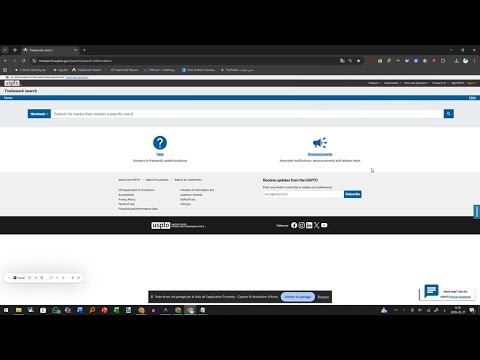
Niche Hunter Pro - Complete User Guide Welcome to the Niche Hunter Pro extension (Version 3.1) - the most powerful and comprehensive tool for Print On Demand (POD) sellers! ========================================= 🌟 Key Features ========================================= This extension combines three powerful tools in one place: 1. USPTO Checker: A fast, accurate legal checker for niches to ensure they are free from trademarks and copyrights, avoiding account bans. 2. TeePublic Analysis: A quick competitor analysis tool on TeePublic platform to sort niches by competition levels. 3. AI Assistant (Niche Commander): An advanced AI tool that generates: - SEO Tags, Titles, and Descriptions. - Prompt ideas and generation prompts for AI image tools. - Recommended design color palettes. - Social media copy and hashtags for marketing. ========================================= 🛠️ How to Install on Google Chrome ========================================= 1. Extract the downloaded folder (if it's a .zip file). 2. Open your Google Chrome browser. 3. Type url chrome://extensions/ into the address bar and press Enter. 4. In the top-right corner, turn on "Developer mode". 5. A button will appear in the top-left labeled "Load unpacked", click on it. 6. Select the "uspto_extension_en" folder. 7. The extension will now appear in your list. We recommend clicking the "Pin" icon next to it so it stays visible beside your address bar. ========================================= 🚀 How to Use ========================================= [ 1 ] Trademark Checking (USPTO) ----------------------------------- 1. Open the extension and go to the (USPTO Checker) tab. 2. Paste your list of niches into the box (each niche on a new line). 3. You can use the (Organize) button to format and deduplicate your niches automatically. 4. Click (Start Checking). 5. The extension will open the USPTO page and begin checking your niches automatically. 6. Ultimately, you'll get two lists: Safe and Banned niches. You can copy or export them as a .txt file. [ 2 ] Competition Analysis (TeePublic) ----------------------------------- 1. Go to the (TeePublic Analysis) tab. 2. Paste your niches and click (Start Analysis). 3. The tool will sort your niches into 4 categories: - Excellent: Very low competition, perfect to use now. - Medium: Acceptable competition. - Saturated: Fierce competition. - Empty: No results found. [ 3 ] AI Driven Designs (Niche Commander) ----------------------------------- 1. Once niches are checked in USPTO and deemed SAFE, a "Crown / gear" icon will appear next to them. 2. Click this icon to open the Niche Commander window. 3. Using the available buttons, the AI will generate everything you need for that specific niche. ========================================= 💎 Activating the PRO Version ========================================= The free version allows you to check only up to 5 niches at a time. To get UNLIMITED checking access, upgrade to the PRO version: 1. Open the extension and go to the "Tools & Rewards" tab. 2. At the bottom, you'll find the activation section. 3. Enter the "License Key" you received when you purchased the tool on Gumroad. 4. Click "Verify". 5. Once activated, the limit is removed and you can check hundreds of niches at once! ----------------------------------------- We wish you many sales and great profits! Niche Hunter Pro Dev Team
0 out of 5No ratings
Details
- Version3.1
- UpdatedMarch 3, 2026
- FeaturesOffers in-app purchases
- Offered bymaggouri khalid
- Size2.31MiB
- LanguagesEnglish
- Developer
Email
khalid.maggouri.97@gmail.com - Non-traderThis developer has not identified itself as a trader. For consumers in the European Union, please note that consumer rights do not apply to contracts between you and this developer.
Privacy

This developer declares that your data is
- Not being sold to third parties, outside of the approved use cases
- Not being used or transferred for purposes that are unrelated to the item's core functionality
- Not being used or transferred to determine creditworthiness or for lending purposes