


Tổng quan
Export your NICE schedule to an ICS file for Google Calendar and Outlook, with customizable reminders.
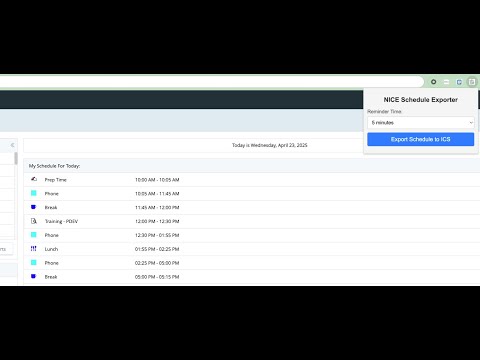
✨ Transform your NICE schedule into a calendar masterpiece with NICE Schedule Exporter! 🚀 Export your daily agenda to an ICS file and sync it with Google Calendar or Outlook in a snap. Set your perfect reminder time—5, 10, 15, or 30 minutes—so you’ll never miss a beat! 🎯 Smart UIDs ensure updates overwrite old events, avoiding pesky duplicates. Your ICS files are named with flair (NICE-YYYY-MM-DD.ics) for easy tracking. Ideal for busy pros who crave seamless scheduling magic. Download now and take control of your day! 📅💥 How to Export Your NICE Schedule and Import It into Your Calendar Step 1: Install the Extension Add the “NICE Schedule Exporter” from the Chrome Web Store. Pin the extension to your Chrome toolbar by clicking the puzzle icon, finding “NICE Schedule Exporter,” and clicking the pin icon. Step 2: Open Your NICE Schedule Log into your NICE account and navigate to the Home tab in the Schedule section. This is crucial because the extension needs to access your daily schedule from this specific page to export it correctly. Ensure your daily schedule is visible on the page. Step 3: Export Your Schedule Click the NICE Schedule Exporter icon in your Chrome toolbar. Choose your reminder time (e.g., 5, 10, 15, or 30 minutes) from the dropdown. Click “Export Schedule to ICS.” Save the file (e.g., NICE-2025-04-22.ics) to your computer. Step 4: Import into Your Calendar Google Calendar: Open calendar.google.com. On the left, click “+” next to “Other calendars,” then select “Import.” Choose the saved ICS file and select a calendar (e.g., “NICE Schedule”). Click “Import” to add your events with the chosen reminders. Outlook: Open Outlook and go to the Calendar view. Click “File” > “Open & Export” > “Import/Export.” Select “Import an iCalendar (.ics) file,” choose your ICS file, and click “Open.” Your events will be added with the selected reminders. Step 5: Update Your Schedule (Optional) If your NICE schedule changes, repeat Steps 2-4. The extension updates existing events without duplicates.
0/5Không có lượt xếp hạng nào
Chi tiết
- Phiên bản1.1
- Đã cập nhật29 tháng 4, 2025
- Kích thước9.89KiB
- Ngôn ngữEnglish
- Nhà phát triển
- Người bán phi thương mạiNhà phát triển này không tự nhận mình là người bán. Đối với người tiêu dùng ở Liên minh Châu Âu, xin lưu ý rằng các quyền của người tiêu dùng không được áp dụng trong hợp đồng giữa bạn và nhà phát triển này.
Quyền riêng tư

Nhà phát triển này tuyên bố rằng dữ liệu của bạn
- Không được bán cho bên thứ ba, ngoài những trường hợp sử dụng đã được phê duyệt
- Không được sử dụng hoặc chuyển nhượng cho các mục đích không liên quan đến chức năng chính của mặt hàng
- Không được sử dụng hoặc chuyển nhượng để xác định khả năng thanh toán nợ hoặc phục vụ mục đích cho vay
Hỗ trợ
Nếu bạn có câu hỏi, ý kiến đề xuất hoặc gặp vấn đề, vui lòng mở trang này bằng trình duyệt dành cho máy tính để được trợ giúp