

gridtabs – Speed Dial & Visual Bookmarks for New Tab

Overview
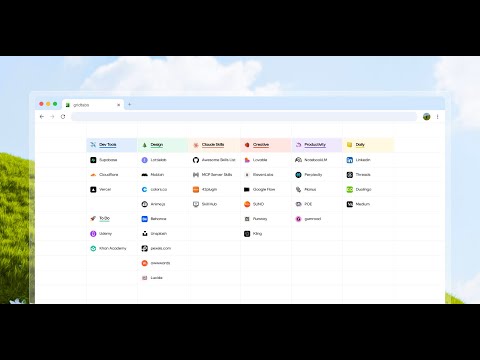
Turn your new tab into a clean grid of your favorite sites. Save in one click, organize by drag & drop, sync across devices.
gridtabs is a speed dial for people who save a lot of sites. Fit dozens of your favorite sites on one clean grid, save any page in one click, and see it every time you open a new tab — so the sites you save stop getting lost in bookmark folders. ━━━━━━━━━━━━━━━━━━━━━━━━━━━━ WHY GRIDTABS ✦ More than a speed dial Classic speed dials hold a dozen big tiles. gridtabs fits dozens to hundreds of sites in a compact grid — no nested folders, just a clean visual overview. ✦ Save once, see it every time Add or remove the current page from the toolbar. The badge updates instantly, and the site is waiting on your next new tab. ✦ Drag & drop from anywhere Drag URLs straight into your grid to build your workspace in seconds. ✦ Organize like a spreadsheet Multi-select tiles, move them together, and drop them in the remove zone to clean up fast. Use color highlights to group and prioritize at a glance. ✦ Notes right on the grid Rename tiles and jot notes in place. Switch between Bookmark mode and Memo mode anytime. ✦ Multiple sheets Keep work, study and personal sites on separate sheets. ✦ Optional cloud sync Sign in with Google to see the same grid on all your Chrome devices. ━━━━━━━━━━━━━━━━━━━━━━━━━━━━ PERFECT FOR • Your daily sites, one click away • Tools and resources you don't want to lose • Research and study dashboards • Project planning boards • Self-hosted services and homelab dashboards ━━━━━━━━━━━━━━━━━━━━━━━━━━━━ PRIVACY-FIRST gridtabs only stores the sites and notes you add — it never reads browsing data unrelated to your tiles. Sign-in and sync are optional.
4.7 out of 513 ratings
Details
- Version0.4.1
- UpdatedOctober 29, 2026
- FeaturesOffers in-app purchases
- Size16.41MiB
- LanguagesEnglish (United States)
- DeveloperWebsite
Email
moonyaan@gmail.com - Non-traderThis developer has not identified itself as a trader. For consumers in the European Union, please note that consumer rights do not apply to contracts between you and this developer.
Privacy

gridtabs – Speed Dial & Visual Bookmarks for New Tab has disclosed the following information regarding the collection and usage of your data. More detailed information can be found in the developer's privacy policy.
gridtabs – Speed Dial & Visual Bookmarks for New Tab handles the following:
This developer declares that your data is
- Not being sold to third parties, outside of the approved use cases
- Not being used or transferred for purposes that are unrelated to the item's core functionality
- Not being used or transferred to determine creditworthiness or for lending purposes
Support
For help with questions, suggestions, or problems, visit the developer's support site