


Overview
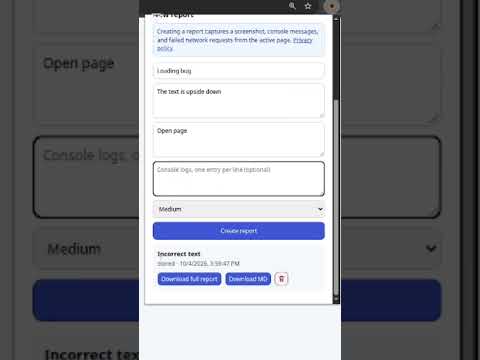
Create bug reports with a screenshot, console logs, and failed network requests from the active page.
Bug Capture helps QA engineers, developers, and product teams create clear, reproducible bug reports without manually collecting browser diagnostics. Open the extension on the page where an issue occurred, describe the problem, and create a report. Bug Capture adds the context needed to investigate it: • a screenshot of the visible page; • console messages and JavaScript errors; • failed HTTP(S) network requests; • HAR data for the complete network log; • browser, operating system, viewport, and page URL details; • expected and actual results. Review the captured data before submitting. Reports are stored in your Bug Capture account, where you can edit them, download Markdown, or export a ZIP bundle with JSON, Markdown, HAR, and screenshot files. Connect Jira to publish reports directly as issues. Bug Capture can attach the screenshot and lets you track the delivery status from the extension. The extension supports English and Russian. Sign in with Google or email to access your reports. To capture actions that happen before you open the popup, Bug Capture temporarily observes diagnostic events on HTTP(S) pages. It sends screenshots and diagnostic context to Bug Capture only after you actively create a report. It does not read request or response bodies. Privacy policy: https://debuggerman.ru/privacy
5 out of 55 ratings
Details
- Version0.1.7
- UpdatedOctober 27, 2026
- FeaturesOffers in-app purchases
- Size56.39KiB
- LanguagesEnglish
- DeveloperWebsite
Email
geralt.rivia.dom@gmail.com - Non-traderThis developer has not identified itself as a trader. For consumers in the European Union, please note that consumer rights do not apply to contracts between you and this developer.
Privacy

Bug Capture Dashboard has disclosed the following information regarding the collection and usage of your data. More detailed information can be found in the developer's privacy policy.
Bug Capture Dashboard handles the following:
This developer declares that your data is
- Not being sold to third parties, outside of the approved use cases
- Not being used or transferred for purposes that are unrelated to the item's core functionality
- Not being used or transferred to determine creditworthiness or for lending purposes
Support
For help with questions, suggestions, or problems, visit the developer's support site