

WCAGify

Overview
WCAG accessibility audit tool
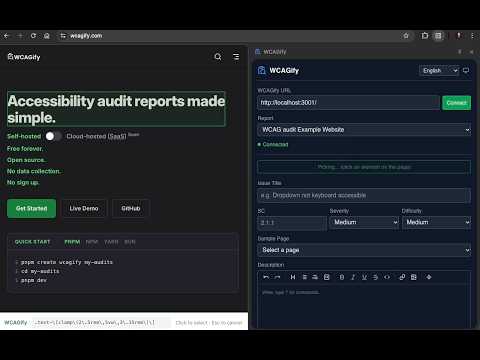
WCAGify - WCAG Accessibility Audit Tool WCAGify is a browser extension for accessibility professionals that streamlines documenting WCAG issues directly from the browser. It integrates with your self-hosted WCAGify instance to turn your browser into a powerful accessibility audit workstation. Stop switching between your browser and your reporting tool. With WCAGify, you can identify issues, pick elements, and submit structured findings, all without leaving the page you're auditing. 🔍 ELEMENT PICKER Select any element on a page with a single click. WCAGify highlights elements as you hover and generates a precise CSS selector automatically. The selector algorithm is aligned with axe-core's approach, handling shadow DOM boundaries and prioritizing the most specific, readable selectors. The selected element's selector, page URL, and page title are captured instantly and passed into your issue report. 📝 STRUCTURED ISSUE REPORTING Every issue you submit is structured for clarity and consistency: • Title - A concise summary of the accessibility barrier • WCAG Success Criterion - Reference the exact SC code (e.g. 1.1.1, 2.1.1, 4.1.2) • Severity - Low, Medium, or High impact rating • Difficulty - Low, Medium, or High effort to resolve • Sample Page - Select from the pages defined in your audit report • Description - Rich text with full markdown support This structured format ensures every issue in your audit report is actionable and complete, following WCAG-EM methodology. ✏️ RICH TEXT EDITOR The built-in editor is powered by TipTap and supports everything you need to document findings thoroughly: • Headings (H1–H6) • Bold, italic, underline, strikethrough • Ordered and unordered lists • Blockquotes and code blocks • Inline code • Links and images • Horizontal rules Use the formatting toolbar or type "/" to open the command palette for quick access to any formatting option. 📷 IMAGE UPLOADS Upload screenshots directly into your issue descriptions. Drag and drop an image or use the image upload button, files are uploaded to your WCAGify instance and embedded as markdown image references. Maximum file size is 2 MB per image. Visual evidence makes your audit findings clear and actionable for development teams. 🔗 WCAGIFY INSTANCE INTEGRATION The extension connects to any WCAGify instance, whether it's running locally during development or deployed on your own server. • Enter your WCAGify instance URL in the connection settings • The extension fetches your available audit reports automatically • Select which report you're working on from the dropdown • Submit issues directly to that report via the WCAGify API All your audit data stays on your own infrastructure. WCAGify is open source, free, and collects no data. 📂 SIDE PANEL INTERFACE WCAGify opens as a Chrome side panel, so it stays visible alongside the page you're auditing. No popups that disappear when you click elsewhere. No separate windows to manage. The side panel stays open as you navigate between pages, making it easy to document multiple issues across a site in one session. 🌍 BILINGUAL INTERFACE The extension is fully translated in English and Dutch. Switch between languages at any time, your preference is saved automatically. 🌙 DARK MODE Choose between light mode, dark mode, or follow your system preference. The theme persists across sessions. ⚙️ HOW IT WORKS 1. Install the extension and click the WCAGify icon to open the side panel 2. Enter your WCAGify instance URL and click Connect 3. Select the audit report you want to contribute to Browse to a page in your audit scope 4. Click "Pick Element" to select a problematic element on the page 5. Fill in the issue details: title, WCAG success criterion, severity, difficulty, and description 6. Submit your issue is sent directly to your WCAGify report 7. Repeat for every issue you find. Your audit report builds up as you go. 🏗️ BUILT FOR ACCESSIBILITY PROFESSIONALS WCAGify is designed for people who conduct WCAG audits professionally. Whether you're an independent consultant, part of an accessibility team, or a developer running internal audits, this extension fits into your workflow. It pairs with the WCAGify reporting platform, which turns your findings into structured, navigable audit reports with: • Executive summaries and scorecards • WCAG success criteria mapping • Severity and difficulty prioritization • Accessible PDF export • Multi-language support The browser extension is the capture tool. The WCAGify platform is the reporting tool. Together, they cover the full audit workflow. 🔒 PRIVACY & PERMISSIONS WCAGify requires the following permissions: • activeTab - To interact with the page you're currently viewing • tabs - To read the current page URL and title for issue context • scripting - To inject the element picker overlay on the active page • storage - To save your settings (instance URL, selected report, theme, language) • sidePanel - To display the extension interface as a side panel • Host permissions (all HTTPS sites) - To run the element picker content script on any page you audit WCAGify does not collect, store, or transmit any personal data. All communication is between your browser and your own WCAGify instance. The extension is open source and available on GitHub. 🛠️ REQUIREMENTS • A running WCAGify instance (self-hosted) • Chrome or any Chromium-based browser (Edge, Brave, Arc, etc.) 📬 SUPPORT & FEEDBACK WCAGify is open source. Report issues or contribute at: https://github.com/focusring/WCAGify
0 out of 5No ratings
Details
- Version0.6.0
- UpdatedSeptember 21, 2026
- Size525KiB
- LanguagesEnglish (United States)
- Developer
Email
hello@focusring.io - Non-traderThis developer has not identified itself as a trader. For consumers in the European Union, please note that consumer rights do not apply to contracts between you and this developer.
Privacy

This developer declares that your data is
- Not being sold to third parties, outside of the approved use cases
- Not being used or transferred for purposes that are unrelated to the item's core functionality
- Not being used or transferred to determine creditworthiness or for lending purposes
Support
For help with questions, suggestions, or problems, visit the developer's support site