

Awesome New Tab
Overview
A privacy-focused new tab with no required permissions. Customize themes and manage links - all data stays on your device.
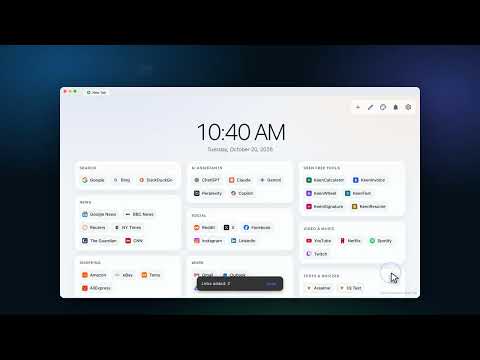
Awesome New Tab turns every new tab into a calm, organized home for the sites you use every day, without asking for your data. YOUR SITES, ORGANIZED • All your links in tidy sections, with real site icons • Add, edit, rename and reorder with drag and drop • Bulk-add from a catalog of 300+ popular sites, or paste a whole list of URLs at once • Smart starter links for your country and language MAKE IT YOURS • 21 themes (light, dark, sharp-cornered and more), or design your own colors and corner radius • Choose how many columns and how wide the page is • Big clock and date, quick notes, optional web search REMINDERS, TIMERS & FOCUS • One-time, daily, weekly and monthly reminders • Timers, a stopwatch with laps, and a focus timer for work and break sessions PRIVATE BY DESIGN • No required permissions, no account, no tracking, no ads • Your data stays on your device • Optional backup file (export and import with drag and drop) and optional sync to your own Google Drive EASY TO LEARN • Built-in interactive tutorials that play on a live copy of the page, narrated in English, Japanese, Chinese, Korean, Spanish, French and German • Interface in 40+ languages Free. Click the toolbar button anytime to open a new tab. Updates: Version 3.4 - Oct 20, 2026 - New: interactive tutorials built into Settings, narrated in English, Japanese, Chinese, Korean, Spanish, French and German. - New: add many sites at once from a catalog of 300+ popular sites, or paste a list of links. - New: 21 themes plus a custom theme editor (colors and corner radius), adjustable columns and page width. - New: timers, a stopwatch and a focus timer next to reminders. - New: choose the interface language; complete translations for all 43 languages. - Improved: full backup export/import with drag and drop; easier link editing. - Fixed: accessibility warnings and reminder errors when storage permission wasn't granted. Version 3.2.6 - May 16, 2026 - Fixed Google Account Sync sign-in issues caused by an incorrect configuration. Version 3.2 - Apr 24, 2026 ### Highlights - Added a new and much more powerful reminders feature. - Improved stability, fixed edge-case bugs, and refined the overall user experience. ### What's New - Added a dedicated reminders center next to the theme button for faster access. - Added flexible reminder schedules: - One-time reminders for a specific date and time - Daily reminders - Weekly reminders by weekday - Monthly reminders by day of month - Added better monthly scheduling behavior for shorter months, including using the last day of the month when needed. - Added richer alert delivery options: - New tab reminder bar - Toolbar badge - Optional system notifications - Looping alarm sounds - Per-reminder sound selection - Per-reminder volume control - Sound preview inside the editor - Added reminder support to data backup, import/export, and Google Drive sync. ### Improvements - Improved the reminder editor layout to make it more compact and desktop-friendly. - Reworked schedule selection into tabs to reduce vertical space usage. - Improved permission handling so optional capabilities are only requested when needed. - Added safer reminder deletion with confirmation. - Fixed issues around snooze handling, badge updates, and reminder state recovery. - Improved multilingual coverage and synchronized locale key sets across all shipped languages. Version 3.1 - May 1, 2025 - Implemented optional Google Drive sync for settings backup and cross-device synchronisation. This is disabled by default; data remains local unless you choose to enable it. Synced data is stored solely in your personal Google Drive. (As always, the extension's code is open for review!) Version 2.11 - March 2, 2025 - Added an option to hide the Quick Notes module for a cleaner interface. Version 2.9 - February 21, 2025 - Fixed a bug preventing the "Import Links" feature from working properly. - Eliminated minor glitches causing console errors. - Enhanced performance with system optimizations for a smoother experience. Version 2.6 - February 3, 2025 - Corrected minor bugs for improved reliability. Version 2.3 - January 31, 2025 - Resolved an issue with drag-and-drop functionality. - Introduced a quick edit option for faster customization. - Boosted overall performance. - Added configurable Chrome-based search for greater flexibility.
4.6 out of 510 ratings
Details
- Version3.4.1
- UpdatedOctober 21, 2026
- Size4.9MiB
- Languages42 languages
- DeveloperWebsite
Email
aw.extensions@gmail.com - Non-traderThis developer has not identified itself as a trader. For consumers in the European Union, please note that consumer rights do not apply to contracts between you and this developer.
Privacy

This developer declares that your data is
- Not being sold to third parties, outside of the approved use cases
- Not being used or transferred for purposes that are unrelated to the item's core functionality
- Not being used or transferred to determine creditworthiness or for lending purposes
Support
For help with questions, suggestions, or problems, please open this page on your desktop browser