


Overview
Free claim X-ray and AI-readiness check for the page you are on. Runs on your device when possible.
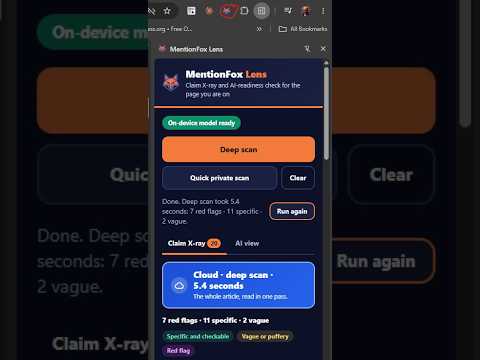
Read any article the way a sharp investor, editor or fact-checker would, in about 5 seconds. In June 2014, Fortune put Theranos on its cover. Could a careful reader have seen the problems using only what was on that page? MentionFox Lens says yes: run it on that article and it puts 7 red flags at the top, including the 70-tests-from-a-finger-prick claim that nobody had independently verified. WHAT LENS DOES Deep scan Reads the whole article in one pass, in about 5 seconds, and lists the red flags first: - Extraordinary claims with no evidence behind them - Secrecy offered as a feature - Evasive or non-answers to direct questions - Big numbers with no source, study, approval or named validator Every flag comes with a one-line reason, so you know exactly why it was flagged. Specific vs vague Every factual claim is labelled. Specific and checkable: it has a date, number, amount, named place, organisation or event you can verify. Vague or puffery: it sounds impressive but gives you nothing to check. You see at a glance how much of a page is substance and how much is hype. Show on page Click "Show on page" on any card and Lens jumps to that exact sentence and highlights it, so you can read the context around it in one click. No scrolling, no Ctrl+F. Quick private scan A fast read of the first part of the page. When your Chrome has its built-in AI model, it runs on your own computer and the page never leaves your browser. When it doesn't, Lens uses the cloud and tells you so. The mode bar always shows which one ran and how many seconds it took. WHO IT IS FOR - Investors and analysts reading founder profiles, press releases and pitch coverage - Journalists and editors checking a draft or a source's claims - Buyers vetting a vendor's case studies and "trusted by" pages - Job seekers reading a too-good-to-be-true company page - Anyone who wants to know which sentences to ask for proof on A flag does not mean a sentence is false. It shows you where to ask for proof. FREE, NO ACCOUNT, OPEN SOURCE - Free to use. No sign-up, no account, no ads, no paywall inside the extension. - Open source under the MIT license: https://github.com/OsakaSaul/mentionfox-lens - Lens only reads a page when you click. It never runs in the background and never touches your other tabs. - No analytics or tracking in the extension. PRIVACY PRIVACY The Quick private scan runs on your computer when your Chrome has its built-in on-device model: nothing from the page leaves your computer, and the panel says On-device. Deep scan, and the Quick private scan when there is no on-device model, send the page text to our server, where an AI provider working for us reads it, only when you click; the panel says Cloud. Our server does not store the text. The AI provider may keep it for a short time under its own terms. To enforce a free daily limit, Lens also sends a random install ID, and our server sees your IP address; the limit counters keep only scrambled forms of both and are deleted after about two days. No account, no sign-up, no ads, and nothing is sold. Full details: https://foxapis.com/lens/privacy/ HOW TO USE IT 1. Open any article or web page. 2. Click the MentionFox Lens icon (or press Alt+Shift+L) to open the side panel. 3. Click Deep scan. 4. Read the red flags at the top, and click "Show on page" to see each one in context. GO DEEPER Found a red flag about a person or company? MentionFox runs verified, sourced research on people and companies, with every claim cited: https://mentionfox.com Built for the #BuildHybridAI hackathon.
0 out of 5No ratings
Details
- Version0.2.2
- UpdatedNovember 28, 2026
- Size109KiB
- LanguagesEnglish
- DeveloperWebsite
Email
osakasaul@gmail.com - Non-traderThis developer has not identified itself as a trader. For consumers in the European Union, please note that consumer rights do not apply to contracts between you and this developer.
Privacy

MentionFox Lens has disclosed the following information regarding the collection and usage of your data. More detailed information can be found in the developer's privacy policy.
MentionFox Lens handles the following:
This developer declares that your data is
- Not being sold to third parties, outside of the approved use cases
- Not being used or transferred for purposes that are unrelated to the item's core functionality
- Not being used or transferred to determine creditworthiness or for lending purposes
Support
For help with questions, suggestions, or problems, visit the developer's support site