

YouTube Transcript Automation
10 ratings
)
Overview
Scan, sort, export YouTube video metadata and transcripts.
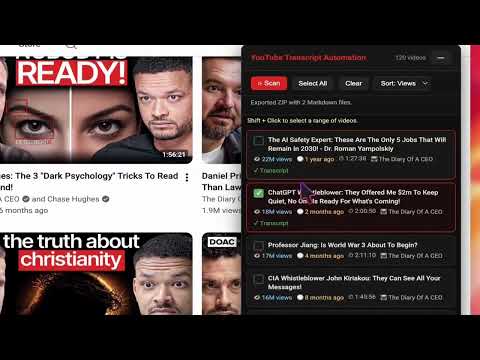
Youtube Transcript Automation: Bulk Download & NotebookLM Ready Transform how you extract, organize, and analyze video content. YouTube Transcript Automation allows you to download transcripts from single videos, multiple tabs, or entire playlists in bulk—100% free. Automatically combine extracted transcripts into a single, beautifully structured Markdown (.md) document ready for instant upload into Google NotebookLM, ChatGPT, Claude, Obsidian, or Notion. 📝 Release Notes ✨ Bulk Exporting: Download transcripts from dozens of videos or full playlists in a single click ✨ Single .md Consolidation: Merge all extracted text into one organized Markdown document ✨ NotebookLM Optimized: Pre-formatted headers, metadata, and syntax tailored for Google NotebookLM ✨ Dark Theme Support: Seamless visual integration with YouTube's official dark mode 🚀 Unlock the Power of Content with YouTube Transcript Automation ✅ Transform Hours of Footage into Text: Convert long lectures, tutorials, and podcasts into readable text in seconds. ✅ Seamless Playlist Processing: Stop copying transcripts video by video—extract entire series with one click. ✅ AI-Ready Output: Feed bulk transcripts straight into NotebookLM to generate instant Q&As, podcasts, and study guides. 📦 Key Features Deep Dive ⚡ Bulk Transcript Downloader Download transcripts from individual clips, multiple open tabs, or full channel playlists effortlessly. Unlimited bulk exports with no hidden paywalls or rate limits. 📄 Consolidated Markdown (.md) File Generation Automatically combine dozens of video transcripts into one clean, well-structured .md file. Eliminates messy copy-pasting across multiple text documents and local folders. 🧠 Engineered for NotebookLM & AI Knowledge Hubs Built specifically to complement Google NotebookLM, ChatGPT, Claude, Notion, and Obsidian workflows. Turn complex multi-part video courses into a centralized knowledge base ready for custom querying. 🎯 Clean & Flexible Formatting Controls Choose whether to include or remove exact timecodes based on your research needs. Automatically includes video titles, URLs, channel names, and metadata for effortless academic citation. 📚 Efficient Learning & Academic Research 🎯 Accelerate Literature Reviews: Convert entire educational video series into structured text for fast scanning. 🎯 Instant Academic Citations: Built-in metadata formatting makes citing YouTube sources straightforward and accurate. 🎯 Study Guide Generation: Upload consolidated transcript files into NotebookLM to automatically generate flashcards, summaries, and Q&A sets. 🔍 Simplified Content Creation & Repurposing • Repurpose Long-Form Content: Quickly transform video podcasts, webinars, and talks into articles, newsletters, and social posts. • Accurate Quote Extraction: Find exact spoken phrases across multi-hour video series without manual scrubbing. • In-Depth Commentary: Import structured transcripts into AI tools to outline video essays or detailed reaction pieces. 💼 Professional Edge & Business Intelligence 📌 Streamlined Market Research: Extract transcript data from product reviews, competitor channels, and industry keynotes in bulk. 📌 Meeting & Webinar Archiving: Save recorded industry talks and internal video training sessions into searchable text repositories. 📌 Rapid Decision Making: Scan consolidated documentation instead of spending hours watching long presentation clips. 🎨 Creative Inspiration & Brainstorming ✨ Explore Diverse Topics Quickly: Gather insights across dozens of videos without time constraints. ✨ Build Concept Repositories: Archive creative discussions and tutorials into your personal knowledge base (PKM). ✨ Contextual Idea Generation: Combine transcript data with AI prompts to uncover hidden angles and new ideas. 🌐 Global Accessibility & Multilingual Support ➤ Bypass Spoken Language Barriers: Extract auto-generated or official subtitles across languages. ➤ Enhanced Comprehension: Help non-native speakers review video content at their own reading pace. ➤ Translation Ready: Easily translate consolidated Markdown files using modern AI translation tools. 📈 Maximize Productivity & Workflow Efficiency • Save Hours of Viewing Time: Scan key points visually in a fraction of the time it takes to watch videos. • Seamless Daily Integration: Fits quietly into your browser workflow without intrusive popups or setup hurdles. • Centralized Notes: Keep your study materials, research hubs, and reference files organized in standardized Markdown format. 👥 Who Is This Tool For? Students & Researchers: Turn online lectures, university channels, and documentary series into consolidated study bases. Content Creators & Writers: Repurpose existing YouTube libraries into blog posts, ebooks, and scripts. Professionals & Analysts: Extract key findings from tech conferences, financial webinars, and market trends. AI & Knowledge Management Enthusiasts: Build rich personal knowledge bases in NotebookLM, Obsidian, and PKM tools. 🔒 Privacy & Data Protection First No Account Required: Start downloading transcripts immediately without registration or login. 100% Local Processing: All transcript extraction and Markdown merging happen locally inside your browser. Zero Tracking: We do not track your viewing history, log IP addresses, or store extracted transcript content. ❓ Frequently Asked Questions (FAQ) 💡 How do I download transcripts in bulk? Open any YouTube playlist or multiple video tabs. Click the extension icon, choose "Export Combined," select your desired videos, and click export. The tool gathers all transcripts automatically. 💡 How does combining transcripts into a single .md file work? When downloading multiple transcripts, the extension automatically formats each video under its own heading (including title, channel, and URL) and merges them into one organized Markdown document. 💡 How do I use the exported .md file with Google NotebookLM? Export your combined .md file using the extension. Go to Google NotebookLM and create a notebook. Click "Add Source" and upload your single .md file. NotebookLM will instantly process all videos as a unified knowledge source! 💡 Does this extension cost anything? No! YouTube Transcript Automation is completely free for bulk exports and Markdown file generation. # Version 1.0.5 — Update Fixed an issue where the tool would hang during the "Scan Short" process Clip scanning is now faster and more stable Improved the "Stop Scan" function—stopping now halts the process immediately instead of waiting for the current cycle to complete Added a new Search feature—users can perform custom searches and retrieve between 100 and 500 clips Added an option to hide the tool icon from the menu bar Added a confirmation prompt when cancelling (stopping) a Search or Scan operation Added support for two new output file formats: TXT and RTF (Microsoft Word) Fixed minor UX and performance issues ❤️ Contact & Support Have questions, bug reports, or feature requests? We’d love to hear your feedback! Email: hdstudiosupport@gmail.com
4.9 out of 510 ratings
Details
- Version1.0.5
- UpdatedSeptember 28, 2026
- Size92.82KiB
- LanguagesEnglish
- Developer
Email
hunghuu82@gmail.com - Non-traderThis developer has not identified itself as a trader. For consumers in the European Union, please note that consumer rights do not apply to contracts between you and this developer.
Privacy

YouTube Transcript Automation has disclosed the following information regarding the collection and usage of your data. More detailed information can be found in the developer's privacy policy.
YouTube Transcript Automation handles the following:
This developer declares that your data is
- Not being sold to third parties, outside of the approved use cases
- Not being used or transferred for purposes that are unrelated to the item's core functionality
- Not being used or transferred to determine creditworthiness or for lending purposes