

ZoneGuard

Overview
Keep time zone, language and Chrome identity consistent, with strict privacy protection by default.
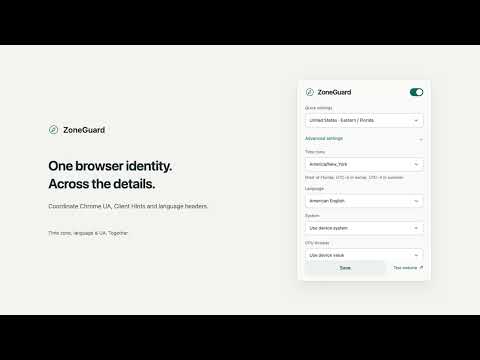
Choose a region. ZoneGuard keeps the default time zone, language and desktop Chrome identity websites read consistent. • Synchronizes Date, Intl.DateTimeFormat and available Temporal, including daylight saving time. • Coordinates User-Agent, Client Hints and language headers across pages, frames and ordinary Dedicated Workers. • Protects first requests and background network fetches with browser-owned header rules; limits high-entropy HTTPS UA headers. • Built-in protection restricts canvas, GPU, audio, local fonts and hardware capability probes whenever ZoneGuard is enabled. • Time zone, language, browser controls and optional tab reloading stay in collapsed Advanced settings. Save and Test website are always accessible. • Saves settings locally and preserves unfinished drafts. No account, telemetry or server. Choose a region, save and enable ZoneGuard. Reload existing pages manually for full effect. Saving does not reload all tabs by default. If a required feature does not work, use “Pause on this site”. It restores page APIs and request headers for the displayed hostname and its subdomains and reloads only the current tab. Other sites stay protected. Browser-wide privacy controls remain active. Requires desktop Chrome 125+. Chrome displays a debugging notice while enabled; DevTools can interrupt protection. New pages may run scripts before attachment. Cached readings and existing Worker UA may require a reload. Temporal is synchronized only when provided by Chrome. ZoneGuard does not change VPNs, proxies, your exit IP or TCP/TLS fingerprints, and cannot guarantee anonymity or an undetectable browser. Custom UA supports desktop Chrome only. Interface: English, Simplified Chinese, Traditional Chinese, Japanese, Korean, German, French and Spanish. The interface follows Chrome; English is the default fallback. Support: tageecc@gmail.com
0 out of 5No ratings
Details
- Version1.7.2
- UpdatedNovember 24, 2026
- Offered bytageecc
- Size69.99KiB
- Languages8 languages
- DeveloperZEXUAN ZHANG
文一西路 杭州市, 浙江省 361000 CNEmail
tageecc@gmail.comPhone
+86 133 3836 4500 - TraderThis developer has identified itself as a trader per the definition from the European Union and committed to only offer products or services that comply with EU laws.
Privacy

This developer declares that your data is
- Not being sold to third parties, outside of the approved use cases
- Not being used or transferred for purposes that are unrelated to the item's core functionality
- Not being used or transferred to determine creditworthiness or for lending purposes
Support
For help with questions, suggestions, or problems, please open this page on your desktop browser