

NexoPad: Expansor de Texto, Snippets, Enlaces, Notas y Asistente de Chat IA

Overview
Expansor de texto, respuestas rápidas, plantillas, notas, pestañas, enlaces y asistente de IA en tu navegador.
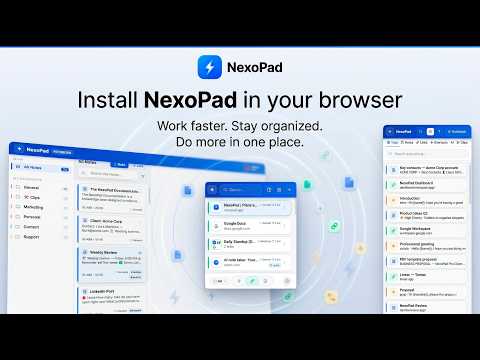
🚀 NexoPad — Expansor de Texto, Notas, Enlaces, IA y Gestor de Pestañas para Chrome ¿Escribes siempre lo mismo en emails, chats o formularios? ¿Pierdes ideas entre mil pestañas abiertas? ¿Nunca encuentras ese enlace importante? NexoPad es la alternativa todo-en-uno más potente a los expansores tradicionales para Chrome. Sustituye varias herramientas de pago en una sola extensión: funciona como tu expansor de texto inteligente, bloc de apuntes con Web Clipper, gestor de enlaces y un poderoso asistente de IA con tu propia clave (BYOK) — con proveedores 100% gratuitos incluidos. 👉 Haz clic en "Añadir a Chrome" — empieza gratis, sin tarjeta de crédito y sin anuncios. ✔️ Escribe hasta 10x más rápido. ✔️ Ahorra horas de trabajo repetitivo cada semana. ✔️ Captura ideas y artículos al instante mientras navegas. ✔️ Automatiza respuestas, correos, recordatorios y tareas diarias. ✔️ Mantén todo tu flujo organizado sin salir del navegador. Ideal para soporte al cliente, ventas, marketing, SEOs, desarrolladores, estudiantes y freelancers que buscan una extensión de productividad para controlar su tiempo y sus pestañas sin perder el enfoque. Disponible en 5 idiomas. Compatible con Chrome, Edge, Vivaldi, Opera y navegadores Chromium. ━━━━━━━━━━━━━━━━━━━━ ✅ FUNCIONA DONDE TÚ TRABAJAS Nuestro motor de inserción está probado en editores reales, no solo en campos simples. Funciona a la perfección en tu correo, mensajería de equipo, gestores de tickets, CRMs, redes sociales y paneles de administración. Incluye compatibilidad total con editores enriquecidos y plataformas construidas sobre frameworks modernos donde otros expansores fallan. Si puedes escribir ahí, nosotros escribimos por ti. 🖥️ 3 FORMAS DE USARLO • Ventana rápida (Ctrl+Space): Inserta una plantilla, guarda una nota o lanza un enlace en 1 segundo. • Panel lateral: Tu copiloto y chat de IA siempre visible mientras navegas. • Editor a pantalla completa (Alt+Q): Tu bóveda inmersiva para cuando necesitas concentrarte y redactar en serio. ⚡ EXPANSOR DE TEXTO Y RESPUESTAS PREDEFINIDAS Crea un atajo para cualquier contenido que repitas y NexoPad lo insertará al instante. • Escribe /firma → aparece tu firma completa al instante. • Escribe // en cualquier campo → busca e inserta fragmentos sin tocar el ratón. • Formularios dinámicos: Completa datos variables (nombre, precios) en un mini-formulario antes de inyectar el texto. • Captura de contexto: Extrae automáticamente el nombre del cliente o la empresa desde la página que estás viendo. • Fechas y variables automáticas: Usa {{fecha:+7_dias}} para calcular el día exacto. También soporta {{hora}}, {{dia}}, {{mes}}, {{url}} y {{dominio}}. • Prueba A/B (Spintax): Hasta 8 variantes de un mismo mensaje con rotación automática para evitar filtros de spam. • Inspector visual: Extrae cualquier dato de una web con un clic y úsalo como variable. • Editor enriquecido: Soporta imágenes, tablas, colores, HTML y modo máquina de escribir. 📝 APUNTES, WEB CLIPPER Y RECORDATORIOS Captura datos mientras navegas y conviértelos en seguimientos infalibles. • Web Clipper (Alt+C): Selecciona un texto en cualquier web y guárdalo al instante. • Post-it flotantes: Notas en ventana independiente, siempre a la vista sobre tu trabajo. • Recordatorios nativos: Ponle fecha y hora a cualquier apunte. Repetición diaria, semanal o mensual con alertas que no te roban el foco de la pantalla. • Buscador global (Ctrl+K): Encuentra cualquier cosa en milisegundos con resaltado (Ctrl+F). • Papelera de seguridad: Nada se pierde por accidente. 🔗 GESTOR DE ENLACES Y PESTAÑAS (TAB MANAGER) • Grupos nativos: Agrupa URLs por nombre y color. Abre todos los enlaces de un cliente o proyecto de un solo clic. • Renombrado permanente: Identifica al instante pestañas repetidas del CRM o de herramientas internas. • Búsqueda desde la barra URL: Escribe "sys" seguido de tu búsqueda para abrir atajos sin clics. • Importación y Privacidad: Importa tus marcadores actuales conservando carpetas o abre cualquier dirección guardada en modo incógnito. 🤖 ASISTENTE INTELIGENTE — BYOK (CON OPCIONES GRATUITAS) Conecta tu propia clave API. Tú eliges el proveedor y el modelo, sin intermediarios ni pagar suscripciones mensuales extra. 🆓 Empieza sin pagar nada: Compatible con Groq, OpenRouter, Mistral y Cohere (ofrecen acceso gratuito). 💳 En total ya son 10 proveedores compatibles, y sumamos más en cada actualización. • IA Inline: Selecciona un párrafo en cualquier web → corrige, traduce, resume o reescribe reemplazando el texto original al instante. • Traducción nativa a 8 idiomas sin cambiar de pestaña. • Chat con contexto: Adjunta tu propio material y notas para que la IA responda basándose en tus documentos. • Menú contextual rápido: Clic derecho sobre cualquier selección para lanzar una acción de IA. 📊 DASHBOARD Y ESTADÍSTICAS Llevamos la cuenta de lo que ahorras. Visualiza tus inserciones, caracteres automatizados y tiempo de vida recuperado con gráficas de rendimiento. 💎 NUESTROS PLANES 🌱 GRATIS: Para siempre. Funciones esenciales, bóveda personal, sincronización en la nube, asistente IA con proveedores sin coste y Dashboard. ⭐ PRO: Potencia individual sin límites de contenido. Extractor visual de variables, renombrado de pestañas, variantes A/B y analíticas avanzadas. 🏢 TEAMS: Bóveda compartida para empresas. Permisos por rol (Admin, Editor, Lector), flujo de aprobación, plantillas de equipo, segmentación por departamentos y variables globales. 🛡️ PRIVACIDAD Y CONTROL • Bloqueo por PIN: Protege el acceso a tu bóveda personal. Mientras está bloqueada, ni siquiera los recordatorios muestran el contenido de tus notas. • Tus datos son tuyos: Sin publicidad. No vendemos datos ni rastreamos tu navegación. Las funciones de lectura solo se activan cuando tú las disparas (ej. al guardar un Web Clip). 🔄 EN DESARROLLO ACTIVO Escuchamos a nuestra comunidad y publicamos mejoras constantemente. Revisa nuestro historial de actualizaciones aquí: https://nexopad.app/changelog 📞 ¿NECESITAS AYUDA? • Web oficial: https://nexopad.app • Contacto y Soporte: https://nexopad.app/contact
4.3 out of 56 ratings
Details
- Version3.1.0
- UpdatedSeptember 5, 2026
- Size678KiB
- Languages5 languages
- DeveloperWebsite
Email
support@nexopad.app - Non-traderThis developer has not identified itself as a trader. For consumers in the European Union, please note that consumer rights do not apply to contracts between you and this developer.
Privacy

NexoPad: Expansor de Texto, Snippets, Enlaces, Notas y Asistente de Chat IA has disclosed the following information regarding the collection and usage of your data. More detailed information can be found in the developer's privacy policy.
NexoPad: Expansor de Texto, Snippets, Enlaces, Notas y Asistente de Chat IA handles the following:
This developer declares that your data is
- Not being sold to third parties, outside of the approved use cases
- Not being used or transferred for purposes that are unrelated to the item's core functionality
- Not being used or transferred to determine creditworthiness or for lending purposes
Support
For help with questions, suggestions, or problems, please open this page on your desktop browser