

NexoPad: Text Expander, Canned Responses, Snippets, Notes & Link Management

Overview
Your all-in-one tool: text expander, canned responses, dynamic templates, secure notes, link manager, and AI assistant (BYOK).
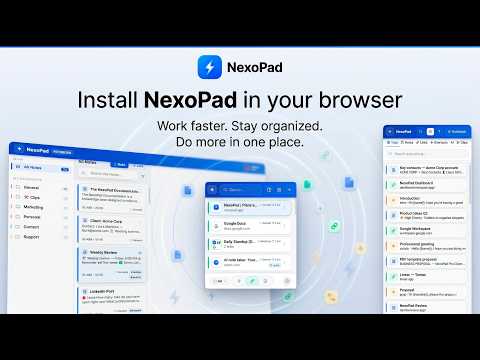
🚀 NexoPad — Text Expander, Canned Responses, AI Assistant, Encrypted Notes & Links for Chrome Are you always typing the same emails, chats, or forms? Do you lose ideas among dozens of open tabs? Can't ever find that important link you saved? NexoPad replaces several tools in one single extension: it works as your smart text expander, encrypted notepad with web clipper, link organizer, and AI assistant with your own key (BYOK). 👉 Click "Add to Chrome" — start for free, no credit card required. ✔️ Type up to 10x faster ✔️ Save hours every week ✔️ Capture ideas and articles instantly while browsing ✔️ Automate responses, notes, and repetitive tasks ✔️ Keep everything organized without leaving your browser Ideal for students, writers, customer support, marketers, SEOs, developers, and freelancers who want to autofill forms instantly, reply faster, and manage their tabs without losing control. Available in 5 languages. Compatible with Chrome and Chromium-based browsers. 🖥️ 3 WAYS TO USE IT • Popup (Ctrl+Space): Insert snippets, save notes, or launch links in 1 second. • Side Panel: Your always-visible copilot while you browse. • Full-Screen Editor (Alt+Q): Notebook-style notes and templates for when you need to focus. ⚡ TEXT EXPANDER & CANNED RESPONSES (SNIPPETS) Create a shortcut for any text you repeat. Type it, and NexoPad inserts it instantly on any website. • Type /sig → your full signature appears instantly. • Smart Forms: fill in variable data before inserting the text. • Context Capture: extract a name or company from the page you are viewing. • Auto-Dates: {{date:+7d}} inserts the date 7 days from now, no calculators needed. • A/B Testing: up to 8 variants of the same message with automatic rotation (Spintax). • Visual Inspector: extract any data from a web page with one click and use it as a variable. • Rich Editor: images, tables, HTML, and typewriter mode. • Export all your snippets whenever you want. 📝 ENCRYPTED NOTES MANAGER + WEB CLIPPER Capture ideas, articles, and data while you browse. Your personal vault is always available in Chrome. • Web Clipper (Alt+C): select text → save it as a Markdown note. • Floating Post-its: notes in an independent, always-visible window. • Urgent Mode: alarms that won't disappear until you act, for critical tasks. • Organization: folders, tags, favorites, and a powerful editor. • Secure cloud sync included. 🔗 LINK & TAB MANAGER • Save your favorite websites and open them with one click, without searching every time. • Colored Tab Groups: open multiple URLs together. • Auto-Rename: identify repeated tabs from your CRM, bank, or internal tools at a glance. • Omnibox Search: type "sys" in the Chrome address bar to find any saved link. • Incognito Mode: open any saved link in a private window with one click. 🤖 AI ASSISTANT FOR CHROME — BYOK Connect your own API key from OpenAI, Gemini, DeepSeek, Anthropic, or other compatible providers. You choose the provider and the model. • Inline AI: select text → fix, translate, summarize, or rewrite directly on the page. • Chat with context: attach your notes so the AI responds using your own content. • Replace the original text keeping the formatting whenever possible. • Summarize the active tab in seconds. • Saved prompts and automatic history from the very first message. ⌨️ KEYBOARD SHORTCUTS Customizable (from chrome://extensions/shortcuts): • Ctrl+Space → Main popup • Alt+Q → Full-screen editor • Alt+S → Notes panel • Ctrl+Shift+Space → Snippets panel • Side Panel → (No default shortcut, configure it to your liking) Fixed & Internal Shortcuts: • Alt+C → Web Clipper (saves selected text) • Ctrl+K → Global Search (inside NexoPad) • // in any field → Search and insert snippets without a mouse 📊 SEE WHAT YOU SAVE (STATS & DASHBOARD) NexoPad keeps track: snippets used, notes saved, links opened, characters, and time saved. The extension shows your graph for the last 7 days, and you can access your web Dashboard to see full analytics for 30 days or up to 1 year. 👉 Install NexoPad for free and start saving time today. 💎 PLANS 🌱 Free — Forever. Core features with generous limits, cloud sync, and Dashboard access. No card required. ⭐ PRO — Individual full power. Unlimited content, variable extractor, unrestricted BYOK AI, and ROI Dashboard. 🏢 TEAMS — Shared vault, role-based permissions (Admin, Editor, Viewer), team templates, global variables, and broadcast messages. 🛡️ PRIVACY & CONTROL NexoPad does not sell your data or use your browsing history for advertising. Page reading features are only used for actions you trigger, like saving clips, capturing context, filling templates, or analyzing content with AI. With the BYOK model, you use your own API key to connect to the AI provider of your choice. 📞 NEED HELP? Need help or have a suggestion? Write to us and we'll help you fast. • Web: https://nexopad.app • Contact: https://nexopad.app/contact
5 out of 55 ratings
Details
- Version2.7.9
- UpdatedApril 30, 2026
- Size554KiB
- Languages5 languages
- DeveloperWebsite
Email
support@nexopad.app - Non-traderThis developer has not identified itself as a trader. For consumers in the European Union, please note that consumer rights do not apply to contracts between you and this developer.
Privacy

NexoPad: Text Expander, Canned Responses, Snippets, Notes & Link Management has disclosed the following information regarding the collection and usage of your data. More detailed information can be found in the developer's privacy policy.
NexoPad: Text Expander, Canned Responses, Snippets, Notes & Link Management handles the following:
This developer declares that your data is
- Not being sold to third parties, outside of the approved use cases
- Not being used or transferred for purposes that are unrelated to the item's core functionality
- Not being used or transferred to determine creditworthiness or for lending purposes
Support
For help with questions, suggestions, or problems, visit the developer's support site