

NexCRM Password Manager

Overview
Save, autofill, and generate logins backed by your NexCRM vault. Bitwarden-style password manager for NexCRM.
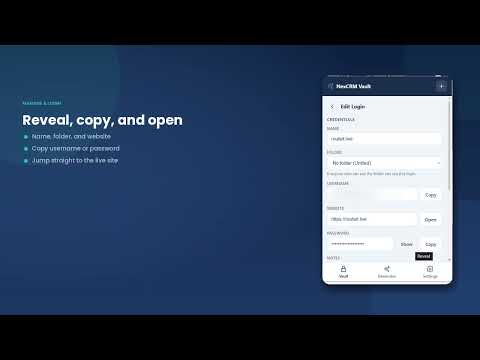
NexCRM Password Manager is the browser companion to the App Vault built into NexCRM. Sign in once and use the credentials your team already keeps in NexCRM, without switching tabs or retyping anything. A NexCRM account is required. This extension is not a standalone password vault — it works with credentials stored in your own NexCRM workspace. WHAT YOU CAN DO • Autofill logins — click into a username field and pick the matching saved login. The extension fills the username and password for you. • Two-factor codes — see the rotating six-digit code for a saved login, copy it in one click, or scan its QR code to set the login up on a new device. • Save as you sign in — when you log in to a site, the extension offers to save that login to your vault so it is there next time. • Copy anything — copy a username, password, or one-time code straight from the popup for sites that autofill cannot handle. • Folders — credentials filed into a folder in NexCRM show that folder in the list, and you can filter to one folder or choose where a new login is saved. • Generate strong passwords — build a password of any length with the character types you want, right where you are signing up. BUILT FOR SHARED TEAM CREDENTIALS Your vault lives in NexCRM, so a credential shared with you by a teammate, or with your whole department, appears in the extension automatically. Access follows the permissions set in NexCRM: you see only what you created or what has been shared with you. SECURITY • No password is ever stored on your device. Passwords are fetched from your NexCRM account only at the moment you copy, reveal, or autofill one, held in memory, then discarded. • Every reveal is recorded in your organization's audit trail in NexCRM. • Copied passwords are cleared from your clipboard about 20 seconds later, and only if you have not copied something else in the meantime. • The extension stays inactive on every page until you are signed in and a real login form is present. It never reads general page content. • Signing out revokes your session and clears everything the extension has stored locally. Learn more at https://nexcrm.net
0 out of 5No ratings
Details
- Version0.4.0
- UpdatedSeptember 12, 2026
- Offered bychrishend llc
- Size183KiB
- LanguagesEnglish
- DeveloperChrishenda LLC
5965 Village Way San Diego, CA 92130 USEmail
support@chrishenda.com - Non-traderThis developer has not identified itself as a trader. For consumers in the European Union, please note that consumer rights do not apply to contracts between you and this developer.
Privacy

NexCRM Password Manager has disclosed the following information regarding the collection and usage of your data. More detailed information can be found in the developer's privacy policy.
NexCRM Password Manager handles the following:
This developer declares that your data is
- Not being sold to third parties, outside of the approved use cases
- Not being used or transferred for purposes that are unrelated to the item's core functionality
- Not being used or transferred to determine creditworthiness or for lending purposes
Support
For help with questions, suggestions, or problems, please open this page on your desktop browser