

NeuroFilterAI — Block YouTube Distractions with AI

Overview
Keep useful YouTube videos visible and fade distractions with AI-powered filtering and Focus Mode.
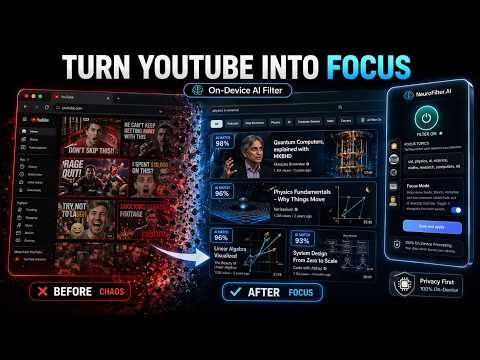
YouTube is useful. The algorithm is the problem. NeuroFilterAI helps turn YouTube from an endless recommendation trap into a focused space for learning, research, coding, study, and intentional browsing using AI. Instead of blocking YouTube completely, NeuroFilterAI gives you a smarter control layer. Tell it what you want to see more of, what you want to avoid, and how strict the filter should be. The extension then scores YouTube videos based on your intent, so useful content stays visible while low-value distractions fade away. Built for people who want YouTube to serve their goals — not steal their attention. WHAT NEUROFILTERAI DOES • Filters YouTube recommendations using AI • Scores videos based on your interests, disinterests, and filter threshold • Helps keep useful learning, research, study, coding, and work-related videos visible • Reduces distracting recommendations, Shorts, autoplay, comments, sidebars, end screens, and other attention-heavy YouTube surfaces • Lets you adjust how strict the filter should be • Lets you reveal hidden videos when you choose • Gives you a polished in-extension dashboard for focus topics, settings, account tools, and Focus Mode • Helps make YouTube feel calmer, cleaner, and more intentional WHY IT IS DIFFERENT Most blockers are blunt. They block websites, channels, or exact keywords. That can be too strict when YouTube is also where you learn, research, revise, build, and explore. NeuroFilterAI is different. It uses semantic AI filtering to understand what a video is about, not just whether a specific word appears in the title. That means a video can still match your goals even when it does not use your exact keywords. For example, if your focus topics are physics, AI, coding, startups, maths, JEE, or research, NeuroFilterAI can help surface related videos while reducing unrelated distractions. You do not have to quit YouTube. You make YouTube work for your intent. FOCUS MODE FOR YOUTUBE NeuroFilterAI also includes Focus Mode — a set of controls designed to reduce the parts of YouTube that pull you into endless scrolling. You can reduce or hide distractions such as: • Shorts • Autoplay • Comments • Related videos • Sidebar recommendations • End screens • Search shelves • Other high-friction attention traps The goal is simple: keep the useful part of YouTube, reduce the parts that hijack your time. ON-DEVICE AI SCORING NeuroFilterAI’s core recommendation scoring runs inside your browser. Video titles, descriptions, transcript context, interests, disinterests, thresholds, and local scoring data are used by the extension to decide what should stay visible and what should fade. Sign-in, account status, pricing, checkout, student benefits, referrals, licenses, and optional synced interest features use secure cloud services only when those features are used. This creates a practical local-first design: the core filtering happens where the distraction happens — inside your browser. BEST FOR Students: Keep lectures, exam prep, tutorials, JEE content, science, maths, and academic videos visible while reducing random recommendations and Shorts. Developers: Focus on coding, software engineering, system design, AI, machine learning, documentation, and technical learning. Researchers and serious learners: Use YouTube as a research surface without letting the recommendation engine pull you away from your original goal. Professionals: Use YouTube for work, learning, and industry research without turning every session into a distraction spiral. Anyone reducing distraction: Use Focus Mode and AI filtering to make YouTube calmer, cleaner, and more intentional. HOW IT WORKS 1. Install NeuroFilterAI and login 2. Add the topics you want to see more of 3. Add the topics you want to avoid 4. Choose your filter strictness 5. Open YouTube and start browseing NeuroFilterAI does not replace your judgment. It gives you a control layer between your attention and the algorithm. USE YOUTUBE ON PURPOSE YouTube has some of the best educational content on the internet. The problem is the noise around it. NeuroFilterAI helps you keep the signal and reduce the noise — so YouTube becomes useful on purpose, not useful by accident. Turn YouTube into focus with NeuroFilterAI.
4.5 out of 52 ratings
Details
- Version4.2
- UpdatedApril 27, 2026
- FeaturesOffers in-app purchases
- Size38.73MiB
- LanguagesEnglish (United States)
- DeveloperPiyush PalWebsite
0741-A aluminium factory road Ashok Nagar colony, gaderia tola, Basharatpur GORAKHPUR, Uttar Pradesh 273004 INEmail
piyushpal2828@gmail.com - Non-traderThis developer has not identified itself as a trader. For consumers in the European Union, please note that consumer rights do not apply to contracts between you and this developer.
Privacy

NeuroFilterAI — Block YouTube Distractions with AI has disclosed the following information regarding the collection and usage of your data. More detailed information can be found in the developer's privacy policy.
NeuroFilterAI — Block YouTube Distractions with AI handles the following:
This developer declares that your data is
- Not being sold to third parties, outside of the approved use cases
- Not being used or transferred for purposes that are unrelated to the item's core functionality
- Not being used or transferred to determine creditworthiness or for lending purposes