

Network API Exporter

Overview
Export General, Payload, and Response data of Fetch/XHR requests to TXT files.
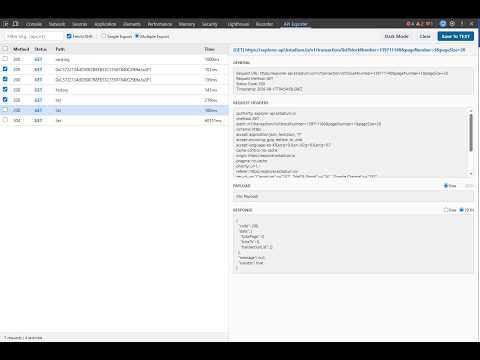
Network API Exporter는 웹 개발자, QA 엔지니어, 테스터를 위해 개발된 Chrome 개발자 도구(DevTools) 전용 확장 프로그램입니다. 브라우저에서 발생하는 Fetch/XHR 네트워크 통신 데이터를 실시간으로 감지하고, General 정보부터 Request Headers, Payload, Response까지 일목요연하게 정리된 TXT 파일로 간편하게 내보낼 수 있습니다. ━━━━━━━━━━━━━━━━━━━━━━━━━━━━━━━━━━━━━ 주요 기능 ━━━━━━━━━━━━━━━━━━━━━━━━━━━━━━━━━━━━━ 1. DevTools 전용 커스텀 패널 제공 • 기본 Chrome 개발자 도구 상단에 독립된 "API Exporter" 탭을 추가하여 기존 작업 환경 방해 없이 쾌적하게 사용 가능합니다. 2. Fetch/XHR 자동 필터링 및 실시간 검색 • 이미지, CSS, JS 등 불필요한 정적 리소스를 제외하고 실제 API 통신(Fetch/XHR)만 자동으로 수집합니다. • 엔드포인트 URL 검색창을 통해 원하는 요청만 실시간으로 즉시 필터링할 수 있습니다. 3. 유연한 내보내기(Export) 모드 지원 • Single File 모드: 체크박스로 선택한 여러 개의 API 요청 데이터를 1개의 텍스트 파일에 순서대로 병합 저장합니다. • Multiple Files 모드: 선택한 API 요청별로 각각 개별 텍스트 파일로 분할 다운로드합니다. • 가독성 높은 표준 텍스트 포맷 제공: - [GENERAL] Request URL, Method, Status Code, Timestamp - [REQUEST HEADERS] 전체 헤더 키-값 목록 - [PAYLOAD] 전송 본문 원본 데이터 - [RESPONSE] 응답 바디 데이터 4. 스마트 JSON 포맷 뷰어 • Payload 및 Response 영역에 JSON 감지 기능을 탑재하여, 유효한 JSON 형식일 때 원클릭으로 들여쓰기된 포맷으로 가독성 있게 전환해 확인할 수 있습니다 (내보내기 시에는 안전하게 원본 Raw 데이터로 저장). 5. 다크/라이트 테마 (Day / Night Mode) 지원 • 개발자 취향 및 환경에 맞춰 상단 버튼 클릭 한 번으로 라이트/다크 테마를 전환할 수 있습니다. ━━━━━━━━━━━━━━━━━━━━━━━━━━━━━━━━━━━━━ 사용 방법 ━━━━━━━━━━━━━━━━━━━━━━━━━━━━━━━━━━━━━ 1. F12 키(또는 Mac에서 Cmd + Option + I)를 눌러 Chrome 개발자 도구를 엽니다. 2. 상단 메뉴 탭에서 "API Exporter" 패널을 클릭합니다. 3. 웹페이지를 새로고침하거나 동작시켜 발생하는 API 요청 목록을 확인합니다. 4. 내보내고자 하는 요청의 체크박스를 선택합니다. 5. Single File 또는 Multiple Files 옵션을 선택한 뒤 [Export to TXT] 버튼을 클릭하면 파일이 다운로드됩니다. ━━━━━━━━━━━━━━━━━━━━━━━━━━━━━━━━━━━━━ 개인정보 보호 및 보안 ━━━━━━━━━━━━━━━━━━━━━━━━━━━━━━━━━━━━━ • 100% 로컬 브라우저 구동: 모든 데이터 수집 및 파일 가공은 사용자의 로컬 브라우저 내부에서만 수행됩니다. • 외부 전송 없음: 민감한 인증 토큰, 헤더, 응답 데이터는 어떠한 외부 서버로도 전송되거나 저장되지 않습니다. Network API Exporter is a Chrome DevTools extension designed to streamline API inspection and logging for developers, QA engineers, and testers. Capture network traffic in real-time, inspect request/response payloads, and export clean, formatted TXT files with a single click. ━━━━━━━━━━━━━━━━━━━━━━━━━━━━━━━━━━━━━ Key Features ━━━━━━━━━━━━━━━━━━━━━━━━━━━━━━━━━━━━━ 1. Dedicated DevTools Panel • Adds a dedicated "API Exporter" tab directly inside Chrome Developer Tools. • Works alongside your standard Network panel without cluttering your existing workflow. 2. Fetch/XHR Auto-Filtering & URL Search • Automatically filters out static assets (images, CSS, JS) and captures only Fetch/XHR API requests. • Instant real-time URL search filter to quickly find specific endpoints. 3. Flexible Export Options • Single File Mode: Merge multiple selected API logs into one comprehensive TXT file. • Multiple Files Mode: Download each selected request as an individual TXT file. • Clean, human-readable file structure including: - [GENERAL] Request URL, Method, Status Code, Timestamp - [REQUEST HEADERS] Complete header key-value pairs - [PAYLOAD] Raw post data - [RESPONSE] Full response body 4. Smart JSON Viewer • Live inspection of Payloads and Responses. • Auto-detects JSON format and enables one-click pretty-print (indentation) formatting while preserving original raw data during export. 5. Day & Night Theme Support • Seamlessly switch between Dark Mode and Light Mode to match your workspace environment. ━━━━━━━━━━━━━━━━━━━━━━━━━━━━━━━━━━━━━ How to Use ━━━━━━━━━━━━━━━━━━━━━━━━━━━━━━━━━━━━━ 1. Press F12 (or Cmd + Option + I on macOS) to open Chrome DevTools. 2. Click on the "API Exporter" tab in the top navigation bar. 3. Trigger API calls on your web page to see incoming requests captured in real-time. 4. Check the requests you want to export. 5. Select your export mode (Single File / Multiple Files) and click "Export to TXT". ━━━━━━━━━━━━━━━━━━━━━━━━━━━━━━━━━━━━━ Privacy & Security ━━━━━━━━━━━━━━━━━━━━━━━━━━━━━━━━━━━━━ • 100% Client-Side: All data processing occurs entirely within your local browser. • No External Transmission: No network logs, payloads, or sensitive tokens are sent to any external server.
0 out of 5No ratings
Details
- Version1.0.0
- UpdatedSeptember 17, 2026
- Offered byochi-global
- Size52.02KiB
- LanguagesEnglish (United States)
- Developer얍얍돌이
에버랜드 겜돌이월드 2F 용인시, 경기도 17155 KREmail
kuni05@naver.com - Non-traderThis developer has not identified itself as a trader. For consumers in the European Union, please note that consumer rights do not apply to contracts between you and this developer.
Privacy

This developer declares that your data is
- Not being sold to third parties, outside of the approved use cases
- Not being used or transferred for purposes that are unrelated to the item's core functionality
- Not being used or transferred to determine creditworthiness or for lending purposes