

NetSuite Internal ID Display

Overview
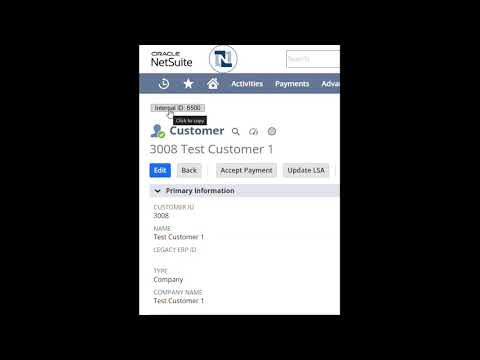
Displays the internal ID of NetSuite records at the top of the page with a button that copies the internal ID when clicked.
This extension displays the internal ID prominently at the top of NetSuite record pages and provides a one-click copy button, eliminating the need to dig through URLs to copy the ID. Instant Visibility — Internal IDs are displayed at the top of every NetSuite record page automatically, so you always know which record you're working with. One-Click Copy — Copy the internal ID to your clipboard with a single click. No more manually parsing URLs. Works Across NetSuite — Compatible with all standard NetSuite record types including customers, vendors, items, transactions, employees, custom records, and more. Lightweight & Fast — Minimal performance impact. The extension only activates on NetSuite pages and uses zero resources elsewhere. Privacy-Focused — Runs entirely in your browser. No data is collected, transmitted, or stored on external servers. Who Is This For? This extension is designed for NetSuite administrators, developers, consultants, and power users who frequently reference internal IDs for: SuiteScript development and debugging SuiteQL and saved search queries CSV imports and data migrations Integration mapping (Celigo, Boomi, Workato, etc.) Workflow and custom record configuration Support tickets and documentation Permissions Explained This extension only requests the minimum permissions needed to function: Storage — Used to save your preferences locally in your browser. NetSuite domain access (*.app.netsuite.com) — Required to display the internal ID on NetSuite pages. The extension does not run on any other website. How to Use Install the extension. Navigate to any NetSuite record page. The internal ID appears at the top of the page automatically. Click the copy button to copy the ID to your clipboard. Support & Feedback If you encounter any issues or have feature suggestions, please email magnusfredwork@gmail.com.
0 out of 5No ratings
Details
- Version1.0
- UpdatedMay 29, 2026
- Offered byMagnus Frederickson
- Size26.93KiB
- LanguagesEnglish
- Developer
Email
magnusfredwork@gmail.com - Non-traderThis developer has not identified itself as a trader. For consumers in the European Union, please note that consumer rights do not apply to contracts between you and this developer.
Privacy

This developer declares that your data is
- Not being sold to third parties, outside of the approved use cases
- Not being used or transferred for purposes that are unrelated to the item's core functionality
- Not being used or transferred to determine creditworthiness or for lending purposes