

NetSuite Finance Assistant
1 rating
)
Overview
Productivity tools for NetSuite Finance professionals. Copy transaction details, GL analysis, and transaction navigation.
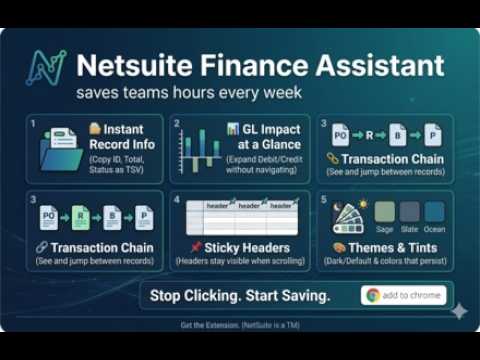
NetSuite Finance Assistant saves Finance and Accounting teams hours of manual work every week by putting critical transaction data right at your fingertips — without ever leaving the NetSuite page you're on. When you're reviewing transactions, tracing a PO to a payment, or reconciling GL entries, you normally have to click through multiple records, manually copy data, and piece together the full picture yourself. This extension eliminates that friction. What it does: 🗂️ Instant Record Info — Open any transaction and instantly see key details like Internal ID, status, total, and dates — all copyable with a single click or in bulk as TSV (paste straight into Excel or Google Sheets). 📊 GL Impact at a Glance — Expand the GL Impact panel to view debit/credit entries, account names, memos, and more — without navigating away from the page. 🔗 Transaction Chain Breadcrumb — See the full transaction flow (PO → Receipt → Bill → Payment) displayed right below the record title. Click any pill to jump to that record, or hover to auto-copy all details. 📌 Sticky Sublist Headers — Column headers stay visible as you scroll through long sublists — no more losing track of which column you're in. 🎨 Themes & Color Tints — Switch between Default and Dark mode, with optional background tints (Sage, Slate, Ocean, and more) that persist across all your NetSuite pages.
5 out of 51 rating
Details
- Version0.2.0
- UpdatedApril 25, 2026
- Offered bysitaramup97
- Size35.5KiB
- LanguagesEnglish
- DeveloperSitaram Upadhya
Near Vidya Bharati International School, Rampur, Jagun Rampur, Jagun Tinsukia, Assam 786188 INEmail
sitaramup97@gmail.com - Non-traderThis developer has not identified itself as a trader. For consumers in the European Union, please note that consumer rights do not apply to contracts between you and this developer.
Privacy

This developer declares that your data is
- Not being sold to third parties, outside of the approved use cases
- Not being used or transferred for purposes that are unrelated to the item's core functionality
- Not being used or transferred to determine creditworthiness or for lending purposes
Support
For help with questions, suggestions, or problems, please open this page on your desktop browser