
![「Netflix™ Extended [QVI]」的項目標誌圖片](https://lh3.googleusercontent.com/ldNccMkxGPvBwMvHo012safEi-F3sLLSGjA9Jnl_FRtMPzY1AY5vWov4dAiQ7DUk0iYCZfgyCdCN3kvt64Dgdr_LfQc=s60)
Netflix™ Extended [QVI]
284 個評分
)![Netflix™ Extended [QVI]的項目媒體 3 (螢幕截圖)](data:image/gif;base64,R0lGODlhAQABAIAAAP///////yH5BAEKAAEALAAAAAABAAEAAAICTAEAOw==)
總覽
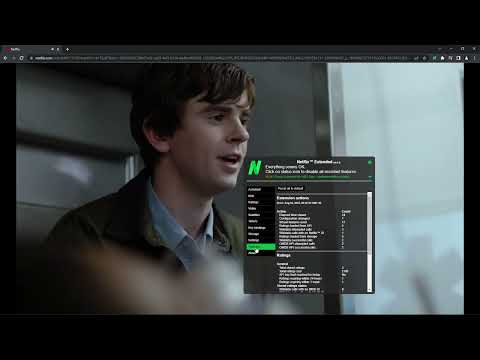
Extension for Netflix™ to skip intros, recaps, start next movie/episode in faster pace and many more.
Disclaimer: NETFLIX is a trademark of Netflix, Inc.. This application and its developer are in no way affiliated with Netflix, Inc.. General features: - Clicking on extension icon will open Netflix™ page in new tab - Clicking on extension status icon in a video player, disable/enable all extension features - Extension has options menu which allows you to change extension behaviour, this is accessible via an icon that is shown when hovering on extension status icon or in browser extension management page - Extension adds a coloured icon at video player controls that indicate extension state and show more extension info when hovered upon - Extension will try to automatically recover if it stops working or updates itself - Options can be changed via extension status information bubble options button in browse or video player pages - If configured, extension will auto-disable itself on Kids profile Title screen key bindings: - Press R on browse page or search screen to start a random title excluding disliked titles (can be changed in the configuration) Title screen features: - If configured, extension will try to obtain and show title ratings on title details screen (turned off by default, note that this feature makes internet calls on background to gather these ratings from https://omdbapi.com/ and https://wikidata.org/) - If configured, extension will be hiding all title story description to avoid spoilers - If configured, extension will be hiding all disliked titles - If configured, extension will stop trailers on browse page Video player key bindings: - Press 'N' in the player if you want to go to the next episode during the current episode (can be changed in the configuration) - Press 'B' in the player if you want to go to the previous episode during the current episode (can be changed in the configuration) - Press 'Escape' in the player to return to browse page (can be changed in the configuration) - Press 'H' in the player to temporarily disable subtitles (can be changed in the configuration) - Press 'Up Arrow' in the player to increase volume (original feature) - Press 'Down Arrow' in the player to decrease volume (original feature) - Press 'M' in the player to mute/unmute (original feature) - Press 'Space/Enter' in the player to play/pause (original feature) - Press 'Right Arrow' in the player to skip forward (original feature) - Press 'Left Arrow' in the player to skip backward (original feature) - Press 'F' in the player to make video full screen (original feature) - Press 'S' in the player to make skip intro or recap, if skip button is shown in UI (original feature) Video player features: - When current episode ends, either next episode will start as soon as possible or credits will be rolled (can be changed in the configuration) - Extension will delay 10 seconds before starting next episode if previous title and next title are different titles (can be changed in the configuration) - Mouse wheel scroll up/down can adjust player volume (can be changed in the configuration) - If configured, extension will stop playing if previous title of a series and next title are different titles - If configured, extension will stop playing if previous title of a movie and next title are different titles - If video is stuck on loading for longer than 5 seconds, it will be reloaded within next 15 seconds if nothing changes (can be changed in the configuration) - Any Skip Intro or Skip Recap button will be clicked automatically (can be changed in the configuration) - If all skip features are turned off, video player will ask every few episodes if you are still watching, this will be automatically skipped (can be changed in the configuration) - Extension keeps 100 unique entries as history in local browser storage (can be changed in the configuration) - If configured, video will automatically pause, if not in focus and can also automatically start, if focus is regained - If configured, highlight shadow around subtitles to stand out more with possibility to remove subtitles, change subtitles size, color and font as well - If configured, video features like playback speed can be enabled and changed permanently or temporarily while extension is running (Video playback speed, Video aspect ratio (21:9), Video zoom) Chromecast player key bindings: - Press 'M' in the player to mute/unmute (original feature) - Press 'Space/Enter' in the player to play/pause (original feature) Chromecast player features: - When current episode ends, next episode will start as soon as possible (can be changed in the configuration) - Hiding extension status icon (can be changed in the configuration) Title ratings: - Support for this feature is very limited as data are obtained from external sources (https://omdbapi.com/ & https://query.wikidata.org/) that are out of reach - Title ratings are turned off by default to prevent unwanted internet calls on background, this can be changed in configuration if wanted - Many ratings may not be available or might be out of date - Due to limited number of calls that we can make to OMDb API daily, it is possible that ratings will stop working because we use this feature too much - Once title rating was obtained, it is stored in local browser storage for some number of days before they get refreshed to reduce number of calls to OMDb API, so we can all enjoy this feature - Currently, OMDb API provides ratings from Internet Movie Database (IMDb), Rotten Tomatoes (RT) and MetaCritic (Meta), if available - If this feature will cause too many problems in the future, it might get removed - If configured, users can define their own API key to make sure they will not share number of calls to this API with other users (Free API keys can be generated here: https://omdbapi.com/apikey.aspx) Note: - At any time Netflix™ can change/update their UI and make this extension not work or misbehave, extension will be updated to work with this new UI once the UI reaches developers and as their updates are not rolled out all at same time this may take a while Supported browsers (all in their own web stores): - Chrome - Edge (Chromium) - Firefox - Opera This extension is part of the Quality Viewership Initiative, a collaborative effort to enhance the understanding of audience engagement. It collects anonymous, aggregated viewing insights to support creators and studios in improving the quality of their content. You can stop sharing your information at any time by switching the toggle on the options page. Warranty: The software is provided "as is", without a warranty of any kind, express or implied, including but not limited to the warranties of merchantability, fitness for a particular purpose and non-infringement. In no event shall the authors or copyright holders be liable for any claim, damages or other liability, whether in an action of contract, tort or otherwise, arising from, out of or in connection with the software or the use or other dealings in the software.
4.4 分 (滿分 5 分)284 個評分
詳細資料
- 版本8.2.30
- 已更新2026年2月13日
- 提供者SVODExtensions
- 大小663KiB
- 語言English
- 開發人員HideApp
1021 East Lincolnway Cheyenne, WY 82001 US電子郵件
netflex.extension@gmail.com電話
+1 802-284-5301 - 交易商這位開發人員表明自己是交易商 (依歐盟的定義),並承諾只提供符合歐盟法律的產品或服務。
- 鄧白氏環球編碼132615120
隱私權

「Netflix™ Extended [QVI]」已揭露下列關於收集及使用資料的資訊。 如需更多詳細資訊,請參閱開發人員的《privacy policy》。
Netflix™ Extended [QVI] 會處理下列資料:
這位開發者就你的資料做出下列聲明:
- 除經核准的用途外,不會將你的資料販售給第三方
- 不會基於與商品核心功能無關的目的,使用或轉移資料
- 不會為了確認信用度或基於貸款目的,使用或轉移資料
支援
如有疑問或建議,請使用電腦版瀏覽器開啟這個頁面