

Netflix Dual subtitle for learning languages

總覽
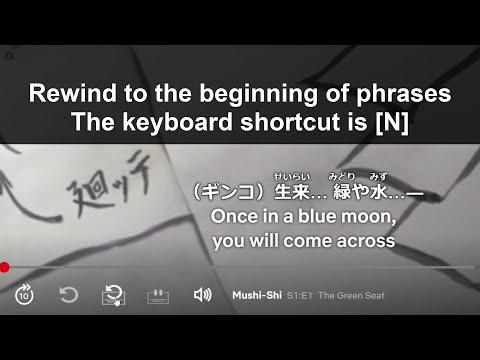
Display two subtitle languages at the same time for language learning. Rewind to the start of phrases. Pause at the end of phrases.
The free trial period is 3 days. The paid version is $0.97 USD(97 cents) per month. To start the free trial or the paid version. Click on the license icon in the Netflix's video pages. Click on the [Reload license] button in the window. For more details https://sites.google.com/view/niko-netflixdualsub-license/ ver.2.4.0 March 8, 2026 ・Auto-translated subtitles are now available in 30+ languages. ver.2.3.1 January 15, 2026 ・Fixed an issue where the video title could not be retrieved when adding words to Favorites. ver.2.3.0 June 23, 2025 ・Added a feature to show and hide native subtitles. ver.2.2.2 March 24, 2025 ・Added a feature to filter and display only the bookmarks added from the current video in “Bookmarked words and phrases”. And refactored the source code. ver.2.1.20 October 11, 2024 ・Refactored the source code to improve readability and maintainability. ver.2.1.16 September 4, 2024 ・Fixed an issue where the audio of favorite phrases does not play on macOS laptops. ver.2.1.8 November 11, 2023 ・The Chrome Web Store category has expanded. We've changed it to the appropriate category. ver.2.1.8 March 20, 2023 ・Migrated to the new Google sign-in from deprecated legacy Google Sign-in ver.2.1.0 November 23, 2022 ・Migrated this Chrome extension from Manifest V2 to Manifest V3 ver.1.21.32 September 19, 2022 ・Changed the manifest ver.1.21.25 March 5, 2022 ・Improved the performance ver.1.21.24 February 24, 2022 ・Changed the descriptions ver.1.21.19 October 9, 2021 ・Fixed the UI ver.1.21.11 July 7, 2021 ・Changed license descriptions ver.1.21.9 January 7, 2021 ・Changed license descriptions ver.1.21.8 December 2, 2020 ・Google has announced that the payment service of the Chrome Web Store will end. The subscription of Chrome Web Store will not renew automatically after February 1, 2021. Please use Stripe's payment platform instead of Chrome Web Store. ver.1.21.4 April 25, 2020 ・Fixed a bug of all available subtitles weren't displayed. ver.1.21.3 April 3, 2020 ・Added features. ver.1.20.3 Dec 31, 2019 ・Added features. ver.1.20.0 Dec 5, 2019 ・Fixed the critical issue. I'm sorry for the inconvenience. ・Added a feature. ver.1.19.0 Oct 30, 2019 ・Added another payment method. ver.1.18.2 July 22, 2019 ・Added to open a page of how to use this extension when installed for the first time ・Fixed displaying double native subtitle ver.1.18.0 July 03, 2019 ・Added an option of changing each subtitle color. ・Added a line between subtitles. ver.1.17.1 Jun 25, 2019 ・Fixed the feature of Hide or show a subtitle. ver.1.17.0 Jun 24, 2019 ・Display all native phrases for a learning phrase when auto pausing ・Changed font size and position of subtitles. ver.1.16.0 May 18, 2019 ・Added customizing keyboard shortcuts options into the settings. ver.1.15.1 May 16, 2019 ・Fixed the UI of Bookmark words and the phrases. ver.1.15.0 May 11, 2019 Many updated on this version ・Added a feature that Bookmark words and the phrases.To add a word to the bookmark list, hovering the mouse over a word and click the star mark. The list has Words, Learning phrases, Translated phrases, Thumbnails, Titles, Play buttons. ・Added a feature that Display the similar phrases and the translated phrases when hovering the mouse over the word. ver.1.14.0 April 19, 2019 ・Added a feature that Favorite playback rate. The default value is set to 0.8x. Press [K] key to set. Press [K] again to reset to the 1.0x. ver.1.13.0 April 12, 2019 ・Added a feature that Dual audio. ver.1.12.4 March 20, 2019 ・Fixed the UI changed by Netflix's version update. ver.1.12.1 March 18, 2019 ・Fixed a bug that occasionally subtitles are not displayed ver.1.12.0 March 11, 2019 ・Added an option to change the default subtitle position ver.1.11.0 March 10, 2019 ・Added an option to enable fixed position of learning subtitle ・Added an option to change subtitle color ver.1.10.1 March 9, 2019 ・Fixed the subtitle menu changed by Netflix's version update. ver.1.10.0 March 7, 2019 ・Added the more detailed settings of adjusting the timestamps. ・Added the option to turn off the Japanese furigana. ver.1.9.2 March 4, 2019 ・Fixed the feature that Adjust the timestamps of the learning subtitle. I'm sorry for the bug ver.1.9.1 March 3, 2019 ・Fixed the feature that Adjust the timestamps of the learning subtitle. ver.1.9.0 February 27, 2019 ・Added a setting to adjust the timestamps of the learning subtitle. ver.1.8.0 February 25, 2019 ・Added a keyboard shortcut [V] for the Hide or show a subtitle. ver.1.7.0 February 10, 2019 ・Added a feature that Hide a subtitle while playing a video, show a subtitle while pausing a video. The keyboard shortcut is [X] twice ・Added Seek a video to the previous phrase, press [N] twice quickly. The next phrase is [H] ver.1.6.0 February 02, 2019 ・Added a feature that Double-click the icon or press the [N] button twice to rewind to the previous phrase. ver.1.5.0 January 29, 2019 ・Added all subtitles and dubbing to the menu if it's available ・Fixed bug that occasionally subtitles are not displayed ver.1.4.2 January 28, 2019 ・Added Furigana(ふりがな) to Japanese subtitles ver.1.4.1 January 26, 2019 ・Fixed Japanese subtitles issue ver.1.3.0 January 24, 2019 ・Changed image based subtitles to text based subtitles. We can select on the subtitles with a mouse cursor. ver.1.2.2 January 22, 2019 ・Fixed the issue caused by other Chrome extensions. ver.1.2.1 January 19, 2019 ・Fixed the issue caused by the internal update of Netflix. ver.1.2.0 December 16, 2018 ・Added a feature that saving the subtitle settings then loading the previous settings ・Added the overlay is not displayed while pausing a video ・Changed the keyboard shortcuts. Pause or play to [V]. Hide the control bar and the overlay to [C] ver.1.1.4 November 21, 2018 Fixed the subtitle menu for the new UI ver.1.1.3 August 18, 2018 Fixed the list of subtitle menu ver.1.1.2 August 7, 2018 Fixed the new player UI ver.1.1.1 July 27, 2018 Fixed the player controller function ver.1.1.0 July 24, 2018 Added keyboard shortcuts for the playback rate ver.1.0.5 July 2, 2018 Fixed subtitles move up at one video frame when hiding the control bar ver.1.0.4 July 1, 2018 Fixed overlapping subtitles on specific videos
3.1 分 (滿分 5 分)67 個評分
詳細資料
隱私權

「Netflix Dual subtitle for learning languages」已揭露下列關於收集及使用資料的資訊。 如需更多詳細資訊,請參閱開發人員的《privacy policy》。
Netflix Dual subtitle for learning languages 會處理下列資料:
這位開發者就你的資料做出下列聲明:
- 除經核准的用途外,不會將你的資料販售給第三方
- 不會基於與商品核心功能無關的目的,使用或轉移資料
- 不會為了確認信用度或基於貸款目的,使用或轉移資料
支援
如有疑問或建議,請使用電腦版瀏覽器開啟這個頁面