

Net Tinker: Mock & Modify API Responses

Overview
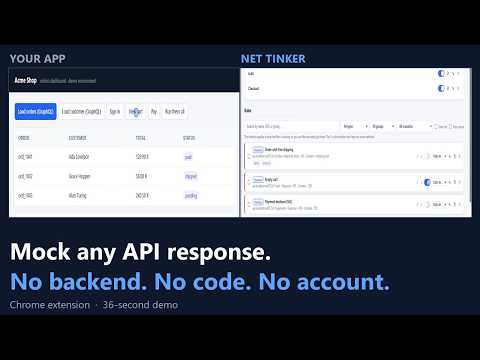
Mock, redirect, delay or rewrite HTTP requests from the browser. No backend, no account, everything stays on your machine.
Net Tinker does one thing: it lets you decide what an API answers while you are working on the page that calls it — without touching your backend, without an account, and without anything leaving your machine. A rule says which requests to catch and what to do with them. Everything else — scenarios, the importers, the network-simulation fields — is built on that one idea. There is nothing else to learn. WHAT A RULE CAN DO • Mock a response — your own status, headers and body. The request never reaches the network. • Change the real response — find and replace text in it, or overwrite a single JSON field and leave everything else exactly as the server sent it. • Modify a real request — its headers, its query parameters, its body, or one JSON field of that body by its dotted path. Then let it go out as usual. • Redirect it, or rewrite part of the URL. A regex pattern can reuse what it matched, so "send all of /api/v1/* to /api/v2/* and keep the rest of the path" is one rule, not one per endpoint. • Block it entirely. • Override the status code the real response came back with. • Add latency to any of the above. Mocking an endpoint and slowing it down is one rule, not a choice between two. • Fill one of your variables from the response, so the requests that follow can use what this one returned. • Print a line in the page's console when the rule fires, with the values you ask for — a breakpoint that doesn't stop anything. MAKE THE NETWORK MISBEHAVE ON PURPOSE • Random latency — a min-max range drawn fresh on every request, so the page under test stops seeing a metronome. • A simulated timeout — it waits, and then fails the way a real network timeout does: a TimeoutError for fetch, the timeout event for XMLHttpRequest. Latency succeeds late and blocking fails at once, so this is the branch your code was written for and could never reach. • Chaos, per rule — 20% a 500, 10% a timeout, the rest business as usual. The successful share is whatever you leave over, so the numbers cannot contradict each other. • A call limit — the first N calls go through and everything after them answers with the status you choose. The only way to see what your interface does when something stops working AND does not come back. • Intermittent failure — one request in every N fails, and never the first, so you see the rule work before you see it break. The count belongs to the page: reloading starts it over, two tabs count separately, and it is never written to disk. HIT EXACTLY THE REQUESTS YOU MEAN Match by URL or host — contains, exact, regex or wildcard — then narrow it down by HTTP method, by a request header, by what's in the request body, or by which page is making the call, and list the URLs to leave alone even when they match. Paste a real URL into the test box and the form tells you straight away whether it would be caught, before you save anything. Pin a rule to a single tab when you don't want it affecting everything else you have open. Because GraphQL sends every operation to the same endpoint, matching on the body is what finally lets you mock one operation without touching the rest — and rewriting a single field of the outgoing body changes variables.userId without pasting a copy of your query into the rule. SEE WHAT ACTUALLY HAPPENED Net Tinker adds a panel to Chrome DevTools with the requests of the page you are inspecting, and a log you can record and keep. • Every entry says what happened to THAT request: the status it really got, and whether a rule mocked it, delayed it, cut it off or let it through. Ten calls governed by the same rule no longer look alike. • Repeated calls carry an xN badge, so a component that renders twice stops looking like ordinary traffic. • A timing summary over what you are filtering — how many, median and P95 — with the requests your own rules delayed counted apart, so the number describes your backend and not the extension. • Search inside the bodies, not only the URLs: it is the only way to find one GraphQL operation among fifty calls to /graphql. • Compare two responses field by field, with the fields that always change kept out of the way and anything that looks like personal data masked. • GraphQL operation names are detected and shown, so a list of calls to a single endpoint is finally readable. • One click turns any request into a rule — and "Mock" fills in the real status, headers and response body, so you start from what the server actually returned instead of typing a fixture by hand. TAKE IT SOMEWHERE ELSE Copy a request or a rule as a curl command, as a fetch() call, as a Playwright or Cypress mock, as TypeScript types for the response, or as a bug report with the request, the response and a curl to reproduce it — ready to paste into a ticket. Credentials are masked and the snippet itself says what it hid. The whole session exports as a standard HAR. And the other way round: paste a curl command — the one your browser or your colleague just copied — and Net Tinker builds the rule from it, method, headers and body included. SWITCH A WHOLE STATE AT ONCE A scenario is one API and several named variants of it — Login > Success / Invalid credentials / Backend down — with one variant live at a time. Rules belonging to a variant that isn't live aren't merely skipped: the engine never looks at them. You switch from a dropdown in the popup, and the exclusion is per scenario, so two services can be in different states at the same moment. Six ready-made scenarios spare you the empty list: typical HTTP errors, a REST collection across four states, sign-in, rate limiting, pagination and GraphQL responses — including errors returned with a 200, which is the shape that catches people out. Every variant arrives with its rule already written, body included. KEEP TWO JOBS APART Everything you have lives inside a project: its rules, groups, scenarios, variables, environments, scope, bin and activity. Only the active project is shown and applied, so the client you are not working on today cannot answer one of your requests. You switch from the options header or from the popup. With a single project there is no picker to see at all. REUSE THE SAME RULES EVERYWHERE Write {{variables}} into bodies, headers, redirect URLs and query parameters, then define environments — Local, Dev, Staging, Prod — that override only the values which actually change. Switch between them from the popup and the same rules follow you from localhost to staging; one shortcut repoints a whole environment at another backend without editing rules one by one. A rule can also fill a variable from a response: point it at a JSON field or at a regular expression, and from then on {{JWT}} interpolates the token your login endpoint just issued. A captured value lives in session memory only — it never reaches disk, never enters an export, and is gone when you close the browser. DON'T TYPE WHAT YOU ALREADY HAVE The same Import button — or a file dropped anywhere on the options page — reads five kinds of file and tells them apart by their own contents, so you cannot pick the wrong one: • A Net Tinker export — rules, groups, scenarios, variables and environments. • An OpenAPI or Swagger spec (3.0, 3.1 and 2.0, in JSON): every endpoint, method and response code becomes a rule with its pattern, status and body already written, and an endpoint with several response codes becomes a scenario. • A Postman collection (v2.0 and v2.1): each saved response example becomes a mock with the real status, headers and body — nothing invented. Environment exports bring their variables across too. • A HAR capture — traffic your browser actually recorded, turned into mocks. It is the only importer that brings something that really happened, so it tells you how many of the new rules carry credentials instead of quietly stripping them. • A ModHeader profile, with its headers, its URL filter and its exclusions. You see every endpoint found and untick the ones you don't want; what you don't tick is never created. Everything arrives switched off, so a hundred new rules change no request until you turn one on, and whatever could not be translated is listed with the reason instead of being dropped in silence. Import the same spec again later and you get a summary of what changed since last time — what is new, what is gone, and what still matches. STAY IN CONTROL • Choose where it works: everywhere, only on localhost, only on the domains you list, or everywhere except the ones you list. Outside that scope Net Tinker doesn't touch the page at all — it removes its own patches rather than filtering later — and the toolbar icon says so. • A permissions screen spells out what the extension asks for and what it does with it, in plain words. • When two rules match the same request, the one lower in the list wins, and you move rules up and down to decide which one that is. A conflict check lists the active rules that would silently cancel each other — a mock hidden behind another one, a block that leaves any other rule without effect — and says which clashes are certain and which are only likely. • Narrow a long list by name, URL, description or tag, by rule type, by group, or by scenario and variant — including the two that are hardest to find any other way: the rules in no group, and the rules outside every scenario. Filtering only hides, never reorders. • Select everything the filter is showing and enable, disable, export or delete it in one go. The counter says how many are selected and how many of those are out of sight. • Group rules and switch a whole group on or off in one click. • Undo a delete. The last ten deletions are kept, and restoring one undoes the whole gesture: deleting two hundred rules on a filter is one entry, not two hundred. • Export and import to share a setup, with an option to strip credentials first and a warning when an import would collide with what you already have. • A built-in help page explains what each rule type does and walks through the reasons a rule might not be firing. • Light and dark themes: follow your system, or pick one yourself. • Keyboard shortcuts for what you do most: / to search, Alt+N for a new rule, Ctrl+S to save it. Your rules run from the moment the page loads, whether or not DevTools is open, and nothing puts a "this browser is being debugged" banner across your tabs. PRIVACY Everything is stored locally in your browser. There is no server, no account, no analytics and no tracking. Requests shown in the DevTools panel live only in memory while DevTools is open: nothing is written to storage unless you turn one into a rule or export a HAR yourself. Recording a tab is the one feature that keeps a log, and only while you have it switched on: the 200 most recent requests of that tab, locally, and one click empties it. Net Tinker needs broad host access because it cannot know in advance which site you will want to create a rule for. That access is used only to run the rules you configure yourself. It declares two permissions in total: storage, and that host access. Nothing else — no tabs, no scripting, no browsing data. The best-known tool in this category declares eleven, plus the same host access. NO LIMITS AND NO UPSELL Every rule type is free, and there is no cap on how many rules you create or keep active. That is worth saying plainly, because it is where comparable tools draw their paid line — the best known one stops you at five rules, three of them active at a time. WHAT IT CANNOT DO It acts on the requests a page makes itself with fetch or XMLHttpRequest. Images, stylesheets, page navigations and anything a site's own service worker asks for are out of its reach, and the DevTools panel says so rather than offering you a rule that would never fire. Specs and collections are read as JSON; a YAML file is recognised only so it can tell you to convert it first. Useful for testing APIs, simulating backend errors, exercising the loading and error states of your frontend, or debugging an integration without depending on a real environment. Available in English and Spanish, and you choose which: the interface follows your browser unless you tell it otherwise. The choice covers the popup, the options page, the DevTools panel and the help.
5 out of 52 ratings
Details
- Version1.14.0
- UpdatedSeptember 27, 2026
- Size956KiB
- Languages2 languages
- DeveloperWebsite
Email
nettinker.support@gmail.com - Non-traderThis developer has not identified itself as a trader. For consumers in the European Union, please note that consumer rights do not apply to contracts between you and this developer.
Privacy

This developer declares that your data is
- Not being sold to third parties, outside of the approved use cases
- Not being used or transferred for purposes that are unrelated to the item's core functionality
- Not being used or transferred to determine creditworthiness or for lending purposes