

NestlyTab
9 ratings
)
Overview
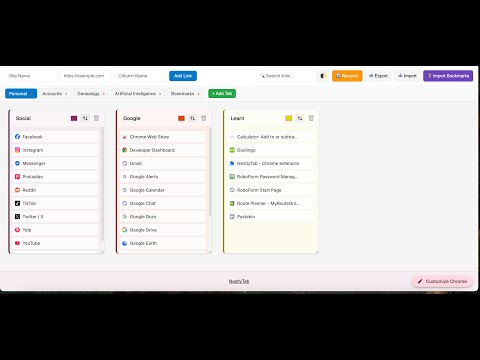
Organize websites in a customizable column-based grid with drag-and-drop, tabs, and quick access.
NestlyTab transforms your chaotic bookmark collection into an organized, visual workspace that actually makes sense. 🎯 WHAT IT DOES: Replace your cluttered bookmark bar with a clean, colorful dashboard. Organize websites into custom columns, create separate workspaces for different projects, and access everything with a single click. ⚡ WHY YOU'LL LOVE IT: - INSTANT ACCESS - Single-click any bookmark to open it immediately - VISUAL ORGANIZATION - Color-coded columns make finding sites effortless - MULTI-SELECT POWER - Hold Ctrl/Cmd to select multiple bookmarks - SMART WORKSPACES - Separate tabs for Work, Personal, Projects, or anything else - DRAG & DROP SIMPLE - Move bookmarks and columns like desktop icons - BULK IMPORT - Add dozens of URLs at once from text or CSV file - IMPORT EXISTING - Bring in all your Chrome bookmarks automatically - BOOKMARK NOTES - Add private notes to any bookmark - AUTO-BACKUP - Schedule automatic exports so you never lose your data - BUILT-IN HELP - A full user guide is one click away, right inside the extension 🚀 PERFECT FOR: - Professionals managing multiple projects with dozens of reference sites - Researchers organizing sources by topic or timeline - Students keeping track of course materials and resources - Anyone with 20+ bookmarks who's tired of endless scrolling ✨ WHAT'S NEW IN v1.7.8: - Built-in User Guide - click the book icon next to your tabs to open a full guide, no internet needed - Faster access to help with no need to leave the extension or search online 🔒 YOUR DATA STAYS PRIVATE: Everything is stored locally in your browser. No accounts, no servers, no data collection — ever. Stop wasting time hunting through bookmark folders. Get organized in under 5 minutes. 🚀
5 out of 59 ratings
Details
- Version1.7.8
- UpdatedJuly 21, 2026
- Offered byNestlyTab
- Size1.93MiB
- LanguagesEnglish
- Developer
Email
TabTimerPro@gmail.com - Non-traderThis developer has not identified itself as a trader. For consumers in the European Union, please note that consumer rights do not apply to contracts between you and this developer.
Privacy

NestlyTab has disclosed the following information regarding the collection and usage of your data. More detailed information can be found in the developer's privacy policy.
NestlyTab handles the following:
This developer declares that your data is
- Not being sold to third parties, outside of the approved use cases
- Not being used or transferred for purposes that are unrelated to the item's core functionality
- Not being used or transferred to determine creditworthiness or for lending purposes