


Overview
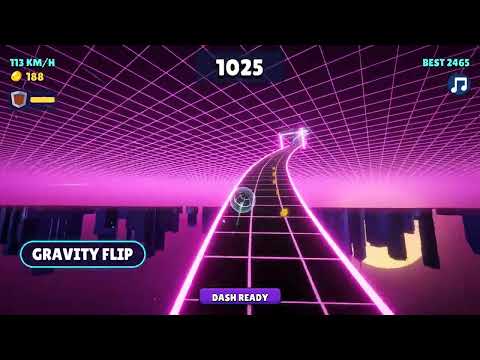
Neon Ball Rush 3D companion: play in one click, learn every track piece and power-up, and log your runs to beat your best distance.
Neon Ball Rush 3D is an endless neon downhill ball runner. This companion puts the game one click away and helps you roll further: a guide to every track piece, the power-ups and the shop, plus a run log that tracks your best distance. Play in one click Press Play in the toolbar popup, or use Alt+Shift+N from any tab, and the game opens in a new tab. Learn the track, in order The hub follows a glowing track line with seven checkpoints: - Steer: keyboard keys (A/D or arrows, Space to jump, Shift to dash) and phone gestures - Track pieces: gaps, hourglass, half gaps, slalom coins, islands, sliding blocks, spinners, wall rows, tube tunnels and gravity flip gates - Near misses: how the bonus works and how the multiplier climbs to x5 - Power-ups and upgrades: Magnet, Shield and Slow motion, what each upgrade does and the coin price of every level - Missions and daily reward: the 7-day streak from 50 to 400 coins - Neon worlds: Neon City, Ice Cave, Lava Core and Deep Space, changing every 1000 m - Run log Run log After a run, type how far you got (and your score if you like). The extension shows your best run, your average, a chart of the last 12 runs and a progress bar towards a distance goal you choose. Export your runs as a file or clear them whenever you want. A new tip every time The popup shows a different tip each time you open it. 16 languages English, Turkish, German, French, Spanish, Italian, Portuguese, Dutch, Russian, Polish, Japanese, Korean, Chinese, Arabic, Hindi and Ukrainian. Switch instantly in Settings. Shortcuts - Alt+Shift+N: play Neon Ball Rush 3D - Alt+Shift+K: open the hub - Right-click the page or the toolbar icon: open the hub or play Privacy No accounts, no analytics, no ads, no tracking. Your settings and run log stay in Chrome's storage on your device. The only network action is opening the game page when you press Play. Made by Tyrone Unblocked Games: https://tyroneunblockedgames.com
0 out of 5No ratings
Details
- Version1.0.0
- UpdatedNovember 7, 2026
- Size643KiB
- Languages16 languages
- DeveloperWebsite
Email
tyrontyc@gmail.com - Non-traderThis developer has not identified itself as a trader. For consumers in the European Union, please note that consumer rights do not apply to contracts between you and this developer.
Privacy

This developer declares that your data is
- Not being sold to third parties, outside of the approved use cases
- Not being used or transferred for purposes that are unrelated to the item's core functionality
- Not being used or transferred to determine creditworthiness or for lending purposes
Support
For help with questions, suggestions, or problems, visit the developer's support site