

Neodeluxe Sidebar

Overview
A Neodeluxe Extension
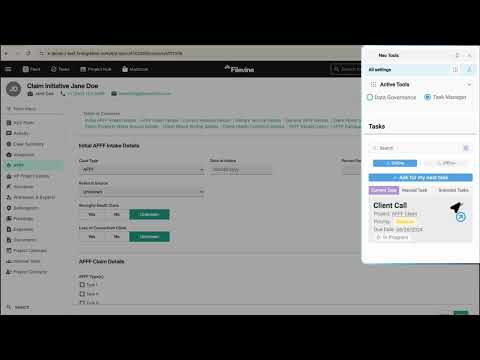
Neodeluxe Sidebar offers users seamless integration for managing tasks and receiving real-time Data Governance alerts. This extension aims to improve productivity and streamline workflows by providing an efficient way to stay on top of responsibilities without constantly switching between platforms. Key Features: • Real-Time Alerts: Users receive instant notifications when entering any unapproved data input values, as well a list of approved options. Users can also request the approval of additional values directly from the Neodeluxe Sidebar. • Task Viewing: The Neodeluxe Sidebar allows users to access and manage their tasks directly from the browser. With a simple click, users can view a summarized list of all pending, upcoming, and completed tasks. • Task Filtering and Sorting: The Neodeluxe Sidebar automatically sorts tasks by priority and deadline, helping users focus on the most urgent items first. • Seamless Background Sync: The Neodeluxe Sidebar updates automatically, so all project or task changes are reflected in real time, ensuring the user is always working with up-to-date information. Benefits: • Improved Task Management: Users can view their task list and receive timely alerts all in one spot. • Increased Efficiency: By having task information and alerts readily available, users save time navigating back-and-forth between tabs, allowing them to stay focused on completing tasks efficiently. • Enhanced Focus on Priorities: Neodeluxe Sidebar task sorting and filtering features make it easy to focus on high-priority or time-sensitive tasks, ensuring important deadlines are met. • Streamlined Workflow: Direct access to tasks within the Sidebar ensures that users can quickly get more context or take action on specific items, cutting down on time wasted switching between tabs and searching for information. • Seamless User Experience: Since the Neodeluxe Sidebar works directly in Chrome, users don’t need to rely on external apps or software to stay on top of their tasks. • Enhanced Productivity: With task management and governance notifications, Sidebar helps reduce distractions and keeps users focused on completing the right tasks at the right time.
0 out of 5No ratings
Details
- Version1.11.14
- UpdatedAugust 19, 2026
- Offered byNeostella, Inc.
- Size2.6MiB
- LanguagesEnglish (United States)
- Developer
Email
sales@neostella.com - Non-traderThis developer has not identified itself as a trader. For consumers in the European Union, please note that consumer rights do not apply to contracts between you and this developer.
Privacy

Neodeluxe Sidebar has disclosed the following information regarding the collection and usage of your data. More detailed information can be found in the developer's privacy policy.
Neodeluxe Sidebar handles the following:
This developer declares that your data is
- Not being sold to third parties, outside of the approved use cases
- Not being used or transferred for purposes that are unrelated to the item's core functionality
- Not being used or transferred to determine creditworthiness or for lending purposes
Support
For help with questions, suggestions, or problems, visit the developer's support site