


Overview
Open your picture, hover, click — get the hex. Zoom eyedropper, RGB/HSL, palette, history. Color picker from image, offline.
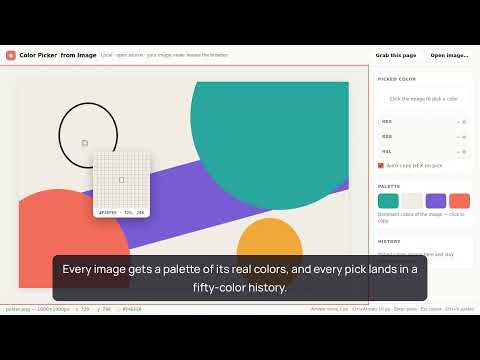
🎨 Drop a screenshot, logo or photo straight into the tab and take the exact color out of it — real pixels of your file, no upload to any server, no sign-in, no permission warning at install. That is the whole job of this color picker from image: open a picture, hover, click — the HEX is on your clipboard. No heavyweight design suite for a single value, no pasting a client's mockup into a random website and hoping for the honest answer. 🚀 Quick start 1. Click the toolbar icon — the picker opens in its own tab, with room to work. 2. Drag a picture in, press Ctrl+V, or browse for a file — every common image format opens, transparency included. 3. Hover, click — this hex code color picker from image has already copied the value and confirmed it on screen. The empty state explains everything once; after that, muscle memory does the work. 🔍 A zoom eyedropper you can trust The loupe magnifies the pixels of your file at native resolution, so the shade you take is the shade that is really in the bitmap — which is what a hex color picker from image is actually for. ➤ Pixel grid around the cursor, with the exact coordinates always in view ➤ Arrow keys nudge the crosshair by exactly 1 px, Ctrl+Arrows jump 10, Enter takes the pick ➤ Anti-aliased edges stop fooling you: an rgb color picker from image should read the source, not a blurry re-render of it ➤ Transparent areas are reported honestly instead of pretending to be black 🎯 Speaks every format you use ▸ HEX for CSS and Figma — an html color picker from image in one click ▸ RGB and HSL side by side, each value copyable on its own — a hexadecimal color picker living in the same panel ▸ Auto-copy on pick with visible confirmation — the words "copied to clipboard" here actually mean it ▸ The panel keeps showing the numbers until your next pick; nothing vanishes after two seconds 🖼 Palette and a history that remembers A palette of the dominant tones is built from the whole picture the moment it opens — handy when a client asks which hues make up a logo, and you can pick a color straight from a swatch — each one is a real tone taken from the artwork, never an averaged shade that exists nowhere in it. Every pick also lands in a fifty-slot history that survives browser restarts. 1️⃣ pick colors from image files all day — the latest fifty stay put 2️⃣ Reopen the popup tomorrow and yesterday's swatches are still there, one click to copy 3️⃣ Clear the list with a single button when the project wraps 📸 The page you are looking at, as a picture Need a tone from a live site? Grab this page as an image: one button in the popup captures the visible tab and opens the snapshot in the same picker — same loupe, same history. Or right-click any picture on a page and choose "Pick color from this image": you get true pixels when the server allows it, a rendered snapshot when it does not, and a plain-words hint when even that is blocked. Never a silent failure. There is also a quiet trick worth learning: right-click a picture anywhere, choose "Copy image", then Ctrl+V into the picker. Chrome hands over the decoded bitmap at full resolution — an image color picker with zero extra permissions involved. 🔒 Private by architecture ▪ no host permissions and no warning screen at install — it cannot read your browsing, and your picks live in local storage only ▪ zero network requests: no analytics, no CDN fonts, nothing phones home — open DevTools and watch for yourself ▪ open source: the entire codebase is public, every line readable ▪ works offline, on a flight, behind a corporate proxy Screenshots often hold dashboards, invoices, unreleased designs. Sites offering a color picker online from image ask you to upload them; this color picker from image extension cannot upload anything, because no code in it talks to a server. The same goes the other way round: an online color picker from image keeps your file for as long as its owner wishes — here it never leaves the tab. ⚖️ Honest scope — what this is not It is not a page-inspecting eyedropper: it does not read CSS variables and will not click through the DOM of a website. It is not a color wheel picker, not a gradient toy, and there are no Pantone books inside. The craft here is narrow and done properly: pick color from image files, screenshots and photos with pixel accuracy, fast. 💬 The one-second habit Copy, paste, click — the whole color pick from image round-trip takes a couple of seconds, and that is the point: a small tool that does one job precisely and gets out of the way. 🧭 Who keeps it pinned ◦ Designers matching a hue from a reference shot or a scanned brand book ◦ Front-end developers who want the HEX of a shade two keystrokes away ◦ Support engineers documenting UI states straight from screenshots ◦ Marketers pulling brand tones out of a partner's logo before a campaign ◦ Illustrators and students labelling shades for a mood board A picture already holds the answer. This tool takes it out — precisely, locally, in seconds.
5 out of 56 ratings
Details
- Version0.1.6
- UpdatedAugust 5, 2026
- Size63.23KiB
- Languages52 languages
- DeveloperWebsite
Email
hello@zumelia.com - Non-traderThis developer has not identified itself as a trader. For consumers in the European Union, please note that consumer rights do not apply to contracts between you and this developer.
Privacy

This developer declares that your data is
- Not being sold to third parties, outside of the approved use cases
- Not being used or transferred for purposes that are unrelated to the item's core functionality
- Not being used or transferred to determine creditworthiness or for lending purposes
Support
For help with questions, suggestions, or problems, visit the developer's support site