

LinkGuard

Overview
Marks links with lookalike characters or spelling, or a shown address that differs from the actual one. Checks run on this device.
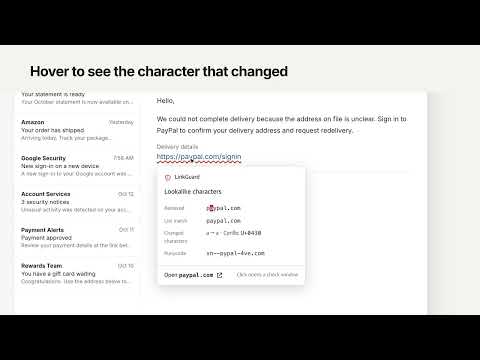
LinkGuard shows facts you can check about a link before you open it, in webmail and web messengers. It does not give verdicts on sites. It finds address differences that are hard to see by eye and marks them. You decide whether to open the link. WHAT IT MARKS A link gets a red wavy underline in these cases: - Lookalike characters: Cyrillic, Greek, or other letters that look like Latin letters appear in the address - Lookalike spelling: the domain differs from a domain on the comparison list by a character or two (for example, the digit 1 in place of l) - Listed domain inside subdomain: a domain from the comparison list appears in the subdomain part of a different domain - Shown and actual address differ: the address text on screen is not where the link actually goes - Mixed scripts: letters from different scripts are mixed within one domain name HOVER CARD AND CHECK BEFORE OPENING - Hover over an underlined link to see its received address, list match, changed characters, Punycode, and registration info, one row each. - Clicking an underlined link opens a "Check before opening" window instead of navigating right away. You can open the listed domain instead, or confirm the address and open the link. - The toolbar popup shows "Marked n · Checked m" for the current page. WHERE IT WORKS - Webmail and web messengers: on by default on the supported webmail and web messenger sites. The toolbar popup lists the supported sites. - Other sites: off by default. If you turn on "Check on all sites" in the popup, the browser asks for permission, and only after you allow it does LinkGuard run on all sites. You can turn it off at any time. - Desktop apps and mobile apps are not supported. PRIVACY - All link checks run on this device. Link addresses, page content, and email text are not sent anywhere. - The only outgoing request is an RDAP lookup for a domain's registration date and registrar. It sends the domain name only, never the path, query, or page content. - Turn off "Domain registration lookup (RDAP)" in the popup and this request is not sent either. - Settings and the lookup cache (7 days) stay in the browser's local storage. - No analytics, no ads, no sale of data. GOOD TO KNOW - No underline only means none of the five cases applied. It is not a statement about the site. - Similarity is checked only against the built-in comparison list. - Registration info appears only when an RDAP server responds.
0 out of 5No ratings
Details
- Version1.0.0
- UpdatedOctober 19, 2026
- Offered byyeomjung95
- Size40.46KiB
- Languages2 languages
- Developer
Email
yeomjung95@gmail.com - Non-traderThis developer has not identified itself as a trader. For consumers in the European Union, please note that consumer rights do not apply to contracts between you and this developer.
Privacy

LinkGuard has disclosed the following information regarding the collection and usage of your data. More detailed information can be found in the developer's privacy policy.
LinkGuard handles the following:
This developer declares that your data is
- Not being sold to third parties, outside of the approved use cases
- Not being used or transferred for purposes that are unrelated to the item's core functionality
- Not being used or transferred to determine creditworthiness or for lending purposes
Support
For help with questions, suggestions, or problems, visit the developer's support site