


Overview
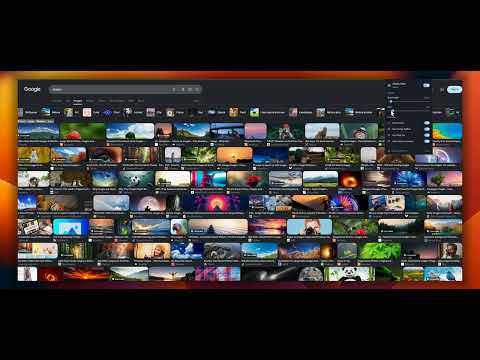
Restore classic Google Images rows with hover zoom, View Image, size filters, AI image controls, and less clutter.
Bring back the classic Google Images layout with horizontal rows, hover zoom, direct image access, and fewer distractions. Prefer columns? Switch to Grid and choose a layout that works for you. Classic View for Google Images™ lets you adjust how image results appear without changing how you search. Choose your layout, thumbnail size, spacing, and corners, then enable the features you need. KEY FEATURES: 🖼️ Classic Horizontal Rows Replace the staggered masonry layout with aligned, justified horizontal rows. Thumbnails keep their natural aspect ratios. 🔲 Adjustable Grid Layout Switch between classic Rows and an equal-width Grid. Choose 2–12 preferred columns. The grid adapts to the available space, so fewer columns may appear in a narrow window or beside an open preview. 🎨 Rounded or Square Corners Choose rounded or square thumbnail corners in either layout. Adjust image height and spacing to fit your screen. 🔍 Hover Image Zoom Move your pointer over a thumbnail to see a larger preview. The preview stays within your browser window, helping you inspect images without opening another page. 🔗 View Image on Thumbnails Open an image in a new browser tab directly from its thumbnail. • Choose your preferred button corner. • Show the button on hover or keep it visible with Always. • The button moves to a free corner when another control overlaps. The shortcut uses an original image URL when available. Otherwise, it may open a thumbnail. 📷 View Image in the Large Preview Open a Google Images result and use the View image button beneath its large preview to open the displayed image in a new tab. This control works independently of thumbnail buttons and hover zoom. You can keep the preview button enabled while turning those features off. 🚫 Hide Sponsored Products Optionally hide sponsored shopping sections and inline sponsored results on Google Images. This setting is off by default. Turn it on for fewer ads in the results, or switch it off again to show sponsored content. ✨ Mark or Hide Likely AI-Generated Images Show a small AI badge on likely AI-generated results or hide them from the image layout. Detection runs locally in your browser using signals available on the Google Images page, such as labels, result text, source domains, filenames, metadata, generator names, and AI-specific searches. No images are uploaded to an external AI service. Detection uses rules, can make mistakes, and may not identify every AI-generated image. 🎯 Quick Size Filters Use a compact filter bar above the results to switch between All sizes, Large, Medium, and Icon. 🙈 Hide Related Searches Hide related-search blocks and carousels when you want to focus on image results. ⚙️ Your Settings, Your Layout • Adjust row height from 120 to 300 px. • Set the gap between results from 0 to 20 px. • Choose Rows or Grid. • Select rounded or square corners. • Customize View image placement and visibility. • Enable or disable individual features. • Save and sync preferences through Chrome. 🔒 Privacy Classic View does not collect your search queries or browsing history, add advertisements, or upload images for AI detection. Preferences are saved through Chrome’s built-in storage. 💬 Support and Feedback Found a broken layout or have an idea? Use Report issue in the popup to prepare a GitHub report. Nothing is submitted until you review and send it yourself. Website: https://classicview.cc Source code and support: https://github.com/hsr88/classic-view-for-google-images PLEASE NOTE: Designed for Google Images in desktop Chrome. Google supplies the results and may change its interface over time. View image opens the image URL available to the extension. It does not guarantee a full-resolution original or bypass restrictions set by the source website. Classic View for Google Images™ is an independent extension and is not affiliated with or endorsed by Google LLC. Google Images™ is a trademark of Google LLC.
4.2 out of 510 ratings
Details
- Version1.0.0
- UpdatedNovember 11, 2026
- Size71.84KiB
- LanguagesEnglish
- DeveloperWebsite
Email
haser88@gmail.com - Non-traderThis developer has not identified itself as a trader. For consumers in the European Union, please note that consumer rights do not apply to contracts between you and this developer.
Privacy

This developer declares that your data is
- Not being sold to third parties, outside of the approved use cases
- Not being used or transferred for purposes that are unrelated to the item's core functionality
- Not being used or transferred to determine creditworthiness or for lending purposes
Support
For help with questions, suggestions, or problems, visit the developer's support site