

TrackBee - Job Tracker for Google Sheets

Overview
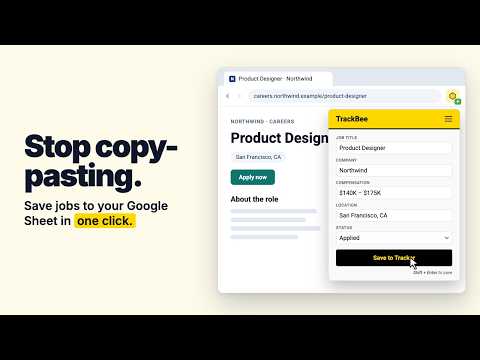
Save job listings to your Google Sheets in one click. No dashboards, just data in your own Sheet.
TrackBee captures job details from any job page and saves them directly to your Google Sheets in one click — no more copy-pasting, no third-party dashboards, no cost. YOUR DATA, YOUR SHEET Most job trackers are built as hooks for AI subscription ecosystems. They don't care about your workflow, they want to replace it. TrackBee is different. TrackBee is a lightweight productivity tool built for Sheets-first job seekers who want the flexibility, portability, and power of owning their data. Our one-click extension saves everything to a Google Sheet you own. WHAT GETS CAPTURED - Job Title - Company - Location - Compensation - Job Description - Application Status - Date Applied - Job URL NEW: A SAVED COPY OF EVERY JOB DESCRIPTION Postings often get taken down. TrackBee now saves a copy of each job description as a Google Doc in a "TrackBee Job Descriptions" folder in your Drive, linked from your tracker. Headings and bullet points are kept, so it stays readable long after the original listing is gone. WORKS ON MAJOR JOB BOARDS AND ATS PLATFORMS TrackBee works on the most popular job boards and applicant tracking systems, with smart page detection that adapts to virtually any job listing page. HOW IT WORKS 1. Authorize your Google Account on first use* — one-time setup 2. Stick to your normal job search workflow. TrackBee automatically detects job listings and is available whenever you need it 3. Click the TrackBee extension icon and hit "Save to Tracker" — done *TrackBee requests Google Drive access scoped only to the files it creates: your tracker sheet and the TrackBee Job Descriptions folder. It cannot access any other files in your Drive. PRIVACY FIRST TrackBee only reads the page you're on. It writes only to your own Google Drive: your tracker sheet and your saved job descriptions. No browsing history. We don't collect your data. No third-party servers. FREE FOREVER No subscriptions, no paywalls, no catch. TrackBee is free to install, free to use, and free forever. No strings attached. SUPPORT Questions or feedback? Reach us at support@usetrackbee.com or visit https://usetrackbee.com/support.
5 out of 51 rating
Details
- Version1.2
- UpdatedOctober 29, 2026
- Size53.36KiB
- LanguagesEnglish (United States)
- DeveloperWebsite
Email
support@usetrackbee.com - Non-traderThis developer has not identified itself as a trader. For consumers in the European Union, please note that consumer rights do not apply to contracts between you and this developer.
Privacy

TrackBee - Job Tracker for Google Sheets has disclosed the following information regarding the collection and usage of your data. More detailed information can be found in the developer's privacy policy.
TrackBee - Job Tracker for Google Sheets handles the following:
This developer declares that your data is
- Not being sold to third parties, outside of the approved use cases
- Not being used or transferred for purposes that are unrelated to the item's core functionality
- Not being used or transferred to determine creditworthiness or for lending purposes
Support
For help with questions, suggestions, or problems, visit the developer's support site