


概要
Pin notes & highlights on websites. Track bugs, collect feedback, manage web projects — no screenshots required.
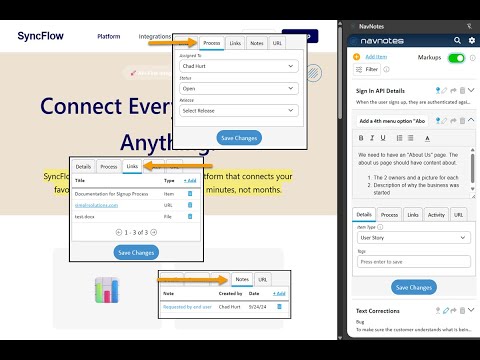
WEBSITE ANNOTATION & FEEDBACK TOOL FOR DEV TEAMS NavNotes is a markup.io and BugHerd alternative that lets you pin notes, highlights, and comments directly on live websites—no screenshots required. Perfect for development teams, digital agencies, and QA testers working on staging sites and web applications. PIN NOTES DIRECTLY ON WEB PAGES - Click anywhere to add annotations with pins and highlights - Annotate staging sites, web apps, and production environments - Notes stay connected to specific pages as you navigate TRACK BUGS & COLLECT FEEDBACK - Pin bug reports with automatic technical details captured - Collect client feedback directly on websites - Track issues across QA test cycles - Eliminate endless email threads and screenshot attachments BUILT FOR WEB DEVELOPMENT TEAMS - Annotate staging sites during code reviews - Document technical specs and API information on actual pages - Create user stories and requirements connected to pages - Manage web project feedback in one place REAL-TIME TEAM COLLABORATION - Team members see annotations instantly - Assign tasks and set status for each annotation - Upload related documents and links - Filter by status, assignee, or page CURRENTLY FREE FOR ALL TEAMS - Unlimited projects and team members - No credit card required - Full access to all features during beta Perfect for: ✓ Development teams annotating staging sites ✓ Digital agencies collecting client feedback ✓ QA testers tracking bugs and issues ✓ Project managers coordinating web projects ✓ Business analysts documenting requirements ✓ Designers reviewing UI/UX implementations WHY CHOOSE NAVNOTES? Unlike screenshot-based tools like Markup.io or project management tools like Jira, NavNotes pins your annotations directly on live websites. Your feedback stays in context on the actual page, making collaboration seamless and eliminating confusion about "which screenshot was that?" GET STARTED IN 2 MINUTES 1. Install the extension 2. Navigate to any website 3. Click to pin notes or select text to highlight 4. Share with your team No complex setup. No training required. Just install and start annotating. For each entry, you can set status, assign ownership, pin its location on the screen, upload related documents, associate external URLs and more. Save user stories, technical data, requirements, feedback, tasks or any type of project documentation to specified web pages. Grant access to team members and utilize built-in SDLC process features for seamless collaboration on website projects.
5 点満点で 0評価なし
詳細
プライバシー

NavNotes: Website Annotation & Feedback Tool から、お客様のデータの収集と使用に関する以下の情報が開示されています。 詳しくは、デベロッパーの privacy policy をご確認ください。
NavNotes: Website Annotation & Feedback Tool は次を扱います。
このデベロッパーは、お客様のデータについて以下を宣言しています
- 承認されている以外の用途で第三者に販売しないこと
- アイテムの中心機能と関係のない目的で使用または転送しないこと
- 信用力を判断する目的または融資目的で使用または転送しないこと