


Overview
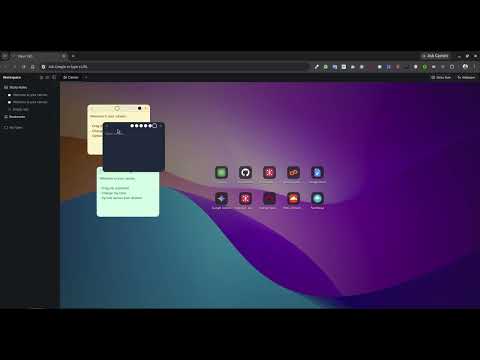
A new tab that works like a quiet desk: sticky notes on a wallpaper canvas, folders for notes, and your bookmarks one click away.
NativeChrome turns every new tab into a quiet desk: sticky notes on a calm wallpaper, your notes and folders in a sidebar, and your favorite sites one click away. No account to create, nothing to set up. STICKY NOTES ON YOUR CANVAS - Add a note with one click, Ctrl+Shift+S or a right-click on the canvas, then drag it anywhere. - Bold, italic, underline, bulleted and numbered lists, and checklists you tick with a click. - Resize from the corner and pick one of six colors, or any color you like. - Close a note to tuck it away. Every note stays listed in the sidebar, so you can bring it back. WIDGETS - A clock, the weather and your location, right on the canvas. - Weather and location stay off until you turn them on. Choose a city instead if you prefer. - Right-click a widget to choose what it shows, change its text size, or hide its card so it sits straight on the wallpaper. - Remove any widget and drag it back from the sidebar's Widgets folder. NOTES AND FOLDERS - Create notes and folders right in the sidebar, nest folders inside folders, and rename anything with a double-click. - Notes open in tabs and save as you type. - Drag notes between folders. Everything stays sorted alphabetically. BOOKMARKS AND SHORTCUTS - Browse, add, edit, rename and delete your Chrome bookmarks from the sidebar. - Drag any bookmark, note or folder onto the canvas to pin it as a shortcut, or right-click the canvas to add one. - Place shortcuts anywhere; near each other they snap into tidy rows and columns. Select several with a drag box, move them together, or press Delete to remove them. Right-click a shortcut to edit it. - Site icons come from Chrome's own icon cache, so the sites you use are never sent anywhere. A CALM PLACE TO START - Eight curated wallpapers or your own images. Keep one, or rotate in order or at random, with every new tab, hourly or daily. - Your layout keeps its shape on any screen. On a small window the canvas zooms out instead of hiding anything. - Hide the sidebar with Ctrl+B for a clean canvas, and drag its edge to resize it. SYNC Your workspace syncs through your Chrome account when Chrome sync is on, so your notes follow you to your other computers. Chrome gives extensions a limited amount of sync space. NativeChrome compresses your workspace to fit as much as possible, and if you go past the limit it tells you, pauses syncing and keeps everything saved on this device. KEYBOARD SHORTCUTS - Ctrl+Shift+S (Cmd+Shift+S on Mac): new sticky note - Ctrl+B (Cmd+B): show or hide the sidebar - Alt+N (Option+N on Mac): new note in the sidebar - Delete or Backspace: remove the selected shortcuts - In a sticky note: Ctrl+B bold, Ctrl+I italic, Ctrl+U underline, Ctrl+Shift+9 checklist PRIVACY - No account, no analytics, no ads, no tracking. - Your notes, sticky notes and settings are stored in Chrome's own storage and synced only through your Chrome account. - Weather and location stay off until you turn them on. Then your location (or a city you choose) is used to fetch the weather from Open-Meteo, and the place name comes from BigDataCloud. - Otherwise the only outside requests are the wallpaper images.
0 out of 5No ratings
Details
- Version2.4.0
- UpdatedOctober 30, 2026
- Size106KiB
- LanguagesEnglish
- DeveloperWebsite
Email
niloymahmudapu@gmail.com - Non-traderThis developer has not identified itself as a trader. For consumers in the European Union, please note that consumer rights do not apply to contracts between you and this developer.
Privacy

NativeChrome - Your quiet desk on new tab has disclosed the following information regarding the collection and usage of your data. More detailed information can be found in the developer's privacy policy.
NativeChrome - Your quiet desk on new tab handles the following:
This developer declares that your data is
- Not being sold to third parties, outside of the approved use cases
- Not being used or transferred for purposes that are unrelated to the item's core functionality
- Not being used or transferred to determine creditworthiness or for lending purposes
Support
For help with questions, suggestions, or problems, visit the developer's support site