


總覽
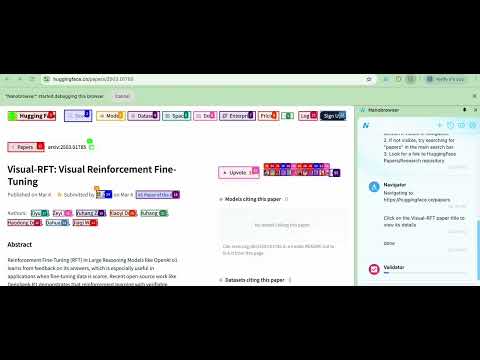
使用 AI 自動化網頁任務!Nanobrowser 是一款開放原始碼的 Chrome 擴充功能,能協助您擷取資料、填寫表單等。
An open-source and local-first web automation agent that runs in your browser. 📦 Repository: https://github.com/nanobrowser/nanobrowser ⭐ Our repository has been starred by 4.7k developers in 4 weeks! 🔥Why Nanobrowser? 1️⃣ 100% Free: No subscription fees or hidden costs. Just install and use your own API keys 2️⃣ Privacy-Focused: Agent runs in your local browser instead of cloud 3️⃣ Flexible LLM Options: Supports SOTA LLM models as well as local models 4️⃣ Fully Open Source: Complete transparency in how your browser is automated 📊Key Features: ✅ Multi-agent System: Specialized agents collaborate to accomplish complex web tasks. ✅ Interactive Side Panel: Intuitive chat interface with real-time status updates. ✅ Task Automation: Seamlessly automate repetitive tasks across websites. ✅ Follow-up Questions: Ask contextual follow-up questions about completed tasks. ✅ Conversation History: Easily access and manage your interaction history. ✅ Multiple LLM Support: Connect your preferred LLM providers and assign different models to different agents. 🌐 Browser Support ✅ Chrome ✅ Edge ❌ Firefox ❌ Safari ❌ Other Chromium variants (Opera, Arc, etc.) ⚠️ While Nanobrowser may work on some Chromium-based browsers, they are not officially tested and supported. 🚀 Quick Start 1️⃣ Click the Nanobrowser icon in your toolbar to open the sidebar. 2️⃣ Click the Settings icon (top right). 3️⃣ Add your preferred LLM API keys. 4️⃣ Choose which model to use for different agents (Navigator, Planner, Validator). 5️⃣ Send your commands to Nanobrowser 💡 Prompt Examples 1️⃣ Go to TechCrunch and extract top 10 headlines from the last 24 hours 2️⃣ Look for the trending Python repositories on GitHub with most stars 3️⃣ Find a portable Bluetooth speaker on Amazon with a water-resistant design, under $50. It should have a minimum battery life of 10 hours 🤝 Contributing We are open source. We need your help to make Nanobrowser even better! Contributions of all kinds are welcome: 1️⃣ Share prompts & use cases in our Discord server 2️⃣ Create issues or even submit pull requests on our Github repository ❤️ Loving Nanobrowser? Leave us a review on the Chrome Web Store and help others discover this powerful extension! Your support means everything to us.
3.9 分 (滿分 5 分)59 個評分
詳細資料
隱私權

「Nanobrowser:AI 網頁代理程式與自動化」已揭露下列關於收集及使用資料的資訊。 如需更多詳細資訊,請參閱開發人員的《privacy policy》。
Nanobrowser:AI 網頁代理程式與自動化 會處理下列資料:
這位開發者就你的資料做出下列聲明:
- 除經核准的用途外,不會將你的資料販售給第三方
- 不會基於與商品核心功能無關的目的,使用或轉移資料
- 不會為了確認信用度或基於貸款目的,使用或轉移資料
支援
如有疑問或建議,請前往開發人員的支援網站