

MyQuota — AI Usage Tracker & Cost Monitor for ChatGPT, Claude & Gemini

Overview
See AI limits before they stop work: usage, reset times & spend across Claude, ChatGPT, Gemini & more. Free, private. No account.
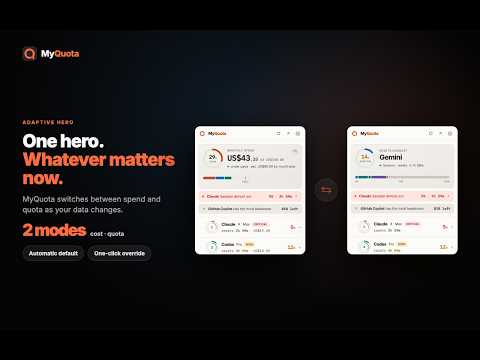
Already hit a Claude session limit mid-conversation? Surprised by a $200 AI bill at month-end? MyQuota keeps you in control — one popup, six AI assistants, live quota bars and spend tracking. No account needed. Nothing leaves your browser. WHAT YOU GET • Live quota & session bars for every AI you use — Claude, ChatGPT, Gemini, Cursor, Perplexity, GitHub Copilot. • Monthly spend tracker — see projected end-of-month cost at a glance, powered by real pricing data. • Budget alerts — get a desktop notification before you hit 80% or 95% of any quota or budget. • Critical-session urgency chip — know exactly which provider is closest to its limit and how many minutes you have left. • 90-day usage history — native sparkline trends per provider, with one-click CSV/JSON export. • Quota Mode + Cost Mode — auto-adapts the hero display based on whether your plans have measurable spend. • Cross-device sync — settings and latest snapshots sync across your Chrome browsers via your Google account. • Standalone dashboard — open as a floating app window so usage is always visible without burning a tab. • Side Panel option — pin MyQuota beside your AI conversation, updated automatically. WHY MYQUOTA — AND NOT THE PROVIDER'S OWN PAGE Provider usage pages require leaving your conversation, logging in separately, and are often delayed by minutes. MyQuota intercepts the usage data your browser already fetches from each provider, parses it locally, and shows you a live unified view the instant you open the popup — no extra network request, no latency. WHY MYQUOTA IS THE PRIVACY-SAFE CHOICE Every other "AI tracker" sends your usage data to their server for processing. MyQuota processes everything locally in your browser. We have no server — so we, the developers, never receive your prompts, completions, email, or usage numbers. Nothing leaves your machine except the settings sync across your own Chrome devices via Google's standard chrome.storage.sync (the same mechanism Chrome uses for bookmarks). HOW TO USE 1. Install and pin MyQuota to your toolbar (⌘+Shift+U / Ctrl+Shift+U). 2. Visit any supported AI provider and use it normally — data is captured from your existing session automatically. 3. Click the MyQuota icon for a live quota snapshot. 4. Click "Dashboard" to configure alerts, review 90-day history, or set per-provider budgets. SUPPORTED PROVIDERS ✓ Claude (claude.ai) — session and weekly token quotas, Max/Pro/Free plan detection ✓ ChatGPT / Codex (chatgpt.com) — session and weekly usage windows ✓ Gemini (gemini.google.com) — session usage and plan detection ✓ Cursor (cursor.com) — premium and on-demand request counts ✓ Perplexity (perplexity.ai) — monthly query quota ✓ GitHub Copilot (github.com) — monthly completions and chat turns PERMISSIONS — WHAT AND WHY • "Read and change data on [provider sites]" — MyQuota intercepts the usage API responses these sites make to their own servers while you browse normally. It never reads your conversations, modifies page content, or makes any additional network requests. • "Storage" — Saves settings and 90-day usage history locally on your device via IndexedDB. • "Alarms" — Schedules a background refresh (every 5–60 min, configurable) so quota data stays current even when the popup is closed. • "Notifications" (optional) — Desktop alerts when you cross a configured quota or budget threshold. • "Context menus" — Adds a right-click shortcut to jump directly to a provider's usage page. TRADEMARKS & AFFILIATION MyQuota is independent and is not affiliated with, endorsed by, or sponsored by Anthropic, OpenAI, Google, Anysphere, Perplexity AI, GitHub, or Microsoft. Provider names are used solely to identify the services monitored. Version 0.2.0 — Supporting Claude, Gemini, ChatGPT, Cursor, Perplexity, and GitHub Copilot.
5 out of 57 ratings
Details
- Versionv0.6.82
- UpdatedOctober 20, 2026
- Size533KiB
- Languages55 languages
- DeveloperWebsite
Email
myquotainfo@gmail.com - Non-traderThis developer has not identified itself as a trader. For consumers in the European Union, please note that consumer rights do not apply to contracts between you and this developer.
Privacy

This developer declares that your data is
- Not being sold to third parties, outside of the approved use cases
- Not being used or transferred for purposes that are unrelated to the item's core functionality
- Not being used or transferred to determine creditworthiness or for lending purposes
Support
For help with questions, suggestions, or problems, visit the developer's support site