


Overview
An extension for https://mymemory.dev - an AI hub for all your knowledge.
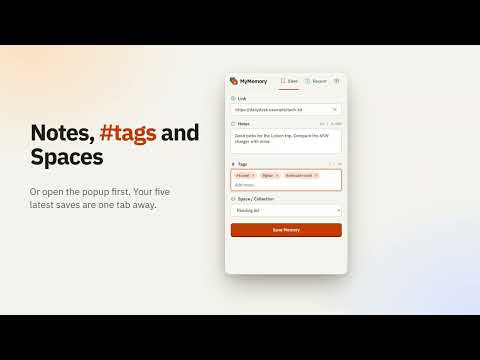
🧠 MyMemory: save anything from the web in one click, then find it and chat with it later. You save articles, videos, posts, PDFs and ideas all day, and then never find them again. MyMemory fixes that. Click the toolbar button and the page lands in your personal memory, where you can search it in plain English and ask questions that are answered from your own material. ✨ WHAT YOU CAN DO 📌 Save any page in one click Articles, blog posts, videos, social posts, forum threads and any other website. Add a note and #tags while you save, and pick a Space to file it into. ⚡ Keyboard shortcuts Alt+Shift+M (Command+Shift+M on Mac) opens the popup. Alt+Shift+S (Command+Shift+S on Mac) saves the current tab silently, no popup. You can change both at chrome://extensions/shortcuts. 📝 Quick notes Capture a thought without a link. Notes-only saves go straight into your memory. 🔍 Search by meaning, not exact words Type "that article about spaced repetition" and find it, even if you forgot the title. Works in many languages, including Chinese. 💬 Chat with everything you saved Ask a question and get an answer drawn from your own notes, pages and videos, with the sources listed so you can check them. 📥 Import what you already saved Bring in your Chrome bookmarks and the posts you saved on social sites, so your old "read later" pile becomes searchable too. 🎙️ Meeting notes and transcription The MyMemory app does more than save pages. Record a meeting live, or upload a recording you already have. You get a transcript split by speaker, plus insights. Press B while recording to bookmark a key moment. Afterwards, ask "what did we decide?" or "what did I promise?" and get answers that cite the exact moment. Meetings are searchable together with your pages, notes and PDFs. Live captions are English only. 📄 Documents, images and voice notes Upload PDFs and documents, add images, or record a voice note. Everything lands in the same searchable memory as your saved pages. 🗂️ Organise your way Tags and Spaces keep projects, research and ideas apart. The popup also shows your five most recent saves, so you can confirm that a save worked. 🤖 Give your AI tools a memory Connect your AI assistant to your saved material with the MyMemory MCP server, so it remembers your projects, preferences and research between conversations. Setup is one command. 🔌 Build on it A public API lets your own apps and agents save and search memories. Documentation: docs.mymemory.dev 🎨 Light and dark themes, and an optional auto-save mode if you want one click to save with no popup at all. 🔒 PRIVATE BY DESIGN • The extension only saves a page when you click it or use the shortcut. It does not record your browsing. • Page icons come from Chrome's own local cache, so no extra requests are made to load them. • Your data stays yours. Export it at any time. 🎯 PERFECT FOR • Researchers, students and writers collecting sources • Developers saving docs, issues and snippets • Anyone who wants meeting notes and transcripts they can search and chat with • Anyone building a second brain or a personal knowledge base • People who want a better bookmark manager and read-it-later app • Anyone who wants their AI assistant to remember their work 🚀 GET STARTED Install the extension. Sign in to your free MyMemory account (or create one in a minute). Click the toolbar icon on any page to save it. Open mymemory.dev to search and chat with everything you've saved. There is a free plan, so you can try it with your own notes first. Questions or ideas? Visit https://mymemory.dev
0 out of 5No ratings
Details
- Version5.1.5
- UpdatedOctober 22, 2026
- Size345KiB
- LanguagesEnglish
- DeveloperRock Nest LLCWebsite
525 ROUTE 73 NORTH STE 104 MARLTON,, NJ 08053 USEmail
hello@mymemory.devPhone
+1 786-664-7625 - TraderThis developer has identified itself as a trader per the definition from the European Union and committed to only offer products or services that comply with EU laws.
- D-U-N-S135312634
Privacy

MyMemory has disclosed the following information regarding the collection and usage of your data. More detailed information can be found in the developer's privacy policy.
MyMemory handles the following:
This developer declares that your data is
- Not being sold to third parties, outside of the approved use cases
- Not being used or transferred for purposes that are unrelated to the item's core functionality
- Not being used or transferred to determine creditworthiness or for lending purposes
Support
For help with questions, suggestions, or problems, visit the developer's support site