

My Suno Studio Helper

Overview
Capture and bulk-download media from your own logged-in Suno library.
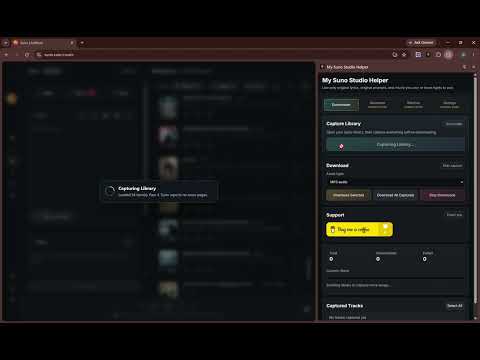
My Suno Studio Helper helps you capture and download media from your own logged-in Suno library. Open your Suno library, click Capture Library, and the extension will reload the page, wait for Suno's own library responses, scroll through your library, and collect downloadable media URLs that are already available to your account. You can then download all captured tracks, selected tracks, or a single track row. Key features: - Capture your own Suno library from the active Suno tab. - Download selected tracks or all captured tracks. - Download individual tracks from each captured row. - Choose available asset types: MP3, M4A, WAV, MP4, or cover image. WAV URLs can be resolved from Suno when the user requests them. - Automatically disables asset types that are not available in the captured data. - Runs locally in your browser with no external backend. Safety and access boundaries: - This extension does not bypass login, paywalls, DRM, permissions, rate limits, or access controls. - It only uses URLs already exposed to your logged-in Suno account. - It does not collect, log, persist, or export passwords, cookies, auth tokens, or private credentials. WAV conversion transiently reuses Suno authorization only for requests back to Suno. - Only download songs you own or have the rights to use. Bulk Create is hidden and inactive in this release. Saved batches and settings shown as Coming Soon are also inactive.
0 out of 5No ratings
Details
- Version1.1.0
- UpdatedJuly 19, 2026
- Offered byMengyi
- Size1.48MiB
- LanguagesEnglish (United States)
- Developer
Email
mengyi.yoeng34@gmail.com - Non-traderThis developer has not identified itself as a trader. For consumers in the European Union, please note that consumer rights do not apply to contracts between you and this developer.
Privacy

This developer declares that your data is
- Not being sold to third parties, outside of the approved use cases
- Not being used or transferred for purposes that are unrelated to the item's core functionality
- Not being used or transferred to determine creditworthiness or for lending purposes
Support
For help with questions, suggestions, or problems, please open this page on your desktop browser