

My Shortcuts
Overview
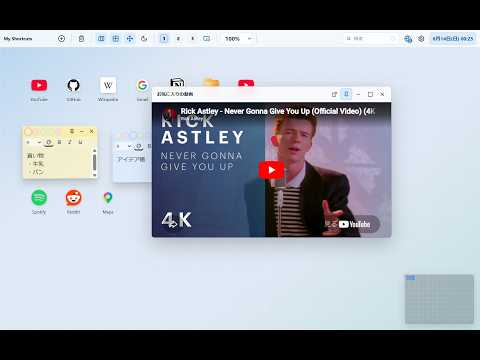
Desktop-style workspace for organizing web shortcuts, folders, and notes.
My Shortcuts turns your browser into a personal desktop. Arrange web shortcuts, folder windows, sticky notes, and inline media players on a wide canvas without leaving the browser. Workspace - Freely position shortcuts, folders, and notes on a wide desktop-style canvas - Organize links with folders and nested folder windows - Switch between three independent desktop screens - Choose grid snapping or free placement - Use light or dark mode - Navigate the workspace with a minimap - Open the workspace in Document Picture-in-Picture when supported - Open the workspace in Chrome's side panel Shortcuts & Folders - Create shortcuts from the toolbar, browser context menus, open tabs, or dragged links - Import bookmarks from an exported browser bookmarks HTML file - Open compatible pages and media inside movable desktop windows - Pin supported windows so they reopen on the next launch Sticky Notes - Create color-coded sticky notes - Format selected text with font size, color, bold, italic, and underline - Pin or minimize notes Media - Play supported YouTube videos and Spotify content in desktop windows - Resume supported videos from their saved playback position - Show video viewing progress on shortcut icons Calendar & Reminders - Add multiple calendar memos with start and end times - Import `.ics` files and Outlook appointment `.msg` files - Show reminders when an event is approaching Apps & Search - Create sandboxed HTML mini-apps that run inside desktop windows - Filter shortcuts by name - Use the floating Quick Web Search dialog Settings & Data - Export and import app data as JSON - Supports English, Japanese, and additional languages Privacy - No account required - No analytics or user tracking - Workspace data is stored locally in the browser using IndexedDB - The extension does not send workspace data to the developer's servers The extension is currently ad-free.
0 out of 5No ratings
Details
- Version1.0.0
- UpdatedJune 28, 2026
- Offered byTakahiro
- Size410KiB
- Languages2 languages
- Developer
Email
koyama0603@gmail.com - Non-traderThis developer has not identified itself as a trader. For consumers in the European Union, please note that consumer rights do not apply to contracts between you and this developer.
Privacy

This developer declares that your data is
- Not being sold to third parties, outside of the approved use cases
- Not being used or transferred for purposes that are unrelated to the item's core functionality
- Not being used or transferred to determine creditworthiness or for lending purposes
Support
For help with questions, suggestions, or problems, visit the developer's support site