

My Islam Prayer Times

Overview
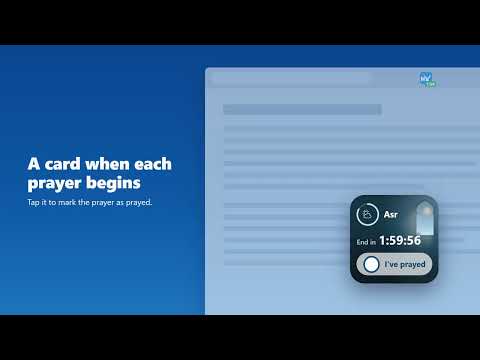
See which prayer is due and how long is left, and tick it off in one tap. Syncs with your My Islam prayer tracker.
"O you who have believed, when the adhan is called for the prayer on the day of Jumu'ah, then proceed to the remembrance of Allah and leave trade. That is better for you, if you only knew." (Quran 62:9) Your work happens at your desk, so your prayer reminders should too. My Islam Prayer Times puts the salah times right in your browser toolbar. No adhan clock to buy. KNOW WHEN THE NEXT PRAYER IS, WITHOUT LOOKING IT UP The toolbar icon always shows which prayer is due and how long is left. It turns amber when 30 minutes remain and red at 10, so you can wrap up a call or finish an email and still pray on time. HEAR THE ADHAN FROM YOUR COMPUTER Pick an adhan recording for each prayer, or choose a quiet notification, or silence. Mute Fajr and keep the full adhan for Maghrib, for example. Stop the adhan with one click if you're in a meeting. A PRAYER CARD ON YOUR SCREEN When a prayer begins, a small card appears. After you pray, tap it to mark that prayer done. Open it anytime with Alt + Shift + W (W for prayer widget), or right-click any page. KEEP TRACK OF YOUR SALAH Mark each prayer as prayed, or prayed in congregation. Friday Dhuhr prayed in congregation is recorded as Jumu'ah. A calendar shows every day at a glance, so you can see which prayers you kept and which you missed. BUILD A STREAK Your streak counts how many days in a row you've kept your prayers. Reach milestones to earn badges along the way. Sisters can mark days of menses with one button: those days pause the streak instead of breaking it. A DU'A FOR EVERY DAY A new du'a each day to read and memorise. WORKS WITH THE MY ISLAM APP Already use the My Islam app? Sign in on myislam.org once and your prayer record syncs between your phone, the website and your browser. YOUR PRIVACY STAYS YOURS The extension never reads, saves or sends the content of the websites you visit. On myislam.org it only picks up your sign-in and saved city. Open it anytime with Alt + Shift + S (S for salah).
0 out of 5No ratings
Details
- Version1.0.2
- UpdatedNovember 12, 2026
- FeaturesOffers in-app purchases
- Offered bysupport@myislam.org
- Size7.1MiB
- LanguagesEnglish
- DeveloperMy Islam Inc
171-251 Queen St S Mississauga, ON L5M 1L7 CAEmail
support@myislam.orgPhone
+1 647-512-7253 - TraderThis developer has identified itself as a trader per the definition from the European Union and committed to only offer products or services that comply with EU laws.
- D-U-N-S243320347
Privacy

My Islam Prayer Times has disclosed the following information regarding the collection and usage of your data. More detailed information can be found in the developer's privacy policy.
My Islam Prayer Times handles the following:
This developer declares that your data is
- Not being sold to third parties, outside of the approved use cases
- Not being used or transferred for purposes that are unrelated to the item's core functionality
- Not being used or transferred to determine creditworthiness or for lending purposes
Support
For help with questions, suggestions, or problems, visit the developer's support site