

My Chat Faces
2 ratings
)
Overview
Readable AI chats with guarded contrast, accessible text sizing, backgrounds, colors, opacity, and brightness controls.
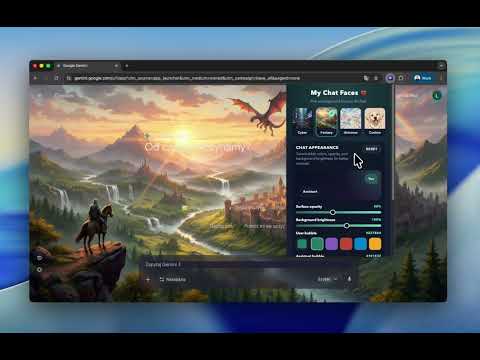
My Chat Faces helps you personalize the appearance and readability of conversations in ChatGPT, Claude, Gemini, and Grok. Choose a built-in background, use an image from your computer, or select a solid color for a simpler reading surface. Adjust message colors, text size, opacity, and background brightness to suit your preferences. 👁️ READABILITY CONTROLS Apply an accessibility preset for larger text or stronger contrast. Low Vision emphasizes readability, while Paper provides a light background with dark text. Message text sizing applies to both your messages and assistant responses. 🛡️ READABILITY GUARD Readability Guard checks selected text and surface colors against a 4.5:1 contrast target and adjusts combinations when needed. This helps protect readability but does not guarantee accessibility of every element on a third-party page. 🎨 PERSONALIZATION • Choose from three built-in image backgrounds, upload your own, or use a solid color. • Set separate colors for your messages and assistant replies. • Adjust text color, message text size, and interface text scale. • Control chat surface opacity and background brightness. • Preview settings before applying manual changes. 🖱️ HOW TO USE 1. Open a supported conversation and click the extension’s toolbar icon. 2. Choose a background or an accessibility preset. Presets apply immediately. 3. For manual adjustments, preview your settings and click Apply Style. Remove Background clears the wallpaper while keeping your saved text and color settings. 🔧 COMPATIBILITY AND UPDATES Version 1.3.9 updates message detection and addresses missing bubbles, inconsistent text sizing, and preset application. Supported menus and document panels also receive readability styling. Embedded apps, external previews, and browser PDF viewers may retain their own appearance. Changes to the underlying services can affect compatibility. 🔒 PRIVACY The extension does not collect chat content or use analytics or tracking. Custom images and appearance settings are stored locally. Your background selection uses Chrome’s built-in sync storage and may sync when browser sync is enabled. No separate extension account is required. 💻 FREE AND OPEN SOURCE Free and open source under the MIT License. This is an independent extension, not an official product of the supported services.
5 out of 52 ratings
Details
- Version1.3.9
- UpdatedOctober 1, 2026
- Offered byLechKalinowski
- Size4.21MiB
- LanguagesEnglish (United States)
- DeveloperLech Kalinowski
Laryska 102D Mysłowice 41-400 PLEmail
lechkalinowski@gmail.comPhone
+48 794 423 397 - TraderThis developer has identified itself as a trader per the definition from the European Union and committed to only offer products or services that comply with EU laws.
Privacy

This developer declares that your data is
- Not being sold to third parties, outside of the approved use cases
- Not being used or transferred for purposes that are unrelated to the item's core functionality
- Not being used or transferred to determine creditworthiness or for lending purposes