My Annotator
Overview
Draw, highlight, and annotate YouTube videos instantly. Supports Vimeo, Wistia, and more! Quick access to your annotation workspace.
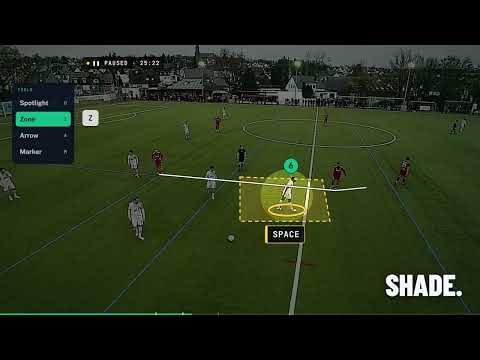
My Annotator – Annotate YouTube Videos with Ease Make YouTube videos truly interactive. My Annotator is a powerful Chrome extension and web app that lets you draw, highlight, and add annotations directly on top of YouTube videos. Whether you're a teacher preparing lessons, a student taking notes, a content creator explaining concepts, or a coach reviewing gameplay, My Annotator makes video learning more engaging and collaborative. ✨ KEY FEATURES 🖊️ POWERFUL ANNOTATION TOOLS • Freehand drawing with adjustable brush size and colors • Shapes: lines, arrows, circles, and ellipses • Highlighting with transparent overlays • Eraser for precise editing and corrections • Undo/Redo functionality for easy mistake correction • Multiple annotation layers for complex explanations 🎨 MODERN, INTUITIVE INTERFACE • Clean, intuitive toolbar with smooth animations • Dark & Light theme support with automatic switching • Fully responsive design that works on desktops and laptops • Accessibility-first: WCAG compliant with ARIA labels • Customizable brush sizes and colors • Real-time preview of annotations ⌨️ KEYBOARD SHORTCUTS FOR POWER USERS Speed up your workflow with quick commands: • D – Toggle drawing mode • Ctrl+Z / Cmd+Z – Undo last annotation • Ctrl+Shift+Z / Cmd+Shift+Z – Redo • Ctrl+Shift+C / Cmd+Shift+C – Clear all annotations • T – Show/hide toolbar • F – Freehand tool • L – Line tool • E – Ellipse tool • A – Arrow tool • H – Highlight tool • C – Circle tool • X – Eraser tool 🌐 SEAMLESS CHROME EXTENSION INTEGRATION • Floating button on YouTube for one-click access • Popup menu to paste YouTube URLs directly • Auto-detection of the current video tab • Seamless switch between YouTube and the annotation workspace • Works with YouTube, Vimeo, Wistia, and more • No need to leave YouTube – instant access to annotation tools 💾 SMART DATA MANAGEMENT FOR FREE USERS: • Annotations saved locally in your browser (localStorage) • Auto-save keeps your progress safe • Free accounts available – sign up in seconds • No credit card required • Privacy-first: All data stays in your browser • Works offline for viewing existing annotations FOR PRO USERS: • Database storage – All annotations saved to secure cloud • Video library – YouTube videos automatically saved to your library • Persistent annotations – Access from any device, anywhere • Sharing & collaboration – Share annotated videos with others • No data loss – Annotations survive browser clears and device changes • Cross-device sync – Start on desktop, continue on mobile • Video organization – Organize and search your annotated videos • Export capabilities – Download annotations for offline use 🔐 SIMPLE AUTHENTICATION • Free accounts available with email sign-up • Google OAuth for quick sign-in • Magic link authentication (passwordless) • Secure session management • No complex setup required 🚀 HOW IT WORKS 1. Install My Annotator from the Chrome Web Store 2. Open any YouTube video 3. Click the floating "Open in Annotator" button or use the extension popup 4. Sign in (free account available) if not already authenticated 5. Start drawing, highlighting, or marking key points in the video 6. Annotations save automatically: • Free users: Saved locally in browser • PRO users: Saved to cloud database (accessible from any device) 🎯 PERFECT FOR 👨🏫 TEACHERS & EDUCATORS Create interactive lessons, explain key points, and highlight important concepts directly on video lectures. Make your teaching materials more engaging and help students understand complex topics visually. 👨🎓 STUDENTS Take visual notes, highlight difficult sections, and revisit annotated study material anytime. Organize your learning with color-coded annotations and never lose important information. 🎬 CONTENT CREATORS & COACHES Mark timestamps, draw explanations, and create engaging tutorials or video breakdowns. Show your audience exactly what you're talking about with precise annotations. 👥 TEAMS & ORGANIZATIONS Use annotations during training, knowledge sharing, and collaborative video reviews. Share annotated videos with team members for better communication and understanding. 🏃 ATHLETES & COACHES Review gameplay, analyze techniques, and provide visual feedback on sports videos. Break down plays frame by frame with detailed annotations. 🔍 OPTIMIZED FOR PERFORMANCE • Smooth annotations with HTML5 Canvas • Optimized for Core Web Vitals performance • Lightweight, fast-loading extension • No background processes – efficient resource usage • Mobile-first indexing compatibility (when used via the web app) • Works seamlessly with YouTube's player controls 🔒 PRIVACY & SECURITY FIRST My Annotator is built with privacy as a core principle: • No personal data collection beyond what's needed for authentication • No external trackers or third-party cookies • Free users: All annotations stay in your local browser storage • PRO users: Data stored securely in EU-based servers (GDPR compliant) • Fully transparent: Terms of Service, Privacy Policy, and Imprint available • You're always in control of your data • HTTPS only – all communication uses secure connections • Minimal permissions – extension only requires storage permission 🛠️ TECH BEHIND THE SCENES Built with modern, reliable technology: • Next.js 15 + React 19 + TypeScript for type safety • Tailwind CSS design system • HTML5 Canvas API for smooth drawing • Chrome Extension Manifest V3 (latest standard) • PostgreSQL database for PRO users • No hidden background processes – lightweight and efficient 💡 PRO TIPS FOR BEST RESULTS • Use browser fullscreen (F11) for the best annotation experience • Avoid YouTube's built-in fullscreen (it hides annotation layers) • Mix colors and brush sizes to highlight different concepts • Use keyboard shortcuts for faster, smoother note-taking • PRO users: YouTube videos are automatically saved to your library for easy access • Organize your annotations with different colors for different topics • Use the eraser tool to refine your annotations precisely • Save frequently used annotation styles for consistency 📱 MULTI-PLATFORM SUPPORT • Chrome/Edge extension for quick access • Full web app for comprehensive features • Works on Windows, macOS, and Linux • Responsive design for different screen sizes • Touch-friendly interface for tablet users 🎨 CUSTOMIZATION OPTIONS • Adjustable brush sizes for different annotation styles • Full color palette for creative annotations • Multiple tool options for various annotation needs • Theme switching (dark/light) for comfortable viewing • Toolbar customization for your workflow 📊 SUPPORTED VIDEO PLATFORMS • YouTube – Full support with floating button • Vimeo – URL detection and processing • Wistia – URL detection and processing • Generic embeds – Basic URL support • Local videos – Upload and annotate your own video files (PRO users) 🚀 GETTING STARTED 1. Click "Add to Chrome" to install the extension 2. Visit any YouTube video 3. Look for the floating "Open in Annotator" button 4. Click it to open the annotation workspace 5. Sign in with a free account (or use Google OAuth) 6. Start annotating! The extension works seamlessly – no complex setup required. Just install and start annotating your favorite videos. 📞 SUPPORT & COMMUNITY We're here to help! If you have questions or encounter issues: • Email: teambbocho@gmail.com • Website: https://my-annotator.com • GitHub Issues: Report bugs and request features • GitHub Discussions: Join community discussions We're an open-source project and welcome contributions from the community! 🔄 REGULAR UPDATES We're constantly improving My Annotator based on user feedback: • New annotation tools and features • Performance optimizations • Bug fixes and stability improvements • UI/UX enhancements • New platform support 📝 LICENSE My Annotator is open-source and licensed under MIT. Feel free to contribute, fork, and improve the project! ❤️ MADE FOR THE EDUCATION & CONTENT CREATION COMMUNITY Turn YouTube into your interactive canvas. With My Annotator, videos are no longer just something you watch—they're something you engage with, learn from, and create with. Whether you're preparing a lesson, taking notes, creating content, or collaborating with a team, My Annotator gives you the tools to make video learning more effective and engaging. 👉 Install My Annotator today and start annotating YouTube videos like never before! Transform your video watching experience. Make every video interactive, educational, and collaborative with My Annotator.
0 out of 5No ratings
Details
- Version2.1
- UpdatedDecember 29, 2025
- Size39.74KiB
- LanguagesEnglish
- Developer
Email
teambbocho@gmail.com - Non-traderThis developer has not identified itself as a trader. For consumers in the European Union, please note that consumer rights do not apply to contracts between you and this developer.
Privacy

This developer declares that your data is
- Not being sold to third parties, outside of the approved use cases
- Not being used or transferred for purposes that are unrelated to the item's core functionality
- Not being used or transferred to determine creditworthiness or for lending purposes