


Ringkasan
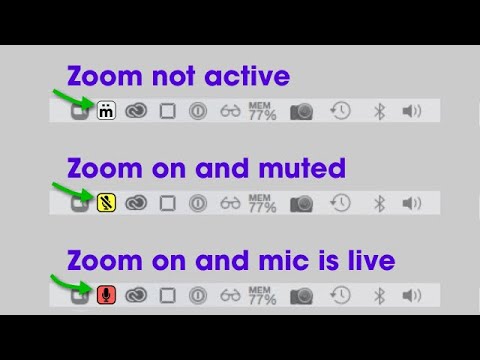
Add a virtual mute button to your system tray to quickly mute Zoom, Teams, and Meet. Requires the free mütesync app.
The mütesync Chrome Extension allows you to mute/unmute Google Meet, Zoom, and other meeting tools directly from an icon that appears in your System Tray (Windows) or Menu Bar (Mac). In addition, the virtual mute button stays in sync. So even if you mute from the video conferencing app, use a hotkey, or the host mutes you, the virtual mute button will stay in sync. This Chrome extension also enables the mütesync physical mute button to work with the video conferencing tools mentioned above. Visit www.mutesync.com to learn more. You MUST also have the mütesync free virtual mute button app for this extension to work properly. You can download the mütesync app for Mac or Windows for free at: www.mutesync.com/download
5 dari 57 rating
Detail
- Versi6.0.5
- Diupdate5 Oktober 2024
- Ukuran775KiB
- BahasaEnglish (United States)
- Developer
- Non-pedagangDeveloper ini tidak mengidentifikasi diri sebagai pedagang. Bagi konsumen di Uni Eropa, perlu diperhatikan bahwa hak konsumen tidak berlaku untuk kontrak antara Anda dan developer ini.
Privasi

Developer ini menyatakan bahwa data Anda
- Tidak dijual ke pihak ketiga, di luar kasus penggunaan yang disetujui
- Tidak digunakan atau ditransfer untuk tujuan yang tidak terkait dengan fungsi inti item
- Tidak digunakan atau ditransfer untuk menentukan kelayakan kredit atau untuk tujuan pinjaman
Dukungan
Untuk mendapatkan bantuan terkait pertanyaan, saran, atau masalah, kunjungi situs dukungan developer