

MultiMoxx Snap: Website Screenshots & Device Mockups

Overview
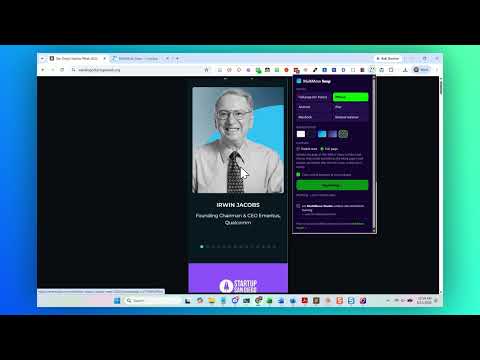
Capture any website as a full-page screenshot or device mockup. Export as PNG or PDF, or send it to MultiMoxx Studio.
# MultiMoxx Snap: Website Screenshots & Device Mockups **Turn any website into a polished screenshot or device mockup in seconds.** MultiMoxx Snap is a free website screenshot and mockup tool built for designers, developers, agencies, and marketers. Capture the website you're viewing, automatically clean up distracting popups and overlays, and turn it into a professional phone, tablet, laptop, or browser mockup. You can also capture an entire webpage from top to bottom and save it as a clean PNG or PDF. No Photoshop. No stitching screenshots together. No uploading your client's website to a screenshot service. ## Create Device Mockups Instantly Capture websites inside realistic: - iPhone - Android - iPad - MacBook - Browser window MultiMoxx Snap doesn't simply shrink your desktop screenshot into a phone frame. It captures the page at the appropriate device width so responsive websites display the way they're supposed to. Choose between capturing the visible screen or the entire page. ## Capture Entire Webpages Need the whole website instead of a device mockup? Capture long landing pages, portfolios, sales pages, websites, and other designs from top to bottom as one continuous image. Export as: - PNG - PDF - Transparent PNG - Framed device mockup No manually scrolling, taking multiple screenshots, or stitching them together afterward. ## Automatically Clean Up Your Screenshots Cookie notices and chat widgets can ruin an otherwise perfect website capture. MultiMoxx Snap can automatically remove common distractions before capturing, including: - Cookie consent banners - Chat and support widgets - Sticky promotional elements - Back-to-top buttons - Fixed overlays - Scroll locks Snap also helps trigger lazy-loaded content and scroll animations so more of the finished page is ready when captured. When the capture is finished, the original webpage is restored. Prefer the page exactly as it appears? Turn cleanup off with one click. ## Make It Presentation-Ready Your screenshot doesn't have to stop at the capture. Add a professional background using: - Solid colors - Custom colors - Gradients - Transparent backgrounds Adjust the presentation and download a high-resolution device mockup ready for: - Client presentations - Website portfolios - Social media - Case studies - Proposals - Marketing graphics - Design reviews - Documentation ## Send It Directly to MultiMoxx Studio Want to take your mockup further? Send your capture directly into MultiMoxx Studio and continue designing with a full website presentation workspace. Create multi-device scenes, before-and-after comparisons, carousels, page flips, animated presentations, scroll-through videos, and more. Capture with Snap. Create with MultiMoxx. ## Private by Design MultiMoxx Snap performs its normal capture and mockup creation directly in your browser. - No account required - No login required - No screenshot server - No analytics or browsing tracking - No automatic uploading of your captures - Minimal browser permissions Your captures stay in your browser unless you explicitly choose to send one to MultiMoxx Studio. ## Free to Use MultiMoxx Snap is free. There are no watermarks forced onto your screenshots and no account is required to start capturing. ## How It Works 1. Visit the website you want to capture. 2. Click the MultiMoxx Snap extension. 3. Choose a device or full-page capture. 4. Select visible screen or full page. 5. Snap captures and cleans up the page. 6. Customize your mockup. 7. Download your PNG or PDF, or send it to MultiMoxx Studio. **From live website to presentation-ready mockup in seconds.** MultiMoxx Snap makes capturing and presenting websites faster, cleaner, and considerably easier.
0 out of 5No ratings
Details
- Version1.1.9
- UpdatedAugust 16, 2026
- Size62.47KiB
- LanguagesEnglish (United States)
- DeveloperNSM Worldwide, IncWebsite
7670 Opportunity Rd Suite 255 Suite 255 San Diego, CA 92111-2272 USEmail
chrome@nonstopmarketing.coPhone
+1 619-363-3500 - TraderThis developer has identified itself as a trader per the definition from the European Union and committed to only offer products or services that comply with EU laws.
- D-U-N-S039054356
Privacy

This developer declares that your data is
- Not being sold to third parties, outside of the approved use cases
- Not being used or transferred for purposes that are unrelated to the item's core functionality
- Not being used or transferred to determine creditworthiness or for lending purposes
Support
For help with questions, suggestions, or problems, visit the developer's support site