

MultiCal – Add Events to Multiple Google Calendars

Overview
Add one event to multiple Google Calendars instantly. Stop duplicating events.
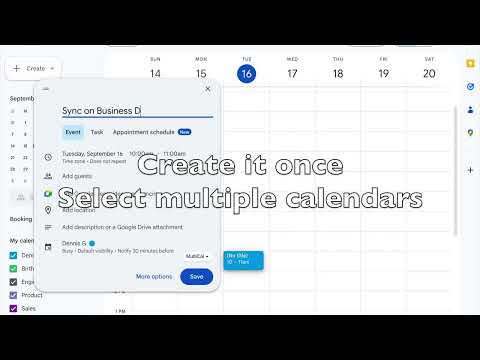
Stop creating the same event multiple times. MultiCal lets you create one event in Google Calendar and instantly add it to multiple calendars (work, personal, or shared) in a single step. Why use MultiCal? If you manage more than one calendar, you’ve probably had to duplicate the same event over and over. MultiCal eliminates that completely, saving you time and keeping your schedules perfectly in sync. How it works Open Google Calendar, create an event, click the MultiCal button, select your calendars, hit Save. Done. Key Features - Add one event to multiple calendars at once - Works directly inside Google Calendar - Simple and intuitive interface - No duplicate events, no extra steps - Perfect for work, personal, and shared calendars - Great for teams, students, and busy professionals Use Cases - Add meetings to both work and personal calendars - Schedule events across shared team calendars - Manage multiple clients or projects - Keep everything in sync without duplicate work Notes - Works within Google Calendar’s event creation flow. - Requires access to your Google calendars to function properly. - Optimized for typical usage (large-scale calendar setups may have limitations) Issues and Limitations Feel free to reach out to the team in case you encounter any issues. Reach us by emailing offerhelpsupport@offerhelp.me. Privacy Your data stays local. MultiCal does not store or share your calendar data externally.
5 out of 51 rating
Details
- Version0.0.5
- UpdatedApril 4, 2026
- Size29.36KiB
- LanguagesEnglish
- DeveloperWebsite
Email
offerhelpsupport@offerhelp.me - Non-traderThis developer has not identified itself as a trader. For consumers in the European Union, please note that consumer rights do not apply to contracts between you and this developer.
Privacy

This developer declares that your data is
- Not being sold to third parties, outside of the approved use cases
- Not being used or transferred for purposes that are unrelated to the item's core functionality
- Not being used or transferred to determine creditworthiness or for lending purposes
Support
For help with questions, suggestions, or problems, please open this page on your desktop browser