

Multi-RTL

Overview
Configurable RTL support for any website - Supports Hebrew, Arabic & Persian
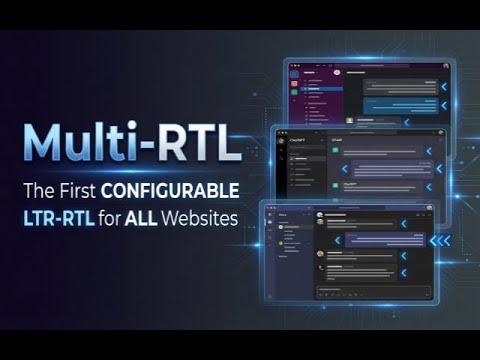
⬅️➡️ The first chrome extension that provides configurable Right-to-Left (RTL) text alignment support for ANY website! תוסף הכרום הראשון המאפשר יישור טקסטים לימין לכל אתר, באופן דינאמי !ומשאיר את החלקים הרלוונטיים (דוגמאות קוד, משוואות מתמטיות) מיושרים לשמאל أول إضافة كروم تمكّن محاذاة النصوص لليمين، لأي موقع ويب، بشكل ديناميكي وتترك الأجزاء ذات الصلة (أمثلة الأكواد، المعادلات الرياضية) محاذاة لليسار! See demos and user guide on: https://multi-rtl.asia-digital.online - הדגמת שימוש והוראות שימוש כאן https://multi-rtl.asia-digital.online Align Hebrew / Arabic / Persian text to Right-to-Left (while keeping non-RTL left-aligned, including code snippets and *math formulas* (KaTeX/LaTeX). Comes pre-configured for ChatGPT, Gemini, Claude.ai, NotebookLM and Slack and enables you to configure any DOM selectors in any web site to automatically detect and apply RTL alignment. !מגיע מוגדר מראש עבור אתרים כגון צ'אט ג'פיטי, ג'מיני, קלוד, נוטבוק, סלאק ועוד !ומאפשר להגדיר אלמנטים ליישור לימין בכל אתר Struggling with reading Hebrew/Arabic on websites that don't support RTL properly? Struggling with reading twisted Math Formulas in ChatGPT in Hebrew conversations? Multi-RTL is here to fix that !! ?מתקשים לקרוא עברית באתרים שלא תומכים ביישור טקסטים לימין כמו שצריך ?מתקשים לקרוא נוסחאות מתמטיות מסובכות בצ'אט ג'יפיטי או בקלוד בשיחות בעברית !התוסף הזה בדיוק בשבילכם ## ✨ Features 🌐 Universal Support - Works with any website! 🎯 Auto-Detection - Automatically detects Hebrew, Arabic, and Persian for auto-RTL using the Unicode BiDi first-strong-character algorithm 📐 Math Formula Support - Correctly aligns mathematical formulas (KaTeX/LaTeX) in RTL contexts 🔄 Real-time Processing - Works with streaming/dynamic content ⚙️ Per-Domain Configuration - Configure different selectors for each domain 📌 Side Panel - Persistent settings panel stays open while you interact with the page — no more popup that closes on every click! 🔍 Element Picker - Click 🔍 to pick an element on the page and build a reliable selector easily. The Side Panel stays open so you see results live! 🎛️ Master Toggle - Enable/disable all selectors for a domain with one switch ⌨️ Keyboard Shortcut - Press `Ctrl+Shift+H` to toggle Master switch ⌨️ Customizable Shortcuts : Set your own preferred keyboard shortcut for the Master Toggle ⌨️ Customizable Fonts - Change the font for all matched elements on any domain! 🔘 Individual Selectors - Enable/disable each selector independently 🎨 Advanced Style Controls - Control direction (dir) and text-align separately ⚡ Force RTL Mode - Skip content inspection and force RTL for specific selectors 👀 Visual Highlight : Hover over selectors in the list to instantly see which elements they match on the page ⏱️ Load Delay - Configure per-domain delay for late-loading content 💾 Smart Import/Export : Backup your settings or share configurations. Imports now merge with your existing settings! ⭐ Premium Features - Unlock advanced capabilities with an affordable lifetime subscription ✅ Pre-configured - The extension comes pre-configured for popular AI chat platforms and collaboration tools: - Claude.ai (claude.ai) - Google Gemini (gemini.google.com) - Slack (app.slack.com) - NotebookLM (notebook.google.com) - Perplexity (www.perplexity.ai) Just visit these sites and RTL text will automatically align to the right! ### Configure it for any website: 1. Visit the website you want to configure 2. Click the extension icon in toolbar to open the Side Panel 3. Click "➕ Add" to add a new selector 4. Click the 🔍 button on the new selector row - The Side Panel stays open and Multi-RTL enters "pick" mode on the page - Click an element you want to target 5. An in-page Selector Builder opens (top-right): - Choose the best element/ancestor from the dropdown - Optionally add classes/attributes via the Properties dropdown (hovering previews highlight) - Click Save to update the selector you started from (or Cancel to discard) 6. Load Delay: Configure a delay (in milliseconds) before the initial processing runs on page load. (useful for sites with late-loading content) 7. The new configuration is saved automatically! Content-based : When enabled, Multi-RTL detects whether the content starts with RTL text before applying styles. When disabled, Multi-RTL forces RTL for that selector. 🎯 HOW IT WORKS: 1. Install & Go : Pre-configured for popular sites - just visit Gemini, ChatGPT, Claude, NotebookLM, or Slack. 2. Add Custom Sites : Click the extension icon to open the Side Panel, click ➕ (Add), then click the 🔍 to pick the target element — the panel stays open so you see results live! 3. Toggle Control : Use the Master toggle or individual selector toggles for instant control 4. Configure Options : Fine-tune with style controls, force RTL, load delays, and more 5. Share & Backup : Export your configuration to share with others or keep as a backup. 🔒 PRIVACY & SECURITY: Multi-RTL is designed with your privacy in mind: * 100% Local Processing : All text analysis and RTL detection happens entirely on your device * Zero Browsing Data Collection : We never collect, store, or transmit your browsing data or page content * No Tracking : No analytics, no telemetry — the only external connection is to our payment provider (PayVia - PayPal) for premium license validation * Secure Identity : The `identity` permission is used solely to associate your Google account with a premium license, so it works seamlessly across devices. Users without a Google account are assigned an anonymous ID instead * Open Source Ready : Transparent code you can inspect 💡 PERFECT FOR: Any website with Hebrew, Arabic, or Persian content - chat platforms, team tools, web apps, forums and email clients. 🌍 LANGUAGE SUPPORT: * Hebrew (עברית) * Arabic (العربية) * Persian/Farsi (فارسی) *Made with ❤️ for the RTL community* See demos and user guide on https://multi-rtl.online # Multi-RTL Release Notes ## v6.4.4 ### Added - Hebrew answers on ChatGPT and Claude that open with an English word are no longer pushed left in full - the extension now weighs how much of the answer is really Hebrew, instead of leaving it to the browser, which looks only at the first word - Editable text inside a Claude artifact - a drafted email or similar - is now aligned like the rest of the conversation ## v6.4.3 ### Added - NotebookLM quizzes and other generated apps are now aligned - they run inside a sandboxed frame the extension could not reach before, so no amount of selectors would help there ## v6.4.2 ### Added - NotebookLM: generated documents are now aligned as well as the chat - headings, paragraphs, bold runs, lists, and the report header and footer ### Fixed - A completed purchase is now recognised immediately - previously the license was only re-checked on browser restart, so a paying customer could keep seeing a subscription-required notice - Numbered headings and list items stayed left-aligned even when the rest was Hebrew, and so did anything opening with an emoji or a latin label - Highlighting was slow to appear when hovering over a long selector list ## v6.4.1 ### Added - NotebookLM works out of the box on its new address, notebook.google.com - notebook title, chat messages and the generated summary; the old address keeps working too - Claude Code Web coverage extended: agent questions and answer buttons, free-text answers, session titles, sidebar items, headings inside answers, and table cells and headers ### Changed - One built-in Claude configuration covering claude.ai and Claude Code Web together, instead of two partial sets - User messages on Claude Code Web now align by the message text itself, leaving the timestamp and hidden controls untouched ## v6.4.0 ### Added - Link your license to a browser signed into a different Google account - keep working on a second computer or profile (Extended: one extra browser, Pro: two) - The license section shows which account your license comes from, and whether it is linked - Unlink a linked browser at any time; the extension reverts to the browser's own account ### Improved - Clearer locked screen: re-fetch on the current account, or link a license from a different Google account ### Changed - Claude.ai sidebar items selector updated to the site's new DOM structure ## v6.3.3 ### Fixed - License refresh button stripped all applied RTL styling until the extension was toggled off/on - License indicator showed "(0 days left)" on active subscriptions due to a stale cancellation record ### Changed - Claude.ai chat title selector updated to the site's new DOM structure ## v6.3.2 ### Fixed - Responses snapping back to LTR when streaming ends on Claude.ai - the site re-creates response elements right after streaming completes; follow-up passes now re-apply RTL directly - Older messages losing RTL when scrolling up on Claude.ai - virtualized messages re-inserted during scrolling are now reliably re-aligned ## v6.3.1 ### Fixed - Cancel Subscription mid-period - extension stopped applying RTL styles immediately after Cancel until manual refresh, even though the paid period was still active. Cache is now updated correctly so RTL stays active until the end of the paid period. ## v6.3.0 ### Added - Custom Font Override (PRO) - change the font for all matched elements on any domain - CSS Variable Discovery - automatically detects font variables from the page - System Font Browser - browse available system fonts with live preview on page ### Improved - Claude.ai default config - removed selectors that caused code blocks to misalign - Font override applies var(--font-ui) by default on Claude.ai - Code blocks (code, pre, kbd, svg) are automatically excluded from font override ## v6.2.3 ### Improved - Extension version is now sent with all license API calls (trial/start, checkout/token, license/cancel) for better diagnostics and audit logging ## v6.2.2 ### Fixed - License lockout on empty tabs - extension incorrectly showed "Subscription Required" even for licensed users - License check race condition - API returned ACTIVE but extension fell into error handler ### Added - Support contact on lockdown screen for users encountering license issues ## v6.2.1 ### Fixed - RTL flickering during streaming on Claude.ai — direction now applied immediately - RTL flash at end of streaming — follow-up passes catch React re-renders ## v6.2.0 ### Added - PRO indicator on custom sites with easy upgrade option - PRO badge on custom selectors within built-in sites - Community configs: Import pre-made configs for Kimi and other sites from GitHub - Dynamic community config portal with live fetching from GitHub repo ### Improved - Unified CTA messaging across all upgrade prompts - Config Portal redesign: RTL table layout with community contribution support ## v6.1.2 ### Added - License refresh button with visual feedback - "Already have a license?" link on lockdown screen - Improved offline resilience — no more lockouts when server is temporarily unreachable - More reliable license matching ## v6.1.1 ### Fixed - Infinite trial bug: Fixed a bug where anonymous users could get unlimited trial access ## v6.1.0 ### Added - License indicator: Shows your current license tier (Basic/Extended/Pro) with color-coded badges and days remaining - Smart unsubscribe dialog: Shows your subscription/trial expiry date — no more "lose access immediately" scare ### Improved - Header layout redesign: Cleaner domain info and license display - Post-cancellation behavior: Subscription stays active until your paid period ends — no immediate lockout ## v6.0.0 ### Added - Side Panel UI : Replaced popup with a persistent Side Panel that stays open while you interact with the page - Tab-Switch Awareness : Side panel automatically updates when switching tabs or navigating to a new domain - Inspector Instructions : Visual overlay (Hebrew + Arabic) guides users to pick an element - Selector Flash : Green glowing animation highlights selectors after configuration - Claude Code Web support : New built-in selector for the Claude Web prompt input box - License enforcement : Auto-trial for new users, subscription management, and pricing page - Premium features: Added subscriptions based (Annual & Lifetime) premium features (Import /Export config and Add Selector). - Unsubscribe flow : Users can manage their subscription directly from the extension ### Improved - Inspector Workflow : Panel stays open during element picking — no more close/reopen cycle - Responsive Layout : UI adapts to side panel width instead of fixed popup dimensions - Top section layout : Redesigned popup header for cleaner appearance - Tab handling : Side panel auto-closes on new tab, better handling for blank tabs - Updated built-in configs : Refreshed default configurations with latest selectors ### Fixed - Crash on undefined key : Fixed error when `e.key` is undefined in keyboard event handlers - Inspector preview limits : Capped inspector preview element count to prevent performance issues ## v5.1.0 ### Improved - Smarter RTL Detection : Now uses the Unicode BiDi "first strong character" algorithm instead of checking just the first character. Emojis, numbers, bullets, and punctuation are properly skipped. - Mixed Content Support : Sentences starting with English but containing mostly Hebrew/Arabic (30%+ RTL letters) are now correctly detected as RTL (e.g. "Phase 1 - תשתית DB"). - Mixed Inline Elements : Fixed detection for elements with mixed inline children (e.g. `<li><strong>Phase 1</strong> - Hebrew text</li>`) where the first text wasn't in a child element. ### Fixed - List Bullet Visibility : List markers (bullets/numbers) no longer disappear when `<li>` elements receive RTL direction. Applies `list-style-position: inside` automatically. ## v5.0.0 ### Added - Premium Features : Added subscriptions based (Annual & Lifetime) premium features (Import config). - User Authentication : Secure identification via Google Identity for cross-device license validation.
4.6 out of 538 ratings
Details
- Version6.4.4
- UpdatedAugust 23, 2026
- FeaturesOffers in-app purchases
- Size102KiB
- LanguagesEnglish (United States)
- DeveloperWebsite
Email
multi-rtl@asia-digital.online - Non-traderThis developer has not identified itself as a trader. For consumers in the European Union, please note that consumer rights do not apply to contracts between you and this developer.
Privacy

Multi-RTL has disclosed the following information regarding the collection and usage of your data. More detailed information can be found in the developer's privacy policy.
Multi-RTL handles the following:
This developer declares that your data is
- Not being sold to third parties, outside of the approved use cases
- Not being used or transferred for purposes that are unrelated to the item's core functionality
- Not being used or transferred to determine creditworthiness or for lending purposes
Support
For help with questions, suggestions, or problems, please open this page on your desktop browser