

Multi-AI Prompt Queue Automator

Overview
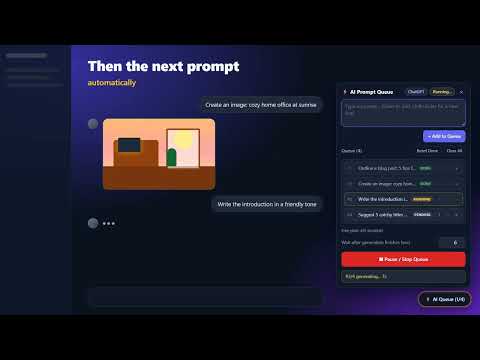
Stop babysitting ChatGPT, Gemini & Claude. Queue your prompts once and each one is sent automatically when the last reply is done.
Tired of babysitting your AI chat? You type a prompt. You wait. You watch the reply slowly appear. You paste the next prompt. You wait again. Twenty prompts later, you've spent an hour staring at a loading animation instead of doing real work — and if you look away, the AI sits idle until you come back. Multi-AI Prompt Queue fixes that. Line up all your prompts once, click Run, and it sends them to ChatGPT, Gemini or Claude one at a time — automatically waiting until each reply, including generated images, has completely finished before sending the next. ━━━━━━━━━━━━━━━━━━━━ WHO IT'S FOR ━━━━━━━━━━━━━━━━━━━━ ✍️ Writers & bloggers Draft a long article, report or ebook section by section — outline, intro, every chapter, conclusion — without pressing Enter between each part. 🎨 Designers & content creators Generate a whole series of images in one go. No more checking back every minute to see whether the last image has finished. 📈 Marketers & social media managers Turn one idea into posts, captions, email drafts and ad variations in a single run. 🎓 Students & researchers Work through a list of questions, summaries or translations while you read, take notes or do something else. 💼 Anyone with repetitive AI work If you've ever pasted the same kind of prompt ten times in a row, this is for you. ━━━━━━━━━━━━━━━━━━━━ WHAT YOU GET ━━━━━━━━━━━━━━━━━━━━ ✓ Works on ChatGPT (chatgpt.com), Google Gemini (gemini.google.com) and Claude (claude.ai) ✓ Smart waiting — detects when streaming text and image generation have truly finished, so prompts never overlap ✓ Adjustable cooldown between prompts, to stay gentle on usage limits ✓ Add prompts one by one, including multi-line prompts ✓ Reorder, remove, reset and clear queue items ✓ Pause and resume any time — and add new prompts while the queue is running ✓ Live status for every prompt: Pending, Running, Done, Error ✓ Control it from the toolbar popup or the ⚡ AI Queue panel right on the chat page — both stay in sync ━━━━━━━━━━━━━━━━━━━━ HOW IT WORKS ━━━━━━━━━━━━━━━━━━━━ 1. Open a chat on ChatGPT, Gemini or Claude. 2. Add your prompts in the popup or the ⚡ panel on the page. 3. Click "Run Queue Sequentially" — then get on with your day. ━━━━━━━━━━━━━━━━━━━━ FREE AND PRO ━━━━━━━━━━━━━━━━━━━━ • Free: queue up to 5 prompts at a time — every feature included. • Pro: unlimited queue length. One-time payment, no subscription. Click "Upgrade to Pro" in the popup to buy on Gumroad, then paste your license key into the popup. One key works on up to 3 browsers. 7-day money-back guarantee. ━━━━━━━━━━━━━━━━━━━━ PRIVATE BY DESIGN ━━━━━━━━━━━━━━━━━━━━ Your prompts and settings stay in your browser. No account, no analytics, no tracking, no data sales. Pro license keys are verified with our payment provider, Gumroad. Privacy policy: [PRIVACY POLICY URL] ━━━━━━━━━━━━━━━━━━━━ GOOD TO KNOW ━━━━━━━━━━━━━━━━━━━━ • Keep the chat tab open and visible while the queue runs — Chrome slows down hidden background tabs. • You need your own ChatGPT, Gemini or Claude account (free or paid). This extension doesn't include AI access. • You remain responsible for following each AI service's terms of use and usage limits. Use a sensible cooldown. Multi-AI Prompt Queue is an independent product and is not affiliated with, endorsed by, or sponsored by OpenAI, Google, or Anthropic. ChatGPT, Gemini, and Claude are trademarks of their respective owners.
0 out of 5No ratings
Details
- Version1.0.0
- UpdatedNovember 1, 2026
- FeaturesOffers in-app purchases
- Offered byzacky.asyari1986@gmail.com
- Size32.35KiB
- LanguagesEnglish (United States)
- DeveloperMuhammad Zacky Asy'ari
Pondok Bambu Jakarta, DKI Jakarta 13430 IDEmail
zacky.asyari1986@gmail.comPhone
+82 10-5597-0368 - TraderThis developer has identified itself as a trader per the definition from the European Union and committed to only offer products or services that comply with EU laws.
Privacy

Multi-AI Prompt Queue Automator has disclosed the following information regarding the collection and usage of your data. More detailed information can be found in the developer's privacy policy.
Multi-AI Prompt Queue Automator handles the following:
This developer declares that your data is
- Not being sold to third parties, outside of the approved use cases
- Not being used or transferred for purposes that are unrelated to the item's core functionality
- Not being used or transferred to determine creditworthiness or for lending purposes