

MTC PageShot
1 rating
)
Overview
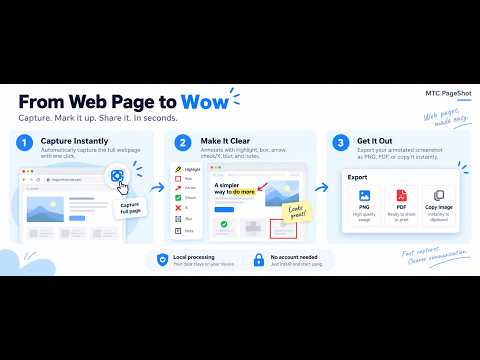
Capture full webpages in one click, annotate locally, and export as PNG, PDF, PNG parts, or Copy Image.
MTC PageShot is a focused Chrome extension for user-initiated full-page screenshot capture. Click the MTC PageShot toolbar icon on the webpage you want to capture, or use the configurable keyboard shortcut. A compact local progress panel starts capture automatically. PageShot measures and scrolls the supported page or dominant scrolling area, captures visible segments, restores the original page state, and opens a local result tab for review, annotation, and export. IMPORTANT DATA-HANDLING DISCLOSURE During a user-requested capture, PageShot temporarily accesses and processes the active webpage's visual content, page title/hostname, current page address during active capture, page dimensions, viewport/scroll information, detected scrolling-area information, and screenshot segments. This is used only to create, align, validate, label, edit, and export the screenshot requested by the user. Screenshot pixels and captured webpage content are processed locally in the browser and are not uploaded by MTC PageShot to MTC or to a third-party screenshot-processing service. Temporary screenshot segments are stored locally only while needed for capture, result assembly/export, recovery, and cleanup. FEATURES • One-click full-page capture with real-time progress • Cancel and Retry capture • Configurable keyboard shortcut (default Alt+Shift+P) • Improved handling for dominant inner scrolling areas used by modern web apps • Cleaner supported table captures without repeated sticky headers or inner-scrollbar artifacts • Local editor with Select, Crop, Highlight, Box, Arrow, Check/X, Blur, multiline Note, Color/Line, and Undo/Redo • Move, resize, recolor, reweight, or remove supported annotations after placing them • PNG download and Copy Image for normal-size results • Local PDF export with A4/Letter, orientation, and quality options • Ultra-long captures divided into memory-bounded, previewable PNG Parts • Full editor available for each ultra-long PNG part • Separate edit and Undo/Redo state for every part • Previous, Next, and All Parts navigation • Download Current Part or All PNG Parts • PDF export that includes saved edits from all parts • Memory-aware PDF generation with a 500-page maximum software safety ceiling • Automatic clean filenames • No account required • No ads or extension analytics WHAT'S NEW IN v0.5.6 • Fixed capture stopping when an app-style or virtualized page would not verify its original scroll position • Restores temporary capture layout before verifying the original page position • Preserves a completed, validated screenshot when only post-capture restoration verification fails • Retained fixed navigation and responsive/mobile viewport-scale improvements • Retained editable PNG Parts and edited PDF export for ultra-long captures • No new permissions, host permissions, or optional permissions Some highly dynamic, continuously changing, virtualized, protected, or Chrome-restricted pages may not support reliable full-page capture. PageShot is designed to stop rather than silently return a result when it detects conditions that could make the capture unreliable. PRIVACY-FOCUSED DESIGN MTC PageShot requests only activeTab and scripting. Access begins only after the user explicitly invokes PageShot from the toolbar or configured extension shortcut. It has no host permissions or optional permissions. The screenshot workflow does not upload screenshot pixels, captured webpage content, capture history, or page URLs to MTC. Privacy Policy: https://extensions.mtccore.com/mtcpageshot/privacy.html FREE MTC TOOL MTC PageShot is provided free by MTC. Optional support, feedback, review, Welcome, and What's New pages are auxiliary to the screenshot workflow and are not required to use the core capture feature. MTC PageShot is not affiliated with or endorsed by Google or Chrome.
5 out of 51 rating
Details
- Version0.5.6
- UpdatedOctober 8, 2026
- Offered bycardeno17
- Size105KiB
- LanguagesEnglish
- DeveloperMARK TITO CARDENO
Blk10 Lot11 Business Street Area 2, 4th State, Area 2 Paranaque City, Metro Manila 1715 PHEmail
support@mtccore.comPhone
+63 928 250 9927 - TraderThis developer has identified itself as a trader per the definition from the European Union and committed to only offer products or services that comply with EU laws.
Privacy

MTC PageShot has disclosed the following information regarding the collection and usage of your data. More detailed information can be found in the developer's privacy policy.
MTC PageShot handles the following:
This developer declares that your data is
- Not being sold to third parties, outside of the approved use cases
- Not being used or transferred for purposes that are unrelated to the item's core functionality
- Not being used or transferred to determine creditworthiness or for lending purposes