

Movie Mode
2 ratings
)
Overview
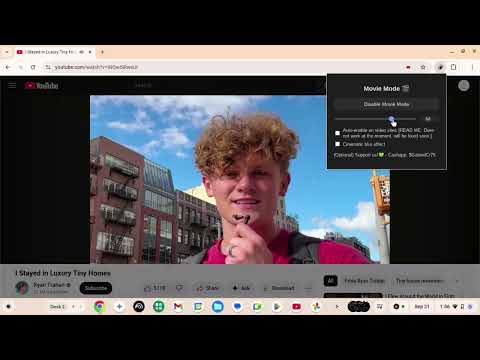
Dim the screen and keep the video bright — with brightness control and optional cinematic blur.
🎬 Movie Mode – Turn Any Video Into a Cinematic Experience ✨ Dim your screen, blur the distractions, and keep your video crystal-clear. Perfect for YouTube, Netflix, Twitch & more. 🚀 Why Movie Mode? Tired of distractions while watching videos? Movie Mode instantly transforms your screen into a home theater experience: 🌑 Dim the background — keep the focus on your video. 🌫️ Cinematic blur effect — smooths out clutter and distractions. 🎥 Crystal-clear video — video player stays untouched and sharp. ⚡ One-click toggle — enable or disable anytime. 🎚️ Custom brightness slider — set the exact dim level you like. 🖊️ Manual % control — type in your perfect brightness. 💾 Smart persistence — remembers your settings between sessions. 🎯 Perfect for: 🍿 Binge-watching Netflix series 🎶 Listening to concerts on YouTube 🎮 Streaming your favorite games on Twitch 📚 Watching tutorials with zero distractions 🔑 Features at a Glance: ✔️ Works on YouTube, Netflix, Twitch, and more ✔️ Adjustable brightness (slider + % input) ✔️ Optional cinematic blur effect ✔️ Toggle with button or keyboard shortcut ✔️ Dark, coffee-vibes design — built for late-night watching 🕹️ How to Use Open any supported video site 🎬 Click the Movie Mode extension 🎥 Adjust brightness to your liking 🌌
3 out of 52 ratings
Details
- Version3.0
- UpdatedOctober 1, 2025
- Offered byHoneyDew Creations
- Size277KiB
- LanguagesEnglish (United States)
- Developer
Email
SoaringAboveTheCoastlines@proton.me - Non-traderThis developer has not identified itself as a trader. For consumers in the European Union, please note that consumer rights do not apply to contracts between you and this developer.
Privacy

This developer declares that your data is
- Not being sold to third parties, outside of the approved use cases
- Not being used or transferred for purposes that are unrelated to the item's core functionality
- Not being used or transferred to determine creditworthiness or for lending purposes
Support
For help with questions, suggestions, or problems, please open this page on your desktop browser