

Movie maker MovieStudio video editor

總覽
Movie maker online to create, edit and record videos, and adding videos, audios, images and texts
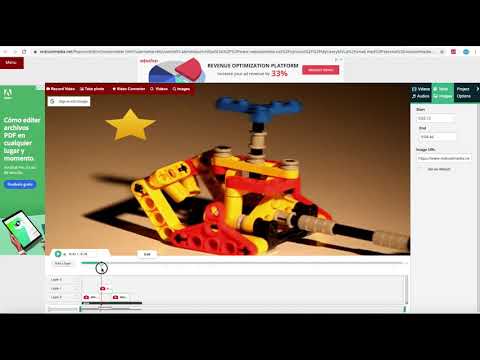
MovieStudio is an extension to make movies, record videos, edit videos, modify them using another videos you can import. MovieStudio also allows to add audios, images, and texts into your movies and videos. Moreover, it scans and collects the webpages you browse in the Internet. These webpages are uploaded to our servers in order to know if they contain MP4 files that can be edited using our extension integrated with our online app. Its main features are: * Support a lot of types of formats. * Record any video and import them in your project: - MovieStudio provides a button that capture videos from your camera. The video recorded are imported in your Gallery along with other objects that can be used to make your movie. - After importing your recorded video in your Gallery, drag your video from the Media Gallery to the timeline. Drag it to Layer 0 or any other layer. - Refer to the following section in order to know what to do with any of your video. * Add and modify MP4 or WEBM videos included in your project: - You can import videos from the Internet by pasting in the link, or uploading a local video. Once you have found a MP4 or WEBM video you like, copy the link by right-clicking on the Video link and selecting Copy Link Address from the context menu. Then paste the link into your VideoStudio project and click on Get Media. - Drag your video from the Media Gallery to the timeline. Drag it to Layer 0 or any other layer. Once you have dragged your video to the timeline, you will enter in an editor from which you can extend the video time or shorten it, you can turn the video portion of your clip off; and you can do the same thing with the audio, as well as turn the volume down. - You assemble your project in layers. Layers with lower numbers appear above layers with a higher number. So layer one appears on top of layer two. * Add any MP3 audio file in your project taking into account that adding MP3 audio files is similar to adding video files: - Once the MP3 audio files are imported you can drag your audio from the Media Gallery to the timeline from which an editor is open. - The audio editor allows to extend the audio time or shorten it, and select only a portion of your audio if you would like. * Include texts into your movie. In the Events tab there is an option to add some text to your video. MovieStudio provides an editor for this text integration. It allows to change the time when your text starts and ends, move it around on the canvas, and change the way it transitions on and off the page. It also allows to change the font and color. * Include images into your movie or video. In the Events tab there is an option to add some images to your video. The formats supported are PNG, JPG and GIF. MovieStudio provides an editor for this images integration. It allows to change the time when your image appears in your video. * Create your MP4 movie or video file. In the Project tab there is a button to create a MP4 file with your composition of videos, audios, images and texts. This MP4 creation uses the open source software FFMPEG. MovieStudio is an enhancement of our VideoStudio but with more capacity and features. It is also based on Mozilla Popcorn Maker. Popcorn Maker could handle sound or video that could come from a number of places like videos from YouTube, Vimeo, or SoundCloud. VideoStudio has removed any feature related to YouTube, Vimeo, or SoundCloud in order to be compliance with YouTube, Vimeo and SoundCloud service terms.
3.1 分 (滿分 5 分)530 個評分
詳細資料
隱私權

「Movie maker MovieStudio video editor」已揭露下列關於收集及使用資料的資訊。 如需更多詳細資訊,請參閱開發人員的《privacy policy》。
Movie maker MovieStudio video editor 會處理下列資料:
這位開發者就你的資料做出下列聲明:
- 除經核准的用途外,不會將你的資料販售給第三方
- 不會基於與商品核心功能無關的目的,使用或轉移資料
- 不會為了確認信用度或基於貸款目的,使用或轉移資料
支援
如有疑問或建議,請使用電腦版瀏覽器開啟這個頁面