

Mouse Gesture Pilot

Visão geral
A powerful mouse gesture extension with visual trail effects
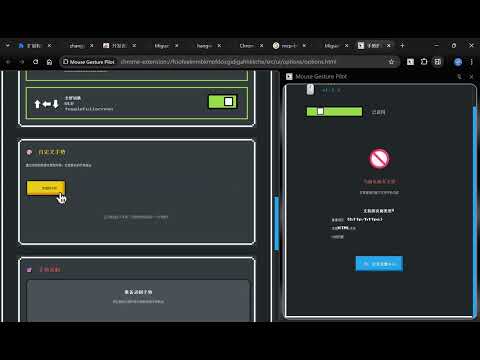
# Mouse Gesture Pilot - Chrome Store Description ## 📝 Short Description Navigate faster with intuitive mouse gestures. Draw patterns, execute actions instantly. 5 languages supported. Private & lightweight. --- ## 📄 Detailed Description ### 🖱️ Browse Smarter with Mouse Gestures **Mouse Gesture Pilot** transforms how you navigate the web. Simply hold right-click, draw a pattern, and execute actions instantly – no keyboard needed! ### ✨ Core Features **🎯 Smart Gestures** 14+ preset patterns for common actions: navigate back/forward, manage tabs, scroll pages, and more. Create custom gestures for your workflow. **🌈 Beautiful Feedback** Smooth animated trails follow your movements. Elegant pixel-art design that's both functional and delightful. **🌍 5 Languages** Choose your preferred language: English, 简体中文, Deutsch, 日本語, Русский. Auto-detects browser language on install. **⚡ Lightning Fast** Pure JavaScript with minimal memory footprint. Works instantly on all websites (except Chrome internal pages). **🎨 Fully Customizable** Adjust sensitivity, create custom gestures, modify trail appearance. One-click enable/disable in side panel. ### 🎮 Quick Start 1. Hold **right mouse button** 2. Draw a pattern (e.g., swipe ← for back) 3. Release to execute 4. Done! **Common Gestures:** - ← Back | → Forward - ↑ Scroll Top | ↓ Scroll Bottom - ↓→ Close Tab | ↓← New Tab - →← Reopen Tab ### 🔒 Privacy First ✅ Zero data collection ✅ No tracking or analytics ✅ Everything runs locally ✅ Open source transparency **Permissions Used:** - `storage` - Save preferences locally - `activeTab` - Detect gestures - `tabs` - Tab navigation - `sessions` - Reopen closed tabs - `sidePanel` - Gesture reference panel ### 🌟 Why Choose Us? ✓ Intuitive & easy to learn ✓ Beautiful retro-pixel design ✓ Multi-language support ✓ Regular updates ✓ Privacy-focused ✓ Completely free ### 💡 Perfect For • Power users seeking faster navigation • International users needing native language support • Anyone tired of keyboard shortcuts • Users wanting efficient browsing --- ## 🎯 Feature Highlights (Bullet Points for Store) • 14+ preset mouse gestures for instant actions • Create unlimited custom gesture patterns • Real-time visual feedback with animated trails • Support for 5 languages with auto-detection • Elegant side panel with gesture reference guide • Adjustable sensitivity and customization options • Lightweight design with minimal performance impact • Privacy-focused: no data collection or tracking • Works on all websites (except Chrome internal pages) • One-click enable/disable toggle • Beautiful retro-pixel inspired interface • Built with modern Manifest V3 architecture --- ## 🖼️ Suggested Screenshots 1. **Hero Shot**: Gesture trail in action on a popular website 2. **Side Panel**: Gesture reference guide showing all patterns 3. **Options Page**: Customization settings and language selector 4. **Custom Gesture**: Recording a new custom gesture 5. **Multi-Language**: Language selector showing all 5 languages 6. **Gesture Gallery**: Visual grid of all preset gestures --- ## 💬 Sample User Responses (FAQ) **Q: Does it slow down my browser?** A: No! Pure JavaScript with minimal footprint. You won't notice any performance impact. **Q: Can I use it in my language?** A: Yes! We support English, Chinese, German, Japanese, and Russian with auto-detection. **Q: Is my data safe?** A: Absolutely. Everything runs locally. We don't collect, track, or transmit any data. **Q: Can I customize gestures?** A: Yes! Create unlimited custom gestures and assign them to any action. **Q: What sites does it work on?** A: Works on all regular websites. Chrome doesn't allow extensions on internal pages (chrome://, chrome-extension://). --- ## 🎬 Promotional Tagline **"Gesture. Execute. Done."** --- *Version 1.1.3 | Updated November 2025 | Made with ❤️ for efficient browsing*
0 de 5Nenhuma nota
Detalhes
- Versão1.1.4
- Atualização14 de dezembro de 2025
- Tamanho1.94MiB
- Idiomas5 idiomas
- Desenvolvedor
E-mail
zhangsongai3@gmail.com - Não negocianteEsse desenvolvedor não se identificou como comerciante. Caso você seja da União Europeia, observe que os direitos do consumidor não se aplicam a contratos firmados entre você e esse desenvolvedor.
Privacidade

Mouse Gesture Pilot divulgou as informações a seguir sobre a coleta e o uso dos seus dados. Para mais detalhes, consulte estas informações do desenvolvedor: privacy policy.
Mouse Gesture Pilot processa o seguinte:
O desenvolvedor declara que seus dados
- Não são vendidos a terceiros, exceto nos casos de uso aprovados
- Não são usados ou transferidos para fins não relacionados à função principal do item
- Não são usados ou transferidos para informações de crédito ou empréstimo
Suporte
Para receber ajuda com perguntas, sugestões ou problemas, acesse o site de suporte do desenvolvedor.