

Mouse Gesture Pilot

Overview
A powerful mouse gesture extension with visual trail effects
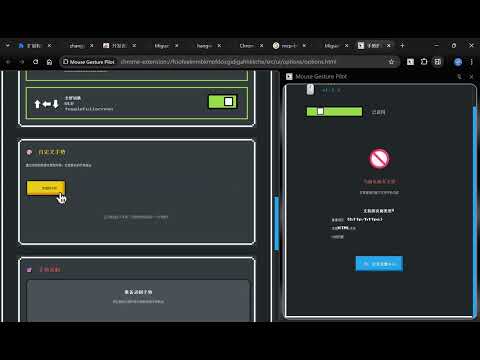
# Mouse Gesture Pilot - Chrome Store Description ## 📝 Short Description Navigate faster with intuitive mouse gestures. Draw patterns, execute actions instantly. 5 languages supported. Private & lightweight. --- ## 📄 Detailed Description ### 🖱️ Browse Smarter with Mouse Gestures **Mouse Gesture Pilot** transforms how you navigate the web. Simply hold right-click, draw a pattern, and execute actions instantly – no keyboard needed! ### ✨ Core Features **🎯 Smart Gestures** 14+ preset patterns for common actions: navigate back/forward, manage tabs, scroll pages, and more. Create custom gestures for your workflow. **🌈 Beautiful Feedback** Smooth animated trails follow your movements. Elegant pixel-art design that's both functional and delightful. **🌍 5 Languages** Choose your preferred language: English, 简体中文, Deutsch, 日本語, Русский. Auto-detects browser language on install. **⚡ Lightning Fast** Pure JavaScript with minimal memory footprint. Works instantly on all websites (except Chrome internal pages). **🎨 Fully Customizable** Adjust sensitivity, create custom gestures, modify trail appearance. One-click enable/disable in side panel. ### 🎮 Quick Start 1. Hold **right mouse button** 2. Draw a pattern (e.g., swipe ← for back) 3. Release to execute 4. Done! **Common Gestures:** - ← Back | → Forward - ↑ Scroll Top | ↓ Scroll Bottom - ↓→ Close Tab | ↓← New Tab - →← Reopen Tab ### 🔒 Privacy First ✅ Zero data collection ✅ No tracking or analytics ✅ Everything runs locally ✅ Open source transparency **Permissions Used:** - `storage` - Save preferences locally - `activeTab` - Detect gestures - `tabs` - Tab navigation - `sessions` - Reopen closed tabs - `sidePanel` - Gesture reference panel ### 🌟 Why Choose Us? ✓ Intuitive & easy to learn ✓ Beautiful retro-pixel design ✓ Multi-language support ✓ Regular updates ✓ Privacy-focused ✓ Completely free ### 💡 Perfect For • Power users seeking faster navigation • International users needing native language support • Anyone tired of keyboard shortcuts • Users wanting efficient browsing --- ## 🎯 Feature Highlights (Bullet Points for Store) • 14+ preset mouse gestures for instant actions • Create unlimited custom gesture patterns • Real-time visual feedback with animated trails • Support for 5 languages with auto-detection • Elegant side panel with gesture reference guide • Adjustable sensitivity and customization options • Lightweight design with minimal performance impact • Privacy-focused: no data collection or tracking • Works on all websites (except Chrome internal pages) • One-click enable/disable toggle • Beautiful retro-pixel inspired interface • Built with modern Manifest V3 architecture --- ## 🖼️ Suggested Screenshots 1. **Hero Shot**: Gesture trail in action on a popular website 2. **Side Panel**: Gesture reference guide showing all patterns 3. **Options Page**: Customization settings and language selector 4. **Custom Gesture**: Recording a new custom gesture 5. **Multi-Language**: Language selector showing all 5 languages 6. **Gesture Gallery**: Visual grid of all preset gestures --- ## 💬 Sample User Responses (FAQ) **Q: Does it slow down my browser?** A: No! Pure JavaScript with minimal footprint. You won't notice any performance impact. **Q: Can I use it in my language?** A: Yes! We support English, Chinese, German, Japanese, and Russian with auto-detection. **Q: Is my data safe?** A: Absolutely. Everything runs locally. We don't collect, track, or transmit any data. **Q: Can I customize gestures?** A: Yes! Create unlimited custom gestures and assign them to any action. **Q: What sites does it work on?** A: Works on all regular websites. Chrome doesn't allow extensions on internal pages (chrome://, chrome-extension://). --- ## 🎬 Promotional Tagline **"Gesture. Execute. Done."** --- *Version 1.1.3 | Updated November 2025 | Made with ❤️ for efficient browsing*
0 out of 5No ratings
Details
- Version1.1.4
- UpdatedDecember 14, 2025
- Size1.94MiB
- Languages5 languages
- Developer
Email
zhangsongai3@gmail.com - Non-traderThis developer has not identified itself as a trader. For consumers in the European Union, please note that consumer rights do not apply to contracts between you and this developer.
Privacy

Mouse Gesture Pilot has disclosed the following information regarding the collection and usage of your data. More detailed information can be found in the developer's privacy policy.
Mouse Gesture Pilot handles the following:
This developer declares that your data is
- Not being sold to third parties, outside of the approved use cases
- Not being used or transferred for purposes that are unrelated to the item's core functionality
- Not being used or transferred to determine creditworthiness or for lending purposes
Support
For help with questions, suggestions, or problems, visit the developer's support site