


Overview
Enterprise monitoring of employee AI tool usage and file interactions
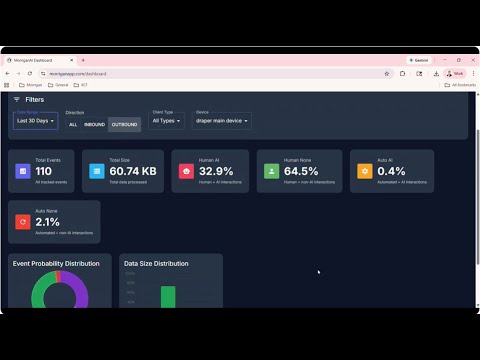
Enterprise monitoring of AI tool usage and file interactions with secure OAuth authentication and privacy-focused tracking. Detailed Description morriganAI Tracker is an enterprise-grade Chrome extension that provides organizations with comprehensive visibility into employee AI tool usage and file handling activities. Designed for security-conscious companies, this extension helps IT administrators monitor how teams interact with AI platforms while maintaining strict privacy standards. Key Features > AI Tool Monitoring Track employee access to popular AI platforms including ChatGPT, Claude, Google Bard, Perplexity, and other generative AI services. Understand usage patterns, adoption rates, and compliance with company AI policies. > File Interaction Tracking Monitor file uploads, downloads, and clipboard operations to ensure sensitive data is handled appropriately. Track when files are shared with AI tools or downloaded from web services. > Enterprise-Grade Security - OAuth authentication with Google and Microsoft - Encrypted data transmission via HTTPS - Local credential storage in Chrome's secure storage - No collection of file contents, passwords, or sensitive data - Privacy-first design with metadata-only tracking > Enterprise Deployment Ready - Supports Chrome Enterprise Policy and managed storage - Silent installation with pre-configured settings - Compatible with Google Workspace Admin Console - Group Policy support for Windows environments - Configuration profiles for macOS deployments > Comprehensive Visibility - Real-time event tracking and queuing - Automatic synchronization with morriganAI dashboard - Device-level monitoring and management - Event history and analytics - Multi-device support per user Who Is This For? - Enterprise IT Administrators managing organizational security and compliance - Security Teams monitoring AI tool adoption and data handling - Compliance Officers ensuring policy adherence across the organization - Business Leaders understanding team AI tool usage and productivity Privacy & Data Collection morriganAI Tracker is designed with privacy as a core principle: > What We Collect: - URLs and timestamps when accessing monitored AI tools - File upload/download metadata (size, destination, timestamp) - Copy/paste event metadata (not clipboard contents) - Browser and device information - Authentication tokens for user identification > What We DON'T Collect: - File contents or actual data - Passwords or login credentials - General browsing history outside monitored tools - Sensitive form data or personal information - Clipboard contents or copied text All data collection is disclosed to users during the consent process, and detailed information is available in our comprehensive Privacy Policy. How It Works 1. Install the extension from the Chrome Web Store 2. Authenticate using your organization's User ID or import existing device credentials 3. Monitor automatically - the extension runs in the background tracking specified activities 4. Review data through your organization's morriganAI dashboard Setup Options Standard Setup: Enter User ID provided by your IT administrator and optionally add a device nickname. Import Existing Device: Already using morriganAI Desktop Client? Import your existing credentials for seamless integration across devices. Enterprise Deployment: IT administrators can push configuration via Chrome Enterprise Policy for completely silent installation requiring no user interaction. Technical Requirements - Chrome browser (version 88 or higher recommended) - Active internet connection for data synchronization - User ID from morriganAI administrator (for standard setup) - OR existing morriganAI Desktop Client credentials (for import) Permissions Explained This extension requires specific permissions to function: - Identity: OAuth authentication with Google/Microsoft - Storage: Local credential and event queue storage - Tabs: Monitor AI tool access and page interactions - Downloads: Track file download events - WebRequest: Monitor file upload events to AI services - All URLs: Detect AI tool usage across all websites All permissions are used exclusively for monitoring purposes as described in our Privacy Policy. We never collect or transmit sensitive data. Support & Documentation - Privacy Policy: https://www.morriganai.com/privacy-policy - User Support: support@morriganapp.com - Privacy Inquiries: privacy@morriganai.com - Enterprise Documentation: Included with extension installation - Dashboard Access: https://morriganapp.com/dashboard Compliance & Legal - Data retention: 90 days - HTTPS encrypted transmission - OAuth 2.0 authentication standards - Enterprise data protection compliant - Full Terms of Service available at https://www.morriganai.com/privacy-policy Version Information Current Version: 1.0.0 © 2025 Morrigan Company. All rights reserved.
0 out of 5No ratings
Details
- Version1.0.1
- UpdatedDecember 12, 2025
- Size1.8MiB
- LanguagesEnglish (United States)
- DeveloperMeidh CorporationWebsite
1023 25th Street Des Moines, IA 50311 USEmail
tech@morriganai.comPhone
+1 515-210-0214 - TraderThis developer has identified itself as a trader per the definition from the European Union and committed to only offer products or services that comply with EU laws.
- D-U-N-S968954466
Privacy

MorriganAI Tracker has disclosed the following information regarding the collection and usage of your data. More detailed information can be found in the developer's privacy policy.
MorriganAI Tracker handles the following:
This developer declares that your data is
- Not being sold to third parties, outside of the approved use cases
- Not being used or transferred for purposes that are unrelated to the item's core functionality
- Not being used or transferred to determine creditworthiness or for lending purposes
Support
For help with questions, suggestions, or problems, please open this page on your desktop browser